
PocketLinux - Linux on Android
In-app purchases

star
283 reviews

Everyone
info
5K+
Downloads

Everyone
Learn more


About this app
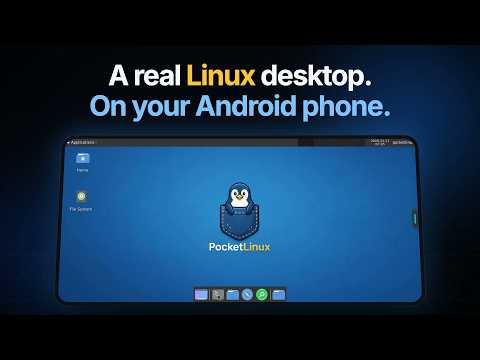
Run a real Linux desktop on your Android phone or tablet. No root, no dual boot, no PC required.
PocketLinux puts a full Linux environment on your device so you can open a desktop, use a terminal, install packages, write code, and practice Linux from anywhere. Free includes Debian, Arch and Ubuntu. Premium is for running more than one environment at a time, longer sessions, and backups.
What you can do
- Open a full Linux desktop with windows, menus, and a file manager
- Use a built-in terminal for shell work, scripts, and package installs
- Install software with apt on Debian, or pacman on Arch
- Code on the go with Python, Git, compilers, and common developer tools
- Learn Linux commands and basics without setting up another machine
- Reach files on your phone storage from inside Linux
- Use it on phones, tablets, and desktop modes such as Samsung DeX
Why PocketLinux
A lot of “Linux on Android” setups need Termux, a separate VNC app, or both. PocketLinux is one app: pick a distro, install it, then launch the desktop or the terminal. Display and input stay in the app, so you spend less time wiring tools together and more time actually using Linux.
Linux distros
- Debian — large package library, solid everyday choice
- Arch Linux — rolling release if you want newer packages
Both are free. Free is limited to one container at a time, so you pick one environment to use. Premium lets you keep multiple containers and switch between them. Additional images may appear as they are published.
Who it is for
Students learning Linux. Developers who want a portable shell and desktop. Anyone who needs a small Linux box in their pocket for scripts, configs, notes, or admin tools they install themselves.
What to expect
This is real Linux running on Android without root. Everyday desktop use, coding, package installs, and terminal work are the sweet spot. Some low-level features that need root or a full Linux kernel are not available—things like loading kernel modules or running standard Docker. That is a tradeoff of staying rootless and installable from the Play Store.
Storage and device tips
- Plan free space for the first image plus packages (often about 1–2 GB or more once you add tools)
- A modern device with roughly 4 GB of RAM or more is more comfortable for desktop sessions
- Desktop mode uses more battery and heat than light terminal use. That is normal.
Free and Premium
Free includes full Debian and Arch desktops, with one container at a time and a daily time limit. You can use either distro; you just cannot run both side by side on free. Premium removes the time limit, allows unlimited containers so you can keep and use more than one environment, and enables backup and restore.
If you have been searching for how to run Linux on Android, install Debian or Arch on your phone, or get a Linux desktop without root, PocketLinux is built for that job.
Questions or feedback: sanket1biz@gmail.com
PocketLinux puts a full Linux environment on your device so you can open a desktop, use a terminal, install packages, write code, and practice Linux from anywhere. Free includes Debian, Arch and Ubuntu. Premium is for running more than one environment at a time, longer sessions, and backups.
What you can do
- Open a full Linux desktop with windows, menus, and a file manager
- Use a built-in terminal for shell work, scripts, and package installs
- Install software with apt on Debian, or pacman on Arch
- Code on the go with Python, Git, compilers, and common developer tools
- Learn Linux commands and basics without setting up another machine
- Reach files on your phone storage from inside Linux
- Use it on phones, tablets, and desktop modes such as Samsung DeX
Why PocketLinux
A lot of “Linux on Android” setups need Termux, a separate VNC app, or both. PocketLinux is one app: pick a distro, install it, then launch the desktop or the terminal. Display and input stay in the app, so you spend less time wiring tools together and more time actually using Linux.
Linux distros
- Debian — large package library, solid everyday choice
- Arch Linux — rolling release if you want newer packages
Both are free. Free is limited to one container at a time, so you pick one environment to use. Premium lets you keep multiple containers and switch between them. Additional images may appear as they are published.
Who it is for
Students learning Linux. Developers who want a portable shell and desktop. Anyone who needs a small Linux box in their pocket for scripts, configs, notes, or admin tools they install themselves.
What to expect
This is real Linux running on Android without root. Everyday desktop use, coding, package installs, and terminal work are the sweet spot. Some low-level features that need root or a full Linux kernel are not available—things like loading kernel modules or running standard Docker. That is a tradeoff of staying rootless and installable from the Play Store.
Storage and device tips
- Plan free space for the first image plus packages (often about 1–2 GB or more once you add tools)
- A modern device with roughly 4 GB of RAM or more is more comfortable for desktop sessions
- Desktop mode uses more battery and heat than light terminal use. That is normal.
Free and Premium
Free includes full Debian and Arch desktops, with one container at a time and a daily time limit. You can use either distro; you just cannot run both side by side on free. Premium removes the time limit, allows unlimited containers so you can keep and use more than one environment, and enables backup and restore.
If you have been searching for how to run Linux on Android, install Debian or Arch on your phone, or get a Linux desktop without root, PocketLinux is built for that job.
Questions or feedback: sanket1biz@gmail.com
Run Linux on Android without root. Full desktop, Terminal, Debian, Arch, Ubuntu.
Updated on
Safety starts with understanding how developers collect and share your data. Data privacy and security practices may vary based on your use, region, and age. The developer provided this information and may update it over time.
- No data shared with third partiesLearn more about how developers declare sharing
- No data collectedLearn more about how developers declare collection
- Data is encrypted in transit
- Data can’t be deleted


Ratings and reviews
245 reviews

Brian Moreno94
- Flag inappropriate
October 31, 2026
The most perfect Android Linux emulator ever! Runs apps smoothly (even for the distro), having you be able to install various softwares (ranging from Browsing - Office apps), lets you add more Linux environments/distros, fast, lightweight, clean GUIs and clear guidances, all are just gems 💎!

Matthew Hutchinson
- Flag inappropriate
November 9, 2026
looks amazing but the screen is so small on my device it's impossible to see anything or be able to click on any icons. looks good though.
Sanket Apps
November 9, 2026
Hi, thanks for the feedback. Please try container option: Display > High resolution. This will help with XFCE. Additionally, you can also try display scale.

J Muller
- Flag inappropriate
October 10, 2026
I really liked the approach. Unfortunately the debian version gets stuck on not being able to upgrade the perl-libraries that come with tightvnc. If debian updates properly I'd probably prefer Pocketlinux over breadsticks. But as it stands, I cannot switch.
Sanket Apps
October 22, 2026
Thank you for reporting this issue. This will be solved in the next update.
Edit: Please update the app, this issue is resolved.
What’s new
• New terminal: faster, smoother rendering, new keyboard bar, themes and fonts
• Desktops start faster
• New tools on the desktop and app window pill: scale and volume sliders
• Back on the desktop opens the pill
• Corner radius setting and more readable accent colours
• Simpler Premium screen
• Fixed: terminal freezes, Cinnamon desktop terminal, Alpine updates, deleting containers
• Desktops start faster
• New tools on the desktop and app window pill: scale and volume sliders
• Back on the desktop opens the pill
• Corner radius setting and more readable accent colours
• Simpler Premium screen
• Fixed: terminal freezes, Cinnamon desktop terminal, Alpine updates, deleting containers
Everyone
Learn moreApp support
About the developer
GAIKWAD SANKET DILIP
sanket1biz@gmail.com
40 KANIFNATH VASTI Malegaon Haweli Sangamner,
Ahmadnagar, Maharashtra 422605
India


