
WJCT Public Media
4.4star
284 reviews
5K+
Downloads

Everyone
info






About this app
WJCT Public Media App:
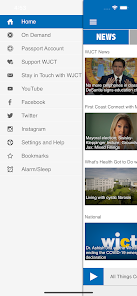
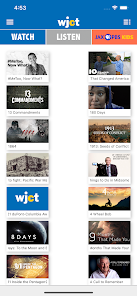
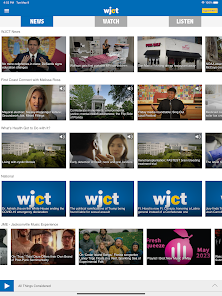
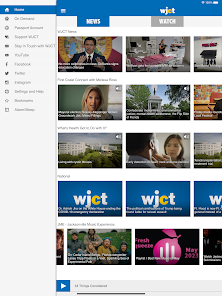
The WJCT Public Media App allows you to listen and watch WJCT Public Media and television, pause and rewind the live audio, and view the program schedule all at once! You can explore On Demand content, search for programs, bookmark a program for later, and wake up to WJCT with the alarm clock!
Live Streaming
• DVR-like controls (pause, rewind, and fast forward). You can pause the live stream to have a conversation and pick up right where you left off! Or rewind to catch a comment you just missed!
• Listen to live streams from WJCT even while traveling! Start the app and your favorite station starts playing – no clicks to start listening.
• Integrated program schedules for the WJCT stream!
• One click stream switching – flip over to the program you noticed on another stream with a single click.
• Listen to WJCT in the background while browsing the web or catching up on your emails!
On Demand
• Access WJCT programs easily and quickly.
• DVR-like controls. Pause, rewind and fast forward your program with ease.
• When listening to programs, individual segments (when available) are listed so you can review and choose one or listen to the entire program.
• Easy to access past programs.
• The WJCT Public Media App displays the web page associated with the program or program segment you are listening to On Demand so you can explore for more information.
Search
• The unique “Search Public Radio” feature finds stories or programs across hundreds of stations and web pages and makes it easy to play instantly.
Additional features
• Easily share stories and programs with family and friends via the “Share” button.
• A built in Sleep Timer and Alarm Clock allows you to go to sleep and wake up to your favorite station.
The WJCT Public Media App is brought to you by the people at WJCT Public Media and Public Media Apps. We work to provide our valued listeners with great solutions to find what you want, when you want it, and where you want it.
Please support WJCT Public Media by becoming a member today!
http://www.wjct.org
http://www.publicmediaapps.com
The WJCT Public Media App allows you to listen and watch WJCT Public Media and television, pause and rewind the live audio, and view the program schedule all at once! You can explore On Demand content, search for programs, bookmark a program for later, and wake up to WJCT with the alarm clock!
Live Streaming
• DVR-like controls (pause, rewind, and fast forward). You can pause the live stream to have a conversation and pick up right where you left off! Or rewind to catch a comment you just missed!
• Listen to live streams from WJCT even while traveling! Start the app and your favorite station starts playing – no clicks to start listening.
• Integrated program schedules for the WJCT stream!
• One click stream switching – flip over to the program you noticed on another stream with a single click.
• Listen to WJCT in the background while browsing the web or catching up on your emails!
On Demand
• Access WJCT programs easily and quickly.
• DVR-like controls. Pause, rewind and fast forward your program with ease.
• When listening to programs, individual segments (when available) are listed so you can review and choose one or listen to the entire program.
• Easy to access past programs.
• The WJCT Public Media App displays the web page associated with the program or program segment you are listening to On Demand so you can explore for more information.
Search
• The unique “Search Public Radio” feature finds stories or programs across hundreds of stations and web pages and makes it easy to play instantly.
Additional features
• Easily share stories and programs with family and friends via the “Share” button.
• A built in Sleep Timer and Alarm Clock allows you to go to sleep and wake up to your favorite station.
The WJCT Public Media App is brought to you by the people at WJCT Public Media and Public Media Apps. We work to provide our valued listeners with great solutions to find what you want, when you want it, and where you want it.
Please support WJCT Public Media by becoming a member today!
http://www.wjct.org
http://www.publicmediaapps.com
Updated on
Safety starts with understanding how developers collect and share your data. Data privacy and security practices may vary based on your use, region, and age. The developer provided this information and may update it over time.


Ratings and reviews
4.4
265 reviews

Stephen O'Toole
- Flag inappropriate
March 11, 2023
Unbelievable how awesome The WJCT app is, totally free, very minimal advertising, and Best of all the 4 options, news, classical music, Anthology, and even music for younger listeners, The Independent. I have tried other music apps, some that charge a fee, yet I keep going back to WJCT Public radio. Well done 👏.
3 people found this review helpful

Vegan Joti
- Flag inappropriate
April 24, 2024
Buggy. The app has to be restarted multiple times for the audio to start.

Chris N.
- Flag inappropriate
- Show review history
April 9, 2022
Not great for usage on the go. The pause/play function doesn't work well. If I am streaming and get a call I can't unpause the stream without opening the app. Nearly a year and the problem still exists.
What's new
Performance enhancements and bug fixes.
Your feedback helps us make our app better for everyone. Please send us your suggestions via the "Settings and Help" section of the app!
Your feedback helps us make our app better for everyone. Please send us your suggestions via the "Settings and Help" section of the app!


