
CinemaControl: TV Remote
Contains adsIn-app purchases


Everyone
info
50+
Downloads

Everyone
Learn more


About this app
CinemaControl turns your phone into a premium Smart TV remote for Android TV
and Google TV — fast, beautiful, and made for the way you actually watch.
No more lost remotes. No more typing one letter at a time. Just open the app,
tap your TV, and you’re in control.
★ KEY FEATURES ★
• Auto-discover Android TV & Google TV on your Wi-Fi in seconds
• Secure pairing with a 6-character PIN (TLS encrypted, on-device)
• Full D-pad, OK, Home, Back, Recents, Power & Menu buttons
• Volume, mute, channel up/down and media keys (play, pause, next, prev)
• Smooth touchpad gestures for free-form navigation
• Full keyboard — type on your phone, instantly appears on the TV
• Voice remote — say “Open YouTube”, “Play music”, “Go home”
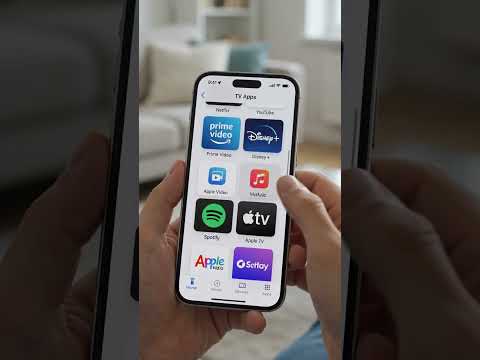
• Curated app launcher: YouTube, Netflix, Prime Video, Disney+, Spotify,
Apple TV, HBO Max, Plex, Twitch & more
• Cast local photos & videos from your phone to your TV over Wi-Fi
• Multi-TV support — save every TV in the house and switch with one tap
• Beautiful light & dark themes with smooth animations
• Haptic feedback, customizable gesture & voice sensitivity
• Works on Android phones, tablets, iPhone and iPad
★ DESIGNED FOR EVERY ANDROID TV ★
CinemaControl works with Sony Bravia, Xiaomi Mi TV / Mi Box, Hisense, TCL,
Philips, Sharp, JVC, Toshiba, Nvidia Shield, Chromecast with Google TV, and
any other certified Android TV or Google TV device — over your home Wi-Fi.
★ PRIVATE BY DESIGN ★
CinemaControl works fully on your local Wi-Fi network. No account required.
No tracking. No ads. No cloud. Your remote-control commands never leave your
home network.
★ HOW IT WORKS ★
1. Connect your phone and TV to the same Wi-Fi.
2. Open CinemaControl — your TV appears in the device list.
3. Tap your TV, enter the 6-character code that appears on the TV screen.
4. Done. The app remembers your TV for next time.
★ TROUBLESHOOTING TIPS ★
• Make sure “Android TV Remote Service” is enabled on your TV
(Settings → Apps → System apps).
• Both phone and TV must use the same Wi-Fi network.
• On iPhone, allow “Local Network” access on first launch.
• 5 GHz Wi-Fi gives the best response time.
★ WHY USERS LOVE CINEMACONTROL ★
“So much faster than the official remote app.”
“Finally, a remote that doesn’t look like it’s from 2010.”
“The voice search and casting alone make it worth installing.”
CinemaControl is an independent app and is not affiliated with Google,
Android, YouTube, Netflix, Amazon, Disney or any other brand whose logos may
appear in the app launcher. All trademarks belong to their respective owners.
Download CinemaControl today and turn your phone into the only TV remote
you’ll ever need.
and Google TV — fast, beautiful, and made for the way you actually watch.
No more lost remotes. No more typing one letter at a time. Just open the app,
tap your TV, and you’re in control.
★ KEY FEATURES ★
• Auto-discover Android TV & Google TV on your Wi-Fi in seconds
• Secure pairing with a 6-character PIN (TLS encrypted, on-device)
• Full D-pad, OK, Home, Back, Recents, Power & Menu buttons
• Volume, mute, channel up/down and media keys (play, pause, next, prev)
• Smooth touchpad gestures for free-form navigation
• Full keyboard — type on your phone, instantly appears on the TV
• Voice remote — say “Open YouTube”, “Play music”, “Go home”
• Curated app launcher: YouTube, Netflix, Prime Video, Disney+, Spotify,
Apple TV, HBO Max, Plex, Twitch & more
• Cast local photos & videos from your phone to your TV over Wi-Fi
• Multi-TV support — save every TV in the house and switch with one tap
• Beautiful light & dark themes with smooth animations
• Haptic feedback, customizable gesture & voice sensitivity
• Works on Android phones, tablets, iPhone and iPad
★ DESIGNED FOR EVERY ANDROID TV ★
CinemaControl works with Sony Bravia, Xiaomi Mi TV / Mi Box, Hisense, TCL,
Philips, Sharp, JVC, Toshiba, Nvidia Shield, Chromecast with Google TV, and
any other certified Android TV or Google TV device — over your home Wi-Fi.
★ PRIVATE BY DESIGN ★
CinemaControl works fully on your local Wi-Fi network. No account required.
No tracking. No ads. No cloud. Your remote-control commands never leave your
home network.
★ HOW IT WORKS ★
1. Connect your phone and TV to the same Wi-Fi.
2. Open CinemaControl — your TV appears in the device list.
3. Tap your TV, enter the 6-character code that appears on the TV screen.
4. Done. The app remembers your TV for next time.
★ TROUBLESHOOTING TIPS ★
• Make sure “Android TV Remote Service” is enabled on your TV
(Settings → Apps → System apps).
• Both phone and TV must use the same Wi-Fi network.
• On iPhone, allow “Local Network” access on first launch.
• 5 GHz Wi-Fi gives the best response time.
★ WHY USERS LOVE CINEMACONTROL ★
“So much faster than the official remote app.”
“Finally, a remote that doesn’t look like it’s from 2010.”
“The voice search and casting alone make it worth installing.”
CinemaControl is an independent app and is not affiliated with Google,
Android, YouTube, Netflix, Amazon, Disney or any other brand whose logos may
appear in the app launcher. All trademarks belong to their respective owners.
Download CinemaControl today and turn your phone into the only TV remote
you’ll ever need.
The fast, premium remote for your Android TV & Google TV. Voice, cast & type.
Updated on
Safety starts with understanding how developers collect and share your data. Data privacy and security practices may vary based on your use, region, and age. The developer provided this information and may update it over time.
- No data shared with third partiesLearn more about how developers declare sharing
- No data collectedLearn more about how developers declare collection


What’s new
🎉 Initial release of Smart TV Remote & Cast!
Control your Android TV with voice, touchpad, keyboard, and smart remote features.
Control your Android TV with voice, touchpad, keyboard, and smart remote features.
Everyone
Learn moreApp support
phone
Phone number
+923254701938
About the developer
Anas Tahir
chanas.tahir.55@gmail.com
Post Office Usman Wala Pial Kalan Tehsil & District Kasur
Kasur, 55010
Pakistan


