
SmarterNoise Pro

star
135 reviews

Everyone
info
1K+
Downloads

Everyone
Learn more


About this app
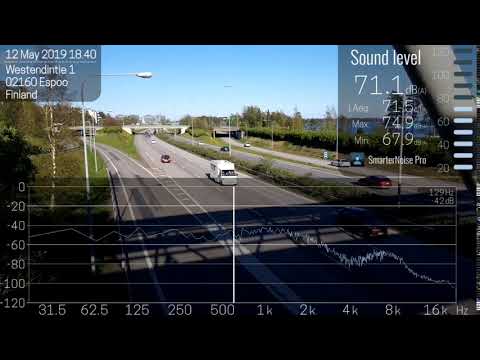
SmarterNoise Pro is the most advanced edition of the SmarterNoise recording sound level meters. Our Pro edition decibel meter is developed especially with more advanced measurements in mind, and includes many requested features such as a frequency spectrum display, export of measurement data, A-, C- or no weighting, and full screen audio measurement. Our Pro edition does not contain any advertising, and performs accurately and fast.
Features of SmarterNoise Pro - sound meter analyzer recorder:
• Sound level measurement in video mode
• Sound level measurement in audio mode
• Sound meter snapshot camera
• Record video and audio files
• Sound level activated audio recording
• Limit recording length
• Frequency spectrum display
• Peak frequency detection
• A-, C- or no weighting
• Export of measurement data in CSV format
• Full HD (1080p), HD (720p) or VGA (480p) video resolution
• Three video quality settings
• Archive for saved files
• Sharing of saved files
• Add text notes to measurements
• Calibration
• Location, address
• Time and date
• Continuous Leq, LAeq, LCeq value
• 10 second sound level average (Leq, LAeq, LCeq)
• 60 second sound level average (Leq, LAeq, LCeq)
• Maximum and minimum decibel level
About decibels and sound level measurement
The unit for measuring sound is called a decibel. Because the decibel scale is logarithmic, a sound with an intensity that is twice that of a reference sound corresponds to an increase of about 3 decibels. The reference point of 0 decibel is set at the intensity of the least perceptible sound, the threshold of hearing. On such a scale a 10-decibel sound is 10 times the intensity of the reference sound. Highlighting this is important as already a few decibels higher or lower makes a noticeable difference in how noise is perceived.
The preferred method to describe sound levels that vary over time, resulting in a single decibel value measuring the total sound energy over the period, is called Leq. It is however common practice to measure sound levels using A-weighting, which attenuates lower and higher frequencies that the average person cannot hear. In this case the value is called LAeq.
A- and C-weighting
The A-weighting is a standard, commonly used filter that attempts to alter the measured sound pressure levels to more closely match the perception of the human ear. A-weighting makes the sound level meter less sensitive to very high (over 8000 Hz) and low frequencies (below 1000 Hz).
C-weighting also attenuates low and high frequencies, but the attenuation of low frequencies is much less severe compared to A-weighting.
Calibrate:
Calibrate the application using the calibration tool found in the settings menu. Phones and their components vary in quality and setup so you need to calibrate the app in order for the results to be relatively comparable. One suggestion is that you close the window and door to your bedroom or bathroom, turn off appliances, and once its very quiet calibrate the app so the reading is about 30 decibel.
Features of SmarterNoise Pro - sound meter analyzer recorder:
• Sound level measurement in video mode
• Sound level measurement in audio mode
• Sound meter snapshot camera
• Record video and audio files
• Sound level activated audio recording
• Limit recording length
• Frequency spectrum display
• Peak frequency detection
• A-, C- or no weighting
• Export of measurement data in CSV format
• Full HD (1080p), HD (720p) or VGA (480p) video resolution
• Three video quality settings
• Archive for saved files
• Sharing of saved files
• Add text notes to measurements
• Calibration
• Location, address
• Time and date
• Continuous Leq, LAeq, LCeq value
• 10 second sound level average (Leq, LAeq, LCeq)
• 60 second sound level average (Leq, LAeq, LCeq)
• Maximum and minimum decibel level
About decibels and sound level measurement
The unit for measuring sound is called a decibel. Because the decibel scale is logarithmic, a sound with an intensity that is twice that of a reference sound corresponds to an increase of about 3 decibels. The reference point of 0 decibel is set at the intensity of the least perceptible sound, the threshold of hearing. On such a scale a 10-decibel sound is 10 times the intensity of the reference sound. Highlighting this is important as already a few decibels higher or lower makes a noticeable difference in how noise is perceived.
The preferred method to describe sound levels that vary over time, resulting in a single decibel value measuring the total sound energy over the period, is called Leq. It is however common practice to measure sound levels using A-weighting, which attenuates lower and higher frequencies that the average person cannot hear. In this case the value is called LAeq.
A- and C-weighting
The A-weighting is a standard, commonly used filter that attempts to alter the measured sound pressure levels to more closely match the perception of the human ear. A-weighting makes the sound level meter less sensitive to very high (over 8000 Hz) and low frequencies (below 1000 Hz).
C-weighting also attenuates low and high frequencies, but the attenuation of low frequencies is much less severe compared to A-weighting.
Calibrate:
Calibrate the application using the calibration tool found in the settings menu. Phones and their components vary in quality and setup so you need to calibrate the app in order for the results to be relatively comparable. One suggestion is that you close the window and door to your bedroom or bathroom, turn off appliances, and once its very quiet calibrate the app so the reading is about 30 decibel.
Analyse frequencies, measure and record sound levels in video and audio modes
Updated on
Safety starts with understanding how developers collect and share your data. Data privacy and security practices may vary based on your use, region, and age. The developer provided this information and may update it over time.
- No data shared with third partiesLearn more about how developers declare sharing
- This app may collect these data typesApp info and performance
- Data is encrypted in transit
- Data can’t be deleted


Ratings and reviews
125 reviews

Darren Walker
- Flag inappropriate
July 25, 2026
really useful app. absolutely needs a setting on the timer to start at a set time, rather than a countdown timer, IE to record automatically from midnight until 5am. currently this can only be done manually which is a massive inconvenience. Also GPS location can be buggy and lock to random local addresses which requires multiple restarts to get through correct location. Regardless of those issues the app is awesome, thx!

Vaibhav Subhash Deshpande
- Flag inappropriate
April 30, 2026
I purchased this app and installed on my android tab and after 3 or 4 successful recordings overnight all of a sudden this app stopped recording and no recording savings found. there was no change in settings. what is causing this issue. otherwise this app is good but not sure why stopped working abruptly.

Philip Bradley
- Flag inappropriate
February 27, 2026
I find new reasons to love this software, for me it has never crashed on older and lots of different devices , I was thinking about getting a solo device just for It in the car for sound, It is also a great dash cam capability on a mount, that can record video with calibrated audio, not into dash cams myself for intended reasons, however I like being able to film nice scenes with calibrated sounds, the car being the stable dolly, the headlights being strong and adaptable light source. Thoughts
1 person found this review helpful
What’s new
Improved the dynamic range of the frequency spectrum displays.
Everyone
Learn moreApp support
About the developer
Johan Boris Mikael Rögård
info@agibiliapps.com
Itäinen Harjutie 10 A
07900 Loviisa
Finland


