
Timeshift Media Player
4.3star
233 reviews
10K+
Downloads

Everyone
info

About this app
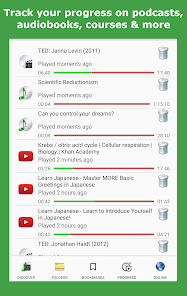
Timeshift makes it easy to learn language courses, musical instruments, talks, podcasts, audiobooks and more.
Use AB Repeat, bookmarks, video zoom, clips, variable speed and interactive subtitles to master any material such as learning the guitar, foreign language movies and dance videos.
AB Repeat
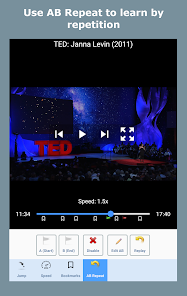
Use AB Repeat to loop repeatedly over sections of the video so you get better at the material.
• Edit A and B markers to fine-tune loops
• Pause between loops to give yourself time to repeat the material before the next loop starts
• Play one loop slowly then the next at normal speed using Switch Loop Speeds
Bookmarks
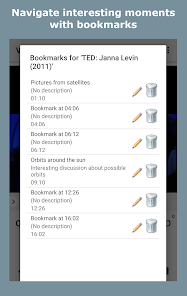
Use bookmarks to remember interesting sections so you can play them whenever you like.
• Change the title and description for easy reference
• Start AB Repeat between two bookmarks
Video Zoom
Video zoom is great for videos featuring musical instruments, dancing, yoga and How To videos.
• Pinch to zoom video up to 500%
• Video zoom is disabled by default - enable from Settings > Video Zoom.
Clips
Create clips to work with sections of your media.
• Repeat all clips to loop over multiple sections
• Save AB Repeat as clips and start AB Repeat from a clip
Interactive Subtitles
Interactive subtitles are great for language learning and video lectures.
• Use subtitles to jump to parts of the video
• Search interactive subtitles
• Start AB Repeat and clips between subtitles
Even More Features
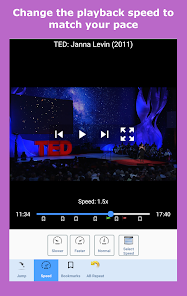
• Variable playback speed: Slow down (slow motion) or speed up playback, from 0.25x to 4x the speed
• Use predefined speeds for easy access
• Automatically rewind after a long pause
• Rewind or fast-forward by 3, 5 or 10 seconds
• Background playback of online media or local/offline files located on your device
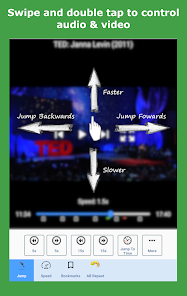
• Use swipe and double tap gestures to control AB Repeat, speed, bookmarks & more
• Use voice narrated menus with Bluetooth headphones to control playlists, playback, favourites, speed, etc
• Use the notification bar and lock screen to control AB Repeat, speed, bookmarks & more
• Load embedded subtitles or subtitles from an external file
Use Timeshift For...
• Language courses and foreign language movies
• Musical instrument training, like the guitar or piano
• Talks, podcasts & audiobooks
• Dancing, yoga, Tai-chi & aerobics videos
• Course lectures & How To videos
Supported Media Formats
Timeshift uses the VLC media player engine so supports all the formats that VLC supports.
Audio formats supported: mp3, mp4, m4a, ogg, 3gp, mka, flac, aac & more
Video formats supported: avi, mp4, mpg, mkv, mov, flv, webm, 3gp & more
Subtitle formats supported: srt, idx, sub, vtt, rt & more
Timeshift Free
Timeshift is completely free from version 76 onwards. The Pro upgrade is no longer required to unlock Pro features so all features are free.
For older versions of Timeshift, the Pro inapp purchase is still available and will still unlock Pro features.
Feedback, Suggestions and Issues
For any feedback, suggestions or issues, email Byron at smokyinkcreations@gmail.com
Permissions
• Read audio & video: Browse and playback media
• Send notifications: Control media during background playback
Use AB Repeat, bookmarks, video zoom, clips, variable speed and interactive subtitles to master any material such as learning the guitar, foreign language movies and dance videos.
AB Repeat
Use AB Repeat to loop repeatedly over sections of the video so you get better at the material.
• Edit A and B markers to fine-tune loops
• Pause between loops to give yourself time to repeat the material before the next loop starts
• Play one loop slowly then the next at normal speed using Switch Loop Speeds
Bookmarks
Use bookmarks to remember interesting sections so you can play them whenever you like.
• Change the title and description for easy reference
• Start AB Repeat between two bookmarks
Video Zoom
Video zoom is great for videos featuring musical instruments, dancing, yoga and How To videos.
• Pinch to zoom video up to 500%
• Video zoom is disabled by default - enable from Settings > Video Zoom.
Clips
Create clips to work with sections of your media.
• Repeat all clips to loop over multiple sections
• Save AB Repeat as clips and start AB Repeat from a clip
Interactive Subtitles
Interactive subtitles are great for language learning and video lectures.
• Use subtitles to jump to parts of the video
• Search interactive subtitles
• Start AB Repeat and clips between subtitles
Even More Features
• Variable playback speed: Slow down (slow motion) or speed up playback, from 0.25x to 4x the speed
• Use predefined speeds for easy access
• Automatically rewind after a long pause
• Rewind or fast-forward by 3, 5 or 10 seconds
• Background playback of online media or local/offline files located on your device
• Use swipe and double tap gestures to control AB Repeat, speed, bookmarks & more
• Use voice narrated menus with Bluetooth headphones to control playlists, playback, favourites, speed, etc
• Use the notification bar and lock screen to control AB Repeat, speed, bookmarks & more
• Load embedded subtitles or subtitles from an external file
Use Timeshift For...
• Language courses and foreign language movies
• Musical instrument training, like the guitar or piano
• Talks, podcasts & audiobooks
• Dancing, yoga, Tai-chi & aerobics videos
• Course lectures & How To videos
Supported Media Formats
Timeshift uses the VLC media player engine so supports all the formats that VLC supports.
Audio formats supported: mp3, mp4, m4a, ogg, 3gp, mka, flac, aac & more
Video formats supported: avi, mp4, mpg, mkv, mov, flv, webm, 3gp & more
Subtitle formats supported: srt, idx, sub, vtt, rt & more
Timeshift Free
Timeshift is completely free from version 76 onwards. The Pro upgrade is no longer required to unlock Pro features so all features are free.
For older versions of Timeshift, the Pro inapp purchase is still available and will still unlock Pro features.
Feedback, Suggestions and Issues
For any feedback, suggestions or issues, email Byron at smokyinkcreations@gmail.com
Permissions
• Read audio & video: Browse and playback media
• Send notifications: Control media during background playback
Updated on
Safety starts with understanding how developers collect and share your data. Data privacy and security practices may vary based on your use, region, and age. The developer provided this information and may update it over time.


Ratings and reviews
4.3
200 reviews

Jerome Ellis
- Flag inappropriate
April 21, 2024
BEST APP EVER! For what it is. It won't be your regular media player. But for creating (and saving) loops for learning purposes (music, languages) it is just terrific. Only thing keeping it from absolute perfection is the file opening method. Rather than providing a folder browser, which keeps things organized, it shows all folders that contain media items. If you have a sizeable library, this makes getting a particular inconvenient. But this is a small knock on otherwise dynamite app.
3 people found this review helpful

A Google user
- Flag inappropriate
- Show review history
July 10, 2019
I bought it. Very good, but needs a few tweaks. For instance, when you see a list of your bookmark (or clips) there should be the ability to delete any bookmark or clip, or all bookmarks...but right there and not in some other location. "Clever" is bad in such cases. Make it straightforward and don't make me think.
1 person found this review helpful
Smoky Ink Creations
July 10, 2019
Thanks for the support and feedback :) Deleting from the main Bookmarks screen is already planned - currently you can only delete from the media's View Bookmarks screen. You can force landscape or portrait from Settings, Screen orientation.
Please email with more questions or comments as it's much easier to discuss - smokyinkcreations@gmail.com
A Google user
- Flag inappropriate
November 19, 2019
Excellent media player, very well thought out and designed, with so many options available, there should be something for everyone, simple and easy to use. In addition the developer offers an extended free trial for the pro version to evaluate the app thoroughly, although it is perfectly usable in the free version, but the cost of the pro version is almost a give away price! Also the developer is very pro active, so id in doubt ask!
3 people found this review helpful
What’s new
• Timeshift is now completely free and all features have been unlocked
• The Pro inapp purchase is disabled for new purchases; existing purchases will still work on older versions of Timeshift
• Request permissions to display notifications for background playback on Android 13+
• Removed the broken Discover page because it's too difficult to maintain access to the online services it used
• The Pro inapp purchase is disabled for new purchases; existing purchases will still work on older versions of Timeshift
• Request permissions to display notifications for background playback on Android 13+
• Removed the broken Discover page because it's too difficult to maintain access to the online services it used
App support
About the developer
Byron Moses
smokyinkcreations@gmail.com
United Kingdom


