
Teleprompter: Vlog & Scripts
In-app purchases

star
18.1K reviews

Everyone
info
1M+
Downloads

Everyone
Learn more


About this app
Script. Read. Record.
1,000,000+ content creators and public speakers use Teleprompter to stay on-camera and on-script — no memorising, no looking down.
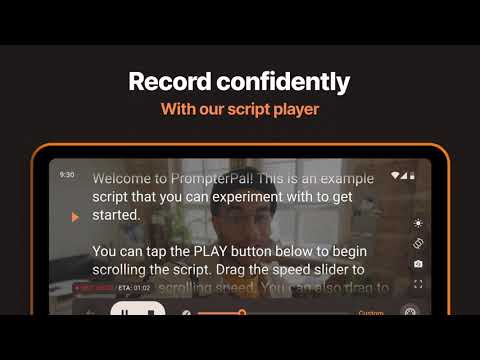
Reading from your phone while recording means breaking eye contact. Teleprompter floats your script next to the lens like an autocue, so you stay locked on camera the whole time.
⭐SCRIPT READER⭐
✔️ Import from PDF, TXT, or Word files
✔️ 20+ fonts — pick one you can read comfortably at distance
✔️ Adjustable text and background colors for any lighting condition
✔️ Mirror mode (horizontal and vertical) for physical teleprompter hardware
✔️ RTL support for Arabic, Hebrew, and other right-to-left languages
✔️ Scroll speed control — pace the text to your voice, not a fixed timer
✔️ Margin adjustment for comfortable line width
✔️ Countdown timer so you're settled before the first frame
⭐TELEPROMPTER OVERLAY & VIDEO RECORDING⭐
✔️ Floating script overlays any app — read while recording with your camera app of choice
✔️ Record in full HD, portrait or landscape
✔️ Switch between front and back cameras for interviews or self-shoots
⭐VOICE CONTROL⭐
✔️ Hands-free scrolling — your voice controls the pace, no tapping required
✔️ Scroll starts and stops based on when you speak
✔️ Works offline — speech recognition runs on-device, no internet needed
⭐REMOTE CONTROL⭐
✔️ Any Bluetooth keyboard or presentation clicker works as a remote
✔️ Set your own keyboard shortcuts
✔️ Useful for podcast recordings, course recordings, and public speaking
⭐CLOUD SYNC⭐
✔️ Scripts back up to the cloud with no storage cap
✔️ Your full library on any device, signed in
⭐SCRIPT MANAGEMENT⭐
✔️ Folder organisation — move, rename, delete without digging around
✔️ Minimal UI so nothing pulls your eye away from the script
Download and stop losing good takes to forgotten lines.
1,000,000+ content creators and public speakers use Teleprompter to stay on-camera and on-script — no memorising, no looking down.
Reading from your phone while recording means breaking eye contact. Teleprompter floats your script next to the lens like an autocue, so you stay locked on camera the whole time.
⭐SCRIPT READER⭐
✔️ Import from PDF, TXT, or Word files
✔️ 20+ fonts — pick one you can read comfortably at distance
✔️ Adjustable text and background colors for any lighting condition
✔️ Mirror mode (horizontal and vertical) for physical teleprompter hardware
✔️ RTL support for Arabic, Hebrew, and other right-to-left languages
✔️ Scroll speed control — pace the text to your voice, not a fixed timer
✔️ Margin adjustment for comfortable line width
✔️ Countdown timer so you're settled before the first frame
⭐TELEPROMPTER OVERLAY & VIDEO RECORDING⭐
✔️ Floating script overlays any app — read while recording with your camera app of choice
✔️ Record in full HD, portrait or landscape
✔️ Switch between front and back cameras for interviews or self-shoots
⭐VOICE CONTROL⭐
✔️ Hands-free scrolling — your voice controls the pace, no tapping required
✔️ Scroll starts and stops based on when you speak
✔️ Works offline — speech recognition runs on-device, no internet needed
⭐REMOTE CONTROL⭐
✔️ Any Bluetooth keyboard or presentation clicker works as a remote
✔️ Set your own keyboard shortcuts
✔️ Useful for podcast recordings, course recordings, and public speaking
⭐CLOUD SYNC⭐
✔️ Scripts back up to the cloud with no storage cap
✔️ Your full library on any device, signed in
⭐SCRIPT MANAGEMENT⭐
✔️ Folder organisation — move, rename, delete without digging around
✔️ Minimal UI so nothing pulls your eye away from the script
Download and stop losing good takes to forgotten lines.
4K Video Teleprompter. Floating Notes, Voice Control & Bluetooth.
Updated on
Safety starts with understanding how developers collect and share your data. Data privacy and security practices may vary based on your use, region, and age. The developer provided this information and may update it over time.
- No data shared with third partiesLearn more about how developers declare sharing
- No data collectedLearn more about how developers declare collection
- Data is encrypted in transit
- You can request that data be deleted


Ratings and reviews
17.4K reviews

Andrew Jipping
- Flag inappropriate
October 2, 2025
Great app in my opinion. I need to shoot some short quick intro videos so I couldn't mess up any of my wording. You can read the text and it looks like you're looking at the camera. I'm holding my phone (selfie style) and you can use any free finger to speed up or slow down the text as needed, but I find the auto scroll works great too. I used it once and was sold. It's exactly what I needed!
52 people found this review helpful
Solid Labs Co., Ltd
October 2, 2025
Hi Andrew, love to hear it’s working so well for your videos 🎥✨. We’re here if you’d like to share ideas for improvements, just drop us a message at hello@solidlabs.io.

Private For Security Reasons
- Flag inappropriate
September 1, 2025
Free! You can upgrade for an unlimited amount of characters in your script. I think this is a great app for making YouTube videos. I wanted to just wing it, but due to social anxiety I freeze up right when I hit record and forget what I'm going to say! So if you literally NEED something like this, go for it! Definitely helps me focus on something else while I hit record.
33 people found this review helpful
Solid Labs Co., Ltd
September 29, 2025
Thanks for your review! Please recommend our app to your friends, and don’t hesitate to shoot us a note at hello@solidlabs.io if you have any questions.

Kristopher “Vegetaman” Justin
- Flag inappropriate
- Show review history
November 3, 2025
Been using the pro version for a while now, but suddenly I am no longer able to run the prompter with the controls on the bottom of the screen. It keeps putting the control panel to the right and this makes my text field too small. Terrible change, unable to use it like this... (Edit) After I made this review initially, the dev team reached out to me and also fixed the problem with the next update. And so, 5 stars for such a response.
42 people found this review helpful
Solid Labs Co., Ltd
October 31, 2025
Thanks for your feedback. We’d like to know the details of the problem you mentioned. Please send the details or screenshot to hello@solidlabs.io. We'll pass it along to our development team and see if there is any way we can improve it.
Everyone
Learn moreApp support
About the developer
SOLID LABS COMPANY LIMITED
hello@solidlabs.io
23 Alley 169/161, Hoang Mai Street,
Hà Nội
Vietnam
+84 932 206 696


