
Maine ME Permit Prep BMV 2025
Contains adsIn-app purchases

star
27 reviews

Everyone
info
1K+
Downloads


About this app
DISCLAIMER
Driver-Start.com is NOT an official government app and is NOT affiliated, associated, authorized, or endorsed by the Maine Bureau of Motor Vehicles (BMV), the Maine Department of Transportation (Maine DOT), the Maine Secretary of State, the U.S. Department of Transportation, or any other government agency. Driver‑Start.com is an independent, private, third‑party study aid.
OFFICIAL SOURCE OF INFORMATION
All practice questions provided in this app are based directly on the official 2025 Maine Motorist Handbook and Study Guide, available from the Maine Bureau of Motor Vehicles at maine.gov.
What the App Does
Study the 2025 Maine BMV DOT driving laws and road rules with flashcards and topic quizzes
Take realistic practice exams that mirror the format of the official Maine BMV permit test
Track your performance with a built-in analytics dashboard
Learn offline—no internet connection required after content download
Study Modes
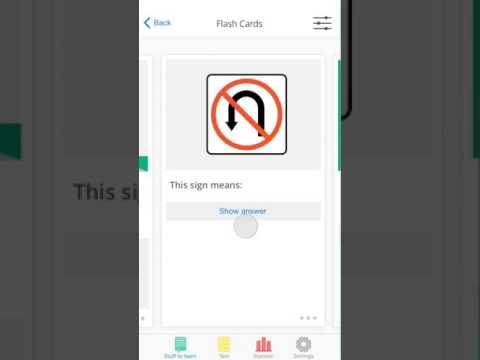
Flashcards: Review traffic signs, road laws, and safety practices
Topic Quiz: Practice one subject at a time, like rules of the road or sharing the highway
Practice Test: Exam simulator based on Maine’s official permit test
Marathon: Work through the entire bank of questions in one go
Why Learners Like Driver-Start.com
100% free to download—no hidden costs
Simple, easy-to-use design with large tap-friendly buttons
Companion website available: https://Driver-Start.com
Privacy & Data Use
This app does not collect personally identifiable information. Anonymous usage statistics are used to improve question quality.
View our full privacy policy at:
https://driver-start.com/info_pages/privacy_policy/
Driver-Start.com is NOT an official government app and is NOT affiliated, associated, authorized, or endorsed by the Maine Bureau of Motor Vehicles (BMV), the Maine Department of Transportation (Maine DOT), the Maine Secretary of State, the U.S. Department of Transportation, or any other government agency. Driver‑Start.com is an independent, private, third‑party study aid.
OFFICIAL SOURCE OF INFORMATION
All practice questions provided in this app are based directly on the official 2025 Maine Motorist Handbook and Study Guide, available from the Maine Bureau of Motor Vehicles at maine.gov.
What the App Does
Study the 2025 Maine BMV DOT driving laws and road rules with flashcards and topic quizzes
Take realistic practice exams that mirror the format of the official Maine BMV permit test
Track your performance with a built-in analytics dashboard
Learn offline—no internet connection required after content download
Study Modes
Flashcards: Review traffic signs, road laws, and safety practices
Topic Quiz: Practice one subject at a time, like rules of the road or sharing the highway
Practice Test: Exam simulator based on Maine’s official permit test
Marathon: Work through the entire bank of questions in one go
Why Learners Like Driver-Start.com
100% free to download—no hidden costs
Simple, easy-to-use design with large tap-friendly buttons
Companion website available: https://Driver-Start.com
Privacy & Data Use
This app does not collect personally identifiable information. Anonymous usage statistics are used to improve question quality.
View our full privacy policy at:
https://driver-start.com/info_pages/privacy_policy/
MaineDOT BMV 2025 Permit Test Prep Help Prepare for ME BMV Knowledge Permit Test
Updated on
Safety starts with understanding how developers collect and share your data. Data privacy and security practices may vary based on your use, region, and age. The developer provided this information and may update it over time.
- No data shared with third partiesLearn more about how developers declare sharing
- This app may collect these data typesLocation, App activity and 2 others
- Data isn’t encrypted
- Data can’t be deleted


Ratings and reviews
27 reviews

Wayward Californian
- Flag inappropriate
March 3, 2025
My lease doesn't allow me to have a vehicle like the other residents, so I have to get my Maine license so I can move to New Hampshire where I will be allowed to have a vehicle like the other renters. This is a good app, often with commercial pop-ups. There is even a girl on Tik-Tok eating a still in the egg chicken, nice and mostly developed! Be a good driver and don't let yourself be distracted! There seems to be all the questions from the actual written exam, except for the moose questions.

A Google user
- Flag inappropriate
April 27, 2024
Use quick settings Open quick settings Settings you adjust frequently, like Bluetooth, are “quick settings”, easy to get to from any screen. To see your first few quick settings, swipe down once from the top of your screen. To see all quick settings, swipe down again. Adjust quick settings To adjust screen brightness, slide . To adjust other settings: Tap an icon to toggle the setting on/off. Touch & hold an icon to adjust related settings. Icon Setting Internet: Wi-Fi Internet: Mobile

Toni Lela
- Flag inappropriate
July 29, 2026
I found this app to be very helpful when trying to prepare for my permit test because it takes a variety of questions.
What’s new
- Redesigned interface.
- Now, you can continue your mock test from where you left it.
- Live updates of questions.
- Contact us page.
- Now, you can remove ads from the screen.
- Now, you can continue your mock test from where you left it.
- Live updates of questions.
- Contact us page.
- Now, you can remove ads from the screen.
App support
About the developer
Spotterlook Inc
support@driver-start.com
4800 Oxford Ct
Bensalem, PA 19020-1708
United States
+1 267-401-2210


