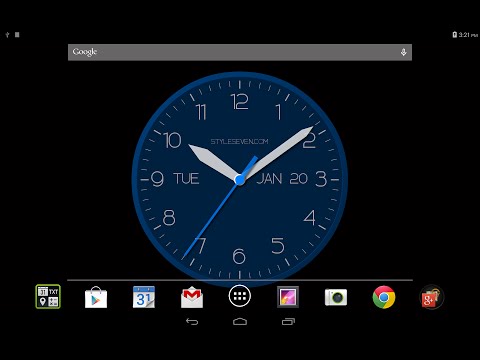

Modern Analog Clock-7
Contains ads

star
3.5K reviews

Everyone
info
500K+
Downloads

Everyone
Learn more


About this app
Original color analog clock based on one color. You can use it as application, Live Wallpaper and widget. The clock also shows the current date, month, day of the week, battery charge and can hint the current time by voice.
Use the analog clock as topmost or overlay clock. The clock will be set under all windows. You can change position of the clock by drag and drop method and size of the clock.
Use the analog clock as screensaver while a device is charging.
🕒 Use analog clocks as “Night Clock” — a calm mode with economy style (black background and dark‑gray hands) that saves battery.
Random position change every minute protects the screen from burn‑in.
All options work in Fullscreen mode, Live Wallpaper, and Screensaver.
🌙 Use analog clocks as “Always on Screen” — the clock remains visible even when the screen is turned off. ⚠ Important: the function does not start automatically, you need to launch it manually in Fullscreen mode.
“Always on Display” emulation works through additional options: 🔆 brightness control and Auto‑lock on exit.
Additional features:
* Change slot position for date, month, day of the week, battery charge or hide slots.
* Set background color.
* Color or black dial.
* Set a background image;
* Time to speech by double tap or periodically.
Additional options for Live Wallpaper:
* Set size and align the clock on the Home screen.
Additional options for widget:
* Show second hand on/off.
* Action by tap: open this app, time to speech, open inbuilt Alarm app.
* Resize widget by standard method.
Use the analog clock as topmost or overlay clock. The clock will be set under all windows. You can change position of the clock by drag and drop method and size of the clock.
Use the analog clock as screensaver while a device is charging.
🕒 Use analog clocks as “Night Clock” — a calm mode with economy style (black background and dark‑gray hands) that saves battery.
Random position change every minute protects the screen from burn‑in.
All options work in Fullscreen mode, Live Wallpaper, and Screensaver.
🌙 Use analog clocks as “Always on Screen” — the clock remains visible even when the screen is turned off. ⚠ Important: the function does not start automatically, you need to launch it manually in Fullscreen mode.
“Always on Display” emulation works through additional options: 🔆 brightness control and Auto‑lock on exit.
Additional features:
* Change slot position for date, month, day of the week, battery charge or hide slots.
* Set background color.
* Color or black dial.
* Set a background image;
* Time to speech by double tap or periodically.
Additional options for Live Wallpaper:
* Set size and align the clock on the Home screen.
Additional options for widget:
* Show second hand on/off.
* Action by tap: open this app, time to speech, open inbuilt Alarm app.
* Resize widget by standard method.
Original color analog clock
Updated on
Safety starts with understanding how developers collect and share your data. Data privacy and security practices may vary based on your use, region, and age. The developer provided this information and may update it over time.
- No data shared with third partiesLearn more about how developers declare sharing
- This app may collect these data typesDevice or other IDs
- Data is encrypted in transit
- Data can’t be deleted


Ratings and reviews
3.39K reviews

Helen Jones
- Flag inappropriate
- Show review history
November 8, 2021
Was my favourite clock widget until lately for no reason it just stops working, and I have to delete it from my home screen and add again - its added to my exception rule in my hibernation app but still it will randomly stop working - a few times I've been late to things because of that!
10 people found this review helpful

A Google user
- Flag inappropriate
- Show review history
July 12, 2019
PROS : Beautiful graphicst; second hand. CONS : Annoying ads; no way to upgrade to eliminate the ads; buggy in that widget will sometimes just disappear and/or seems to be of size zero by zero units.
24 people found this review helpful
Style-7
July 13, 2019
Upgrade to PRO version to remove ads.
A Google user
- Flag inappropriate
October 10, 2019
App is disappearing in a few days and to be reinstalled frequently.
36 people found this review helpful
What’s new
Minor changes.
Everyone
Learn moreApp support
About the developer
Сизенко Алексей Алексеевич
info@style7.website
Волгоградская область, Светлоярский район, с. Дубовый Овраг, ул. Заречная д.37
Волгоград
Волгоградская область
Russia
404175


