
Tags Tool: Tags Finder
Contains adsIn-app purchases


Everyone
info
500+
Downloads

Everyone
Learn more


About this app
🔥 Optimize Your Videos for Success with the Ultimate Tags App!
Introducing Tags Tool Pro, the must-have app for content creators and ytubers seeking to maximize their video visibility and skyrocket their rankings on YouTube. With our powerful features, including a top-notch tags finder, keyword finder, and SEO enhancements, you can ensure your videos receive the attention they deserve. Discover trending tags, unlock the potential of SEO, and watch your channel grow!
🌟 All Features of Tags Tool Pro:
✨ Best YouTube Tag Finder and Keyword Finder:
Find the best tags and keywords that resonate with your content. Our app is designed to help content creators and YouTubers like you boost their videos' performance.
✨ Trending Tags and Keywords:
Stay up to date with the latest trends! Get insights into all the trending tags and keywords associated with videos. Ride the wave of popularity and increase your video's discoverability.
✨ Video Details and View ID:
Gain valuable insights into your videos with essential details such as the view ID and other relevant information. Stay informed about your video's performance.
✨ Thumbnail Downlod:
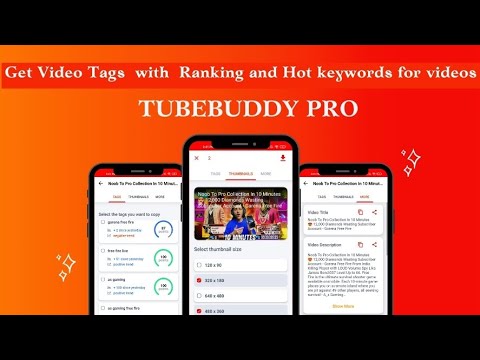
Easily download thumbnails of any video in multiple resolutions. Save them directly to your gallery for quick access. Create eye-catching visuals that captivate your audience.
✨ Tag Viewer:
View the tags associated with any YouTube video, including your competitors' videos. Gain inspiration and learn from successful content.
✨ Top Keyword Tool:
Discover the top keywords that resonate with your target audience. Use this valuable tool to refine your video's metadata and improve its visibility.
✨ Related Videos:
Access videos related to your top keywords. Explore relevant content and expand your content strategy to engage a wider audience.
✨ No Special Device Access Required:
Rest assured, Tags Tool Pro does not require any special access to your device. Your privacy and security are always a priority.
✨ Easy to Use and User-Friendly:
Our app is designed with simplicity in mind. Easily navigate through the features and optimize your videos effortlessly. No technical expertise required.
✨ Search History:
Never lose track of your searches! Tags Tool Pro conveniently saves your search history for future reference. Streamline your workflow and stay organized.
✨ Premium Version Available:
Unlock advanced features and take your optimization to the next level with our premium version. Get the most out of Tags Tool Pro.
✨ Send Feedback:
Have any questions or suggestions? We value your feedback! Send us your thoughts directly from the app, and we'll be happy to assist you.
🚀 How to Use Tags Tool Pro on Android:
Using our application is incredibly simple. Follow these steps to optimize your videos with Tags Tool Pro:
1️⃣ Enter the URL of any YouTube video you want to analyze for tags and keywords.
2️⃣ Select "Extract Tags" to discover relevant tags for your own videos.
3️⃣ Copy the selected tags and implement them in your video's metadata for enhanced visibility.
4️⃣ Easily choose and copy individual tags by clicking on them for precise targeting.
5️⃣ Download high-quality thumbnails of any video to create captivating visuals that grab your audience's attention.
⭐ Tips for Success:
Choose tags and keywords carefully, ensuring they are relevant to your video content.
Incorporate the selected keywords in your video title and description to optimize its visibility.
⚠️ Important Note:
Avoid copying all keywords and tags from other videos. Focus on using keywords that are directly related to your content.
Authenticity is key—use tags and keywords that genuinely represent your video.
Spread the word! If you enjoy using Tags Tool Pro, please consider giving us a 5-star rating and recommending it to your friends.
Introducing Tags Tool Pro, the must-have app for content creators and ytubers seeking to maximize their video visibility and skyrocket their rankings on YouTube. With our powerful features, including a top-notch tags finder, keyword finder, and SEO enhancements, you can ensure your videos receive the attention they deserve. Discover trending tags, unlock the potential of SEO, and watch your channel grow!
🌟 All Features of Tags Tool Pro:
✨ Best YouTube Tag Finder and Keyword Finder:
Find the best tags and keywords that resonate with your content. Our app is designed to help content creators and YouTubers like you boost their videos' performance.
✨ Trending Tags and Keywords:
Stay up to date with the latest trends! Get insights into all the trending tags and keywords associated with videos. Ride the wave of popularity and increase your video's discoverability.
✨ Video Details and View ID:
Gain valuable insights into your videos with essential details such as the view ID and other relevant information. Stay informed about your video's performance.
✨ Thumbnail Downlod:
Easily download thumbnails of any video in multiple resolutions. Save them directly to your gallery for quick access. Create eye-catching visuals that captivate your audience.
✨ Tag Viewer:
View the tags associated with any YouTube video, including your competitors' videos. Gain inspiration and learn from successful content.
✨ Top Keyword Tool:
Discover the top keywords that resonate with your target audience. Use this valuable tool to refine your video's metadata and improve its visibility.
✨ Related Videos:
Access videos related to your top keywords. Explore relevant content and expand your content strategy to engage a wider audience.
✨ No Special Device Access Required:
Rest assured, Tags Tool Pro does not require any special access to your device. Your privacy and security are always a priority.
✨ Easy to Use and User-Friendly:
Our app is designed with simplicity in mind. Easily navigate through the features and optimize your videos effortlessly. No technical expertise required.
✨ Search History:
Never lose track of your searches! Tags Tool Pro conveniently saves your search history for future reference. Streamline your workflow and stay organized.
✨ Premium Version Available:
Unlock advanced features and take your optimization to the next level with our premium version. Get the most out of Tags Tool Pro.
✨ Send Feedback:
Have any questions or suggestions? We value your feedback! Send us your thoughts directly from the app, and we'll be happy to assist you.
🚀 How to Use Tags Tool Pro on Android:
Using our application is incredibly simple. Follow these steps to optimize your videos with Tags Tool Pro:
1️⃣ Enter the URL of any YouTube video you want to analyze for tags and keywords.
2️⃣ Select "Extract Tags" to discover relevant tags for your own videos.
3️⃣ Copy the selected tags and implement them in your video's metadata for enhanced visibility.
4️⃣ Easily choose and copy individual tags by clicking on them for precise targeting.
5️⃣ Download high-quality thumbnails of any video to create captivating visuals that grab your audience's attention.
⭐ Tips for Success:
Choose tags and keywords carefully, ensuring they are relevant to your video content.
Incorporate the selected keywords in your video title and description to optimize its visibility.
⚠️ Important Note:
Avoid copying all keywords and tags from other videos. Focus on using keywords that are directly related to your content.
Authenticity is key—use tags and keywords that genuinely represent your video.
Spread the word! If you enjoy using Tags Tool Pro, please consider giving us a 5-star rating and recommending it to your friends.
Boost video SEO with Tags Finder Find tags, optimize keywords, boost performance
Updated on
Safety starts with understanding how developers collect and share your data. Data privacy and security practices may vary based on your use, region, and age. The developer provided this information and may update it over time.
- No data shared with third partiesLearn more about how developers declare sharing
- No data collectedLearn more about how developers declare collection
- Data is encrypted in transit
- Data can’t be deleted


Everyone
Learn moreApp support
About the developer
Deepak Kumar
dkjkl2727@gmail.com
B45 sector 9 Noida J J colony
Noida, Uttar Pradesh 201301
India


