
Ping Monitor
In-app purchases

Everyone
info
100+
Downloads



About this app
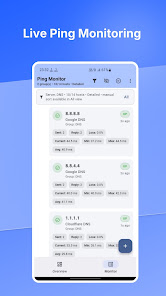
Ping Monitor is a network monitoring and ping utility for Android. Check servers, routers, IP addresses, and hostnames from your phone. Measure latency and packet loss, see reachability status, and identify network problems quickly.
Built for network administrators, sysadmins, IT technicians, VPS owners, homelab users, and anyone who needs a clear view of network devices.
PING AND NETWORK MONITORING
• Monitor IP addresses and hostnames
• See UP, DEGRADED, and DOWN status at a glance
• Track current, minimum, maximum, and average ping latency
• View packet-loss statistics and last-check information
• Start or pause monitoring when needed
• Choose detailed or compact Host views
SEARCH AND ORGANIZE HOSTS
Find devices quickly by Host name, IP address, or hostname. Search changes only the visible list, so other configured Hosts continue to be monitored.
Organize servers, routers, home networks, office infrastructure, VPS instances, client environments, and labs using Hosts and Groups. Elite users can filter Hosts by Group and create multiple Workspaces with separate configurations.
FOCUS ON NETWORK INCIDENTS — ELITE
Use the Overview dashboard to focus on DOWN and DEGRADED Hosts. Open an incident to highlight the affected Host in the Monitor tab.
OPEN EXTERNAL NETWORK TOOLS — ELITE
Configure shortcuts for tools such as Termux, MikroTik Pro, or a system browser.
• Configure up to 5 shortcuts
• Select installed apps or enter an Android package name
• Rename, reorder, add, or remove shortcuts
• Copy a Host IP address when needed
• Open Host addresses in a browser using HTTPS or HTTP
App shortcuts open the selected app only; they do not automatically send Host data or execute commands. Third-party apps must be installed separately.
CONFIGURATION AND BACKUP
• Add, edit, delete, and manually sort Hosts
• Organize Hosts into Groups
• Import, export, and share configuration backups
• Choose Light, Dark, or System theme
PLANS
Free
• Up to 2 Hosts and 2 Groups
• Basic ping monitoring and Host Search
Pro
• Everything in Free
• Unlimited Hosts and Groups
Elite
• Everything in Pro
• Multiple Workspaces
• Overview dashboard and incident focus
• Group filtering
• Incident shortcuts with Open With and Copy IP
PRIVATE AND LOCAL
Ping Monitor has no ads and requires no account. Monitoring configurations and app preferences are stored locally on your device. No mandatory cloud monitoring service is used.
Ping results depend on the target device and network. A server, router, or firewall may block ping while other services remain available.
Built for network administrators, sysadmins, IT technicians, VPS owners, homelab users, and anyone who needs a clear view of network devices.
PING AND NETWORK MONITORING
• Monitor IP addresses and hostnames
• See UP, DEGRADED, and DOWN status at a glance
• Track current, minimum, maximum, and average ping latency
• View packet-loss statistics and last-check information
• Start or pause monitoring when needed
• Choose detailed or compact Host views
SEARCH AND ORGANIZE HOSTS
Find devices quickly by Host name, IP address, or hostname. Search changes only the visible list, so other configured Hosts continue to be monitored.
Organize servers, routers, home networks, office infrastructure, VPS instances, client environments, and labs using Hosts and Groups. Elite users can filter Hosts by Group and create multiple Workspaces with separate configurations.
FOCUS ON NETWORK INCIDENTS — ELITE
Use the Overview dashboard to focus on DOWN and DEGRADED Hosts. Open an incident to highlight the affected Host in the Monitor tab.
OPEN EXTERNAL NETWORK TOOLS — ELITE
Configure shortcuts for tools such as Termux, MikroTik Pro, or a system browser.
• Configure up to 5 shortcuts
• Select installed apps or enter an Android package name
• Rename, reorder, add, or remove shortcuts
• Copy a Host IP address when needed
• Open Host addresses in a browser using HTTPS or HTTP
App shortcuts open the selected app only; they do not automatically send Host data or execute commands. Third-party apps must be installed separately.
CONFIGURATION AND BACKUP
• Add, edit, delete, and manually sort Hosts
• Organize Hosts into Groups
• Import, export, and share configuration backups
• Choose Light, Dark, or System theme
PLANS
Free
• Up to 2 Hosts and 2 Groups
• Basic ping monitoring and Host Search
Pro
• Everything in Free
• Unlimited Hosts and Groups
Elite
• Everything in Pro
• Multiple Workspaces
• Overview dashboard and incident focus
• Group filtering
• Incident shortcuts with Open With and Copy IP
PRIVATE AND LOCAL
Ping Monitor has no ads and requires no account. Monitoring configurations and app preferences are stored locally on your device. No mandatory cloud monitoring service is used.
Ping results depend on the target device and network. A server, router, or firewall may block ping while other services remain available.
Ping servers, IPs and hostnames. Track latency, packet loss and reachability.
Updated on
Safety starts with understanding how developers collect and share your data. Data privacy and security practices may vary based on your use, region, and age. The developer provided this information and may update it over time.
- No data shared with third partiesLearn more about how developers declare sharing
- No data collectedLearn more about how developers declare collection


What’s new
What's new:
• Find Hosts faster with Search by name, IP address, or hostname.
• Elite: Open With and Copy IP actions in Overview incidents.
• Elite: Customize up to 5 app shortcuts, including a browser with HTTP/HTTPS options.
• Tip: Tap an incident card to open and highlight its Host in Monitor.
• Improved shortcut layouts for small screens and landscape.
• Find Hosts faster with Search by name, IP address, or hostname.
• Elite: Open With and Copy IP actions in Overview incidents.
• Elite: Customize up to 5 app shortcuts, including a browser with HTTP/HTTPS options.
• Tip: Tap an incident card to open and highlight its Host in Monitor.
• Improved shortcut layouts for small screens and landscape.
App support
About the developer
ANDRIE JOHANES
themyth@tutamail.com
Jl. Graha Raya Bintaro ( Gracia Residence Blok N No.23)
Tangerang Selatan
Banten 15226
Indonesia


