
VoxRec-Screen & Voice Recorder


Everyone
info
100+
Downloads

Everyone
Learn more


About this app
[VoxRec Screen Recorder] is a professional, stable, and easy-to-use screen recording tool. Whether you want to capture gaming highlights, create software tutorials, or record important video calls, it provides a high-quality, seamless screen recording experience.
No Root required, and NO recording time limits! With a clean, distraction-free interface, you can start your recording journey with just one tap.
🌟 Key Features:
🎬 Full HD Screen Recording
Supports multiple resolutions (1080p, 720p) to meet your specific quality needs.
Smooth and stable performance guarantees pixel-perfect capture of every frame.
🎤 Internal Audio & Microphone Recording
Internal Audio: (Android 10+) Flawlessly record your phone's internal sound without background noise. Perfect for gameplay and music videos!
Audio Mixing: Record system audio and your microphone simultaneously. You can even adjust the volume ratio between your mic and system sound for the perfect voiceover synchronization.
📸 Facecam (Picture-in-Picture) Support
Turn on the front or rear camera to record your reactions alongside the screen!
The floating Facecam window is fully customizable: adjust its transparency, drag it anywhere, and resize it. A must-have tool for gaming creators and tutorial makers.
🛠 Handy Floating Controls
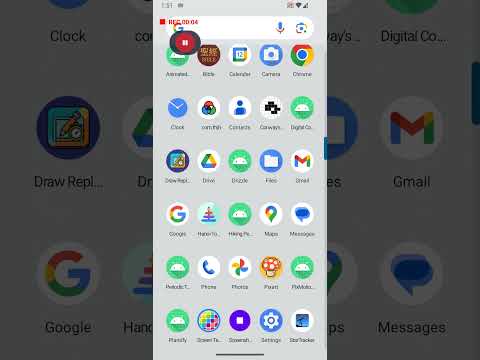
Start, pause, or stop recording effortlessly using the subtle floating button without interrupting your screen.
A helpful 3-second countdown gives you time to prepare, and it won't block you from interacting with your screen during the countdown!
📁 All-in-One Video Manager
Built-in video gallery to instantly preview your masterpieces.
Easily rename, delete, or share your recordings directly to YouTube, TikTok, Instagram, and your friends with just one tap.
🚀 Privacy First & Secure We value your privacy. All recorded videos are saved locally on your device by default. No data will be uploaded to any server without your explicit permission.
No Root required, and NO recording time limits! With a clean, distraction-free interface, you can start your recording journey with just one tap.
🌟 Key Features:
🎬 Full HD Screen Recording
Supports multiple resolutions (1080p, 720p) to meet your specific quality needs.
Smooth and stable performance guarantees pixel-perfect capture of every frame.
🎤 Internal Audio & Microphone Recording
Internal Audio: (Android 10+) Flawlessly record your phone's internal sound without background noise. Perfect for gameplay and music videos!
Audio Mixing: Record system audio and your microphone simultaneously. You can even adjust the volume ratio between your mic and system sound for the perfect voiceover synchronization.
📸 Facecam (Picture-in-Picture) Support
Turn on the front or rear camera to record your reactions alongside the screen!
The floating Facecam window is fully customizable: adjust its transparency, drag it anywhere, and resize it. A must-have tool for gaming creators and tutorial makers.
🛠 Handy Floating Controls
Start, pause, or stop recording effortlessly using the subtle floating button without interrupting your screen.
A helpful 3-second countdown gives you time to prepare, and it won't block you from interacting with your screen during the countdown!
📁 All-in-One Video Manager
Built-in video gallery to instantly preview your masterpieces.
Easily rename, delete, or share your recordings directly to YouTube, TikTok, Instagram, and your friends with just one tap.
🚀 Privacy First & Secure We value your privacy. All recorded videos are saved locally on your device by default. No data will be uploaded to any server without your explicit permission.
Smooth & HD screen recorder with internal audio & Facecam. no time limit!
Updated on
Featured stories

Safety starts with understanding how developers collect and share your data. Data privacy and security practices may vary based on your use, region, and age. The developer provided this information and may update it over time.
- No data shared with third partiesLearn more about how developers declare sharing
- No data collectedLearn more about how developers declare collection


Everyone
Learn moreApp support
About the developer
Liquan Yu
thjhsoft@gmail.com
1015 Cogburn Ln
Diamond Bar, CA 91765-4108
United States


