
Xml Genie: XML Viewer & Editor
Contains adsIn-app purchases

Everyone
info
10K+
Downloads

Everyone
Learn more




About this app
Xml Genie is a fast, no-fuss XML file opener, viewer and editor for Android.
Built by the developer behind Json Genie, a JSON viewer/editor trusted by millions, Xml Genie brings the same practical approach to XML: open the file, understand the structure, make your changes and move on.
No account. No cloud upload. Your XML files stay on your device.
Open .xml files, browse them in a clean structured view, edit values and XML nodes, find content, format the result and save or share your file.
Your XML stays local
Xml Genie opens and edits XML directly on your device. Your XML files are not uploaded to our servers just to view, find, edit or format them.
That makes Xml Genie useful for configuration files, exported data, app files, feeds, backups and other XML content you do not want to send through an online converter.
View XML clearly
Xml Genie turns XML into a structured node list that is easier to read on a phone or tablet than raw XML text.
Browse elements, text values, attributes, comments, CDATA and processing instructions in a clean mobile-friendly layout. Breadcrumb navigation shows where you are, and repeated elements are shown clearly, such as book[2].
Edit without raw XML hassle
Update XML without manually fixing tags and brackets.
Edit element text, attributes, CDATA, comments and processing instructions. Add new elements, text values, attributes, comments, CDATA and processing instructions. Duplicate, delete and reorder XML nodes when you need to change the structure.
Undo and redo help you edit with more confidence, and change history lets you review edits or jump back to an earlier version when needed.
Open XML from anywhere
Open XML from files on your device, pasted text, shared content from other apps and ZIP files containing XML.
Whether the file comes from downloads, email, cloud storage, another app or copied text, Xml Genie helps you inspect it quickly. If Android has another app set as the default XML opener, Xml Genie can help you understand what is happening.
Find, format and export
Find XML content and jump to matching nodes.
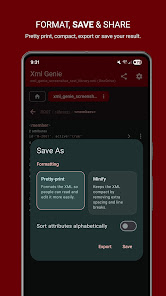
Format XML with pretty print or compact output. Control XML settings such as version, encoding, standalone value, formatting and byte order mark. Save, Save As, share or export your XML file when you are done.
Helpful when you are learning XML
Xml Genie includes simple dashboard help, a sample XML file and a way to contact support if you have a question or issue.
Why Xml Genie?
• Fast XML file opener
• Clean structured XML viewer
• Easy XML editor
• Undo, redo and change history
• Local XML editing
• No account required
• No cloud upload needed
• Edit elements, attributes, CDATA and comments
• Find, format, save and share XML files
• Built by an independent developer
Free and Premium
Xml Genie is free to use. Premium removes ads and unlocks extra functionality with a one-time purchase. No subscription.
Built to make XML work easier on Android: open the file, understand the structure, make your changes and move on.
Built by the developer behind Json Genie, a JSON viewer/editor trusted by millions, Xml Genie brings the same practical approach to XML: open the file, understand the structure, make your changes and move on.
No account. No cloud upload. Your XML files stay on your device.
Open .xml files, browse them in a clean structured view, edit values and XML nodes, find content, format the result and save or share your file.
Your XML stays local
Xml Genie opens and edits XML directly on your device. Your XML files are not uploaded to our servers just to view, find, edit or format them.
That makes Xml Genie useful for configuration files, exported data, app files, feeds, backups and other XML content you do not want to send through an online converter.
View XML clearly
Xml Genie turns XML into a structured node list that is easier to read on a phone or tablet than raw XML text.
Browse elements, text values, attributes, comments, CDATA and processing instructions in a clean mobile-friendly layout. Breadcrumb navigation shows where you are, and repeated elements are shown clearly, such as book[2].
Edit without raw XML hassle
Update XML without manually fixing tags and brackets.
Edit element text, attributes, CDATA, comments and processing instructions. Add new elements, text values, attributes, comments, CDATA and processing instructions. Duplicate, delete and reorder XML nodes when you need to change the structure.
Undo and redo help you edit with more confidence, and change history lets you review edits or jump back to an earlier version when needed.
Open XML from anywhere
Open XML from files on your device, pasted text, shared content from other apps and ZIP files containing XML.
Whether the file comes from downloads, email, cloud storage, another app or copied text, Xml Genie helps you inspect it quickly. If Android has another app set as the default XML opener, Xml Genie can help you understand what is happening.
Find, format and export
Find XML content and jump to matching nodes.
Format XML with pretty print or compact output. Control XML settings such as version, encoding, standalone value, formatting and byte order mark. Save, Save As, share or export your XML file when you are done.
Helpful when you are learning XML
Xml Genie includes simple dashboard help, a sample XML file and a way to contact support if you have a question or issue.
Why Xml Genie?
• Fast XML file opener
• Clean structured XML viewer
• Easy XML editor
• Undo, redo and change history
• Local XML editing
• No account required
• No cloud upload needed
• Edit elements, attributes, CDATA and comments
• Find, format, save and share XML files
• Built by an independent developer
Free and Premium
Xml Genie is free to use. Premium removes ads and unlocks extra functionality with a one-time purchase. No subscription.
Built to make XML work easier on Android: open the file, understand the structure, make your changes and move on.
Fast XML file opener, viewer, editor & formatter. No account or cloud upload.
Updated on
Safety starts with understanding how developers collect and share your data. Data privacy and security practices may vary based on your use, region, and age. The developer provided this information and may update it over time.
- This app may share these data types with third partiesApp info and performance and Device or other IDs
- No data collectedLearn more about how developers declare collection
- Data is encrypted in transit


What’s new
Xml Genie 1.2.0 focuses on reliability:
• Updated the technology behind the app for better compatibility and performance.
• Resolved crashes and other reported issues for a smoother, more stable experience.
• Updated the technology behind the app for better compatibility and performance.
• Resolved crashes and other reported issues for a smoother, more stable experience.
Everyone
Learn moreApp support
About the developer
Tuyware
tuyware@gmail.com
Bredenakkerstraat 96
9070 Destelbergen
Belgium
+32 490 22 59 08


