
Edit Documents: Sign PDF
In-app purchases

Everyone
info
5+
Downloads

Everyone
Learn more


About this app
Transform any document into a legally binding contract with just a few taps. Edit documents brings professional document signing directly to your iPhone.
Key Features:
Create & Sign Documents
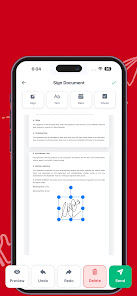
• Import PDFs from Files, iCloud, or scan with your camera
• Draw signatures naturally with your finger or Apple Pencil
• Add text fields, checkboxes, initials, and dates
• Drag and drop fields exactly where you need them
Smart Templates
• Save frequently used documents as templates
• Quick-start new documents from your template library
• Customize fields for different document types
Beautiful Interface
• Clean, intuitive design
• Dark and Light mode support
• Grid and list view for easy document browsing
• Advanced search and filtering options
Privacy & Security
• Documents stored securely on your device
• No data leaves your phone without your permission
Professional Features
• Multi-signature document support
• Document status tracking (Draft, Pending, Signed)
• Export signed documents instantly
Document Management
• Organize documents with smart filtering
• Sort by document type
• Batch operations for multiple documents
• Integrated file preview and management
Perfect For:
• Real estate agents and property managers
• Small business owners and freelancers
• Legal professionals and consultants
• Anyone who needs documents signed quickly
Premium Features
• Upgrade to unlock unlimited signatures, advanced templates, and priority support.
Privacy Policy:
https://umerahmedd.github.io/esign-privacy-policy/privacy-policy.html
Terms and Condition:
https://umerahmedd.github.io/esign-terms-and-condition/terms-of-service.html
Key Features:
Create & Sign Documents
• Import PDFs from Files, iCloud, or scan with your camera
• Draw signatures naturally with your finger or Apple Pencil
• Add text fields, checkboxes, initials, and dates
• Drag and drop fields exactly where you need them
Smart Templates
• Save frequently used documents as templates
• Quick-start new documents from your template library
• Customize fields for different document types
Beautiful Interface
• Clean, intuitive design
• Dark and Light mode support
• Grid and list view for easy document browsing
• Advanced search and filtering options
Privacy & Security
• Documents stored securely on your device
• No data leaves your phone without your permission
Professional Features
• Multi-signature document support
• Document status tracking (Draft, Pending, Signed)
• Export signed documents instantly
Document Management
• Organize documents with smart filtering
• Sort by document type
• Batch operations for multiple documents
• Integrated file preview and management
Perfect For:
• Real estate agents and property managers
• Small business owners and freelancers
• Legal professionals and consultants
• Anyone who needs documents signed quickly
Premium Features
• Upgrade to unlock unlimited signatures, advanced templates, and priority support.
Privacy Policy:
https://umerahmedd.github.io/esign-privacy-policy/privacy-policy.html
Terms and Condition:
https://umerahmedd.github.io/esign-terms-and-condition/terms-of-service.html
Sign & edit PDFs instantly, anywhere
Updated on
Safety starts with understanding how developers collect and share your data. Data privacy and security practices may vary based on your use, region, and age. The developer provided this information and may update it over time.
- No data shared with third partiesLearn more about how developers declare sharing
- This app may collect these data typesFinancial info, App activity and 2 others
- Data is encrypted in transit
- You can request that data be deleted


What’s new
Bug fixes.
Everyone
Learn moreApp support
About the developer
UMER AHMED
umerahmed.dev@gmail.com
House Number: 968, Block 8, Azizabad
Karachi, 75950
Pakistan


