
River People: Whitewater


Teen
info
10+
Downloads


About this app
River People brings your river planning, paddle log, and paddling community together.
FIND YOUR NEXT RUN
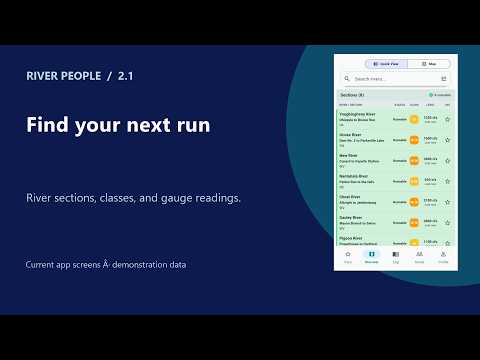
Explore river sections in Quick View or on the map. Compare difficulty, available gauge readings, and runnable indicators. Save favorites and narrow your search by location, class, and river characteristics. Open section details for access points, rapids, reported hazards, and available weather and water-quality context.
KEEP YOUR PADDLE HISTORY
Record GPS runs or add a past paddle. Keep routes, distance, duration, notes, photos, and other run details together. Review your history and merge duplicate entries while choosing which recording to retain.
PLAN WITH YOUR CREW
Browse paddling events and scheduled releases, manage RSVPs, coordinate shuttles, and stay connected through crews, community posts, comments, and direct or group messages.
RECORD WITH A COMPATIBLE WATCH
Companion apps support Apple Watch, Wear OS, and selected Garmin watches. Choose a recording device, control a phone recording, or record on a supported watch and transfer the run for phone review. Saved watch runs shows received recordings and their review, queued-upload, or saved status. Features and pairing requirements vary by platform and watch.
PREPARE BEFORE YOU GO
Save supported river and map information before losing service. Browse paddling learning resources and keep useful information close at hand.
RECORDING ON ANDROID AND WEAR OS
Starting a phone GPS run uses a foreground service and an ongoing recording notification to keep tracking while the screen is locked. Return to the active run and finish it to stop recording. Local Wear OS recording uses GPS and Health Services with an ongoing activity indicator; return through that indicator or the River People tile to pause, resume, or finish. If Android interrupts a recording service, route and exercise metrics may be incomplete. Update your phone and watch apps together.
River People is free. Gauge observations, forecasts, release schedules, and community reports are different sources of information; coverage and freshness vary. Confirm conditions and access locally before paddling. Location permission is needed for GPS recording. Watch recording requires the appropriate companion app and device permissions. Save and sync recordings before uninstalling or changing phones.
FIND YOUR NEXT RUN
Explore river sections in Quick View or on the map. Compare difficulty, available gauge readings, and runnable indicators. Save favorites and narrow your search by location, class, and river characteristics. Open section details for access points, rapids, reported hazards, and available weather and water-quality context.
KEEP YOUR PADDLE HISTORY
Record GPS runs or add a past paddle. Keep routes, distance, duration, notes, photos, and other run details together. Review your history and merge duplicate entries while choosing which recording to retain.
PLAN WITH YOUR CREW
Browse paddling events and scheduled releases, manage RSVPs, coordinate shuttles, and stay connected through crews, community posts, comments, and direct or group messages.
RECORD WITH A COMPATIBLE WATCH
Companion apps support Apple Watch, Wear OS, and selected Garmin watches. Choose a recording device, control a phone recording, or record on a supported watch and transfer the run for phone review. Saved watch runs shows received recordings and their review, queued-upload, or saved status. Features and pairing requirements vary by platform and watch.
PREPARE BEFORE YOU GO
Save supported river and map information before losing service. Browse paddling learning resources and keep useful information close at hand.
RECORDING ON ANDROID AND WEAR OS
Starting a phone GPS run uses a foreground service and an ongoing recording notification to keep tracking while the screen is locked. Return to the active run and finish it to stop recording. Local Wear OS recording uses GPS and Health Services with an ongoing activity indicator; return through that indicator or the River People tile to pause, resume, or finish. If Android interrupts a recording service, route and exercise metrics may be incomplete. Update your phone and watch apps together.
River People is free. Gauge observations, forecasts, release schedules, and community reports are different sources of information; coverage and freshness vary. Confirm conditions and access locally before paddling. Location permission is needed for GPS recording. Watch recording requires the appropriate companion app and device permissions. Save and sync recordings before uninstalling or changing phones.
Find rivers, check levels, record paddles, and connect with your crew.
Updated on
Featured stories

Safety starts with understanding how developers collect and share your data. Data privacy and security practices may vary based on your use, region, and age. The developer provided this information and may update it over time.
- No data shared with third partiesLearn more about how developers declare sharing
- This app may collect these data typesLocation, Personal info and 4 others
- Data is encrypted in transit
- You can request that data be deleted


What’s new
Tutorials now keep your place when you switch apps and return.
Clearer, shorter explanations make every tutorial example easier to follow.
Gold-only highlights and improved spacing keep example text easy to read.
Clearer, shorter explanations make every tutorial example easier to follow.
Gold-only highlights and improved spacing keep example text easy to read.
App support
About the developer
DOMENIC CARL BENTZ
domenic.bentz@gmail.com
United States


