
WiFi Widget


Everyone
info
10+
Downloads

Everyone
Learn more


About this app
WiFi Widget puts your Wi-Fi networks directly on your Android home screen — no more digging through Settings every time you want to check or switch connections.
🔍 SCAN ALL NEARBY NETWORKS
Instantly see every Wi-Fi network around you — network names, signal strength, and your current connection — all displayed on a clean, tap-ready home screen widget.
⚡ CONNECT WITH ONE TAP
Tap any network directly from the widget to connect. No Settings. No menus. Just tap and go.
📊 REAL-TIME SIGNAL STRENGTH
Each network shows its signal strength so you always know which connection gives you the best speed.
🔄 ALWAYS UP TO DATE
The widget refreshes automatically in the background so your network list is always current — even without opening the app.
──────────────────────
HOW TO SET UP (30 SECONDS)
──────────────────────
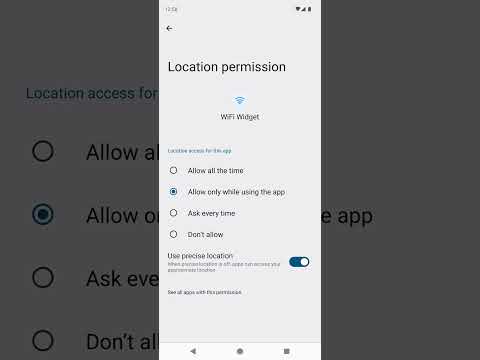
1. Open WiFi Widget and grant Location permission (required by Android for Wi-Fi scanning)
2. Long-press your home screen → Widgets → WiFi Widget → drag to screen
3. Tap the widget to see all nearby networks
──────────────────────
PERFECT FOR
──────────────────────
• Switching between home and work Wi-Fi fast
• Finding the strongest network in a crowded area
• Checking signal strength before streaming or gaming
• Anyone tired of navigating Settings → Wi-Fi every time
──────────────────────
PRIVACY
──────────────────────
WiFi Widget uses Location permission only to scan for nearby Wi-Fi networks — this is an Android requirement. Your location is never stored, recorded, transmitted, or shared.
Download WiFi Widget today and take control of your Wi-Fi connections from your home screen.
🔍 SCAN ALL NEARBY NETWORKS
Instantly see every Wi-Fi network around you — network names, signal strength, and your current connection — all displayed on a clean, tap-ready home screen widget.
⚡ CONNECT WITH ONE TAP
Tap any network directly from the widget to connect. No Settings. No menus. Just tap and go.
📊 REAL-TIME SIGNAL STRENGTH
Each network shows its signal strength so you always know which connection gives you the best speed.
🔄 ALWAYS UP TO DATE
The widget refreshes automatically in the background so your network list is always current — even without opening the app.
──────────────────────
HOW TO SET UP (30 SECONDS)
──────────────────────
1. Open WiFi Widget and grant Location permission (required by Android for Wi-Fi scanning)
2. Long-press your home screen → Widgets → WiFi Widget → drag to screen
3. Tap the widget to see all nearby networks
──────────────────────
PERFECT FOR
──────────────────────
• Switching between home and work Wi-Fi fast
• Finding the strongest network in a crowded area
• Checking signal strength before streaming or gaming
• Anyone tired of navigating Settings → Wi-Fi every time
──────────────────────
PRIVACY
──────────────────────
WiFi Widget uses Location permission only to scan for nearby Wi-Fi networks — this is an Android requirement. Your location is never stored, recorded, transmitted, or shared.
Download WiFi Widget today and take control of your Wi-Fi connections from your home screen.
Updated on
Safety starts with understanding how developers collect and share your data. Data privacy and security practices may vary based on your use, region, and age. The developer provided this information and may update it over time.

No data shared with third parties
Learn more about how developers declare sharing

No data collected
Learn more about how developers declare collection
Everyone
Learn moreApp support
About the developer
THOMAS JOHN MICHAEL LIVIAKIS
thomasliviakis.gulf717@aleeas.com
7 Upper Cecilia Way
Tiburon, CA 94920-2187
United States


