
Testing: Closed Test Assistant
Contains adsIn-app purchases


Everyone
info
100+
Downloads


About this app
Testing helps you find testing partners, easily manage your closed testing apps, track progress, and generate professional reports — all in one place.
Stop wasting time on manual day-counting and cluttered screenshots. Testing makes closed testing simple and stress-free, allowing you to focus on your development work.
Product Highlights:
► Find Testing Partners: Connect with testing communities on Telegram, Facebook, WhatsApp, WeChat, and other platforms to build your closed testing team faster and complete the 14-day testing requirement together.
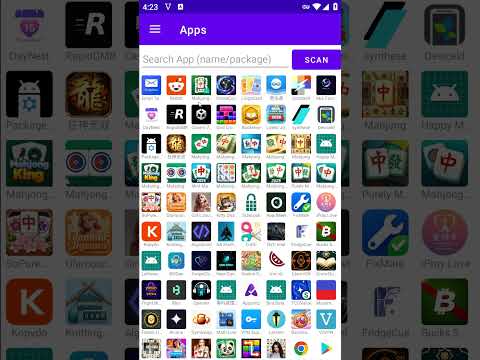
► Effortless App Management: Easily check apps directly from your installed list. It prioritizes recent installs and supports fuzzy search for package/app names with real-time syncing. Find any app within 5 seconds.
► Effortless Management Interface: Manage all apps in one single list with clear progress at a glance: date, progress, version, live status, today's completion, and days tested vs. remaining. Share screenshots directly with partners to maximize communication.
► Automatic Progress Tracking: No more manual tracking. Opening apps through our tool automatically records effective testing days, ensuring you meet the "14 consecutive days" requirement without daily miscounting anxiety.
► One-Click Test Reports: Generate a clean, professional testing status summary image with one tap. The report details key info: version, days installed, days tested, today's completion, daily consistency, and live status.
► Seamless and Convenient Sharing: Choose to save the report to your album or send it directly to group chats and forums with one click. With a simple tap, your testing partners can see today's results in seconds.
► Who Tested My App: Add your package name in "My Closed Testing Apps" and click "Who Tested Me" to monitor details: daily tester counts, cumulative days, days meeting the 12-tester standard, and daily average. This helps verify if partners fulfill their commitment.
► Generate App Testing Invitations: No more saving them scattered in text editors. Fill in the package name and group link to generate a standardized closed testing invitation message with one click, making sharing easy and worry-free.
► Check Live Status: Automatically check if apps are already live. Once Testing detects an app is live, it prompts you upon opening, saving you a lot of communication hassle when authors forget to notify you.
► Duplicate Testing Reminder: Managing many apps makes it easy to forget if you tested a specific one today. Testing automatically checks and reminds you, preventing invalid and repetitive testing.
► Tested for 14 Days Notice: Testing proactively highlights apps that have reached the 14-day mark, making it convenient for you to contact the author to confirm the exact status.
► Network Status Self-Check: Testing automatically verifies network status before launching an app every time, ensuring your every test is valid, data is accurately synced to the backend, and compliant.
► Quick View AdMob Developer Info: Instantly view and copy your device's Google Advertising ID (GAID) and Public IP address. Easily paste them into your AdMob console when configuring test devices for safe ad debugging.
► View the app's SHA-1 certificate fingerprint to easily check if it matches the one entered in the Firebase console, allowing you to quickly detect and resolve misconfiguration issues.
How it works:
1. Select: Pick the target apps you need to test.
2. Track: Testing automatically records the testing progress for you.
3. Report: Tap to generate your daily progress results.
4. Share: Send the report to your testing partners, making communication effortless.
Make app closed testing easier than ever! Whether managing one project or a dozen, Testing ensures you strictly adhere to requirements and smoothly push through the 14-day testing workflow.
Download now and experience the most effortless testing management! Let’s make app testing hassle-free!
Stop wasting time on manual day-counting and cluttered screenshots. Testing makes closed testing simple and stress-free, allowing you to focus on your development work.
Product Highlights:
► Find Testing Partners: Connect with testing communities on Telegram, Facebook, WhatsApp, WeChat, and other platforms to build your closed testing team faster and complete the 14-day testing requirement together.
► Effortless App Management: Easily check apps directly from your installed list. It prioritizes recent installs and supports fuzzy search for package/app names with real-time syncing. Find any app within 5 seconds.
► Effortless Management Interface: Manage all apps in one single list with clear progress at a glance: date, progress, version, live status, today's completion, and days tested vs. remaining. Share screenshots directly with partners to maximize communication.
► Automatic Progress Tracking: No more manual tracking. Opening apps through our tool automatically records effective testing days, ensuring you meet the "14 consecutive days" requirement without daily miscounting anxiety.
► One-Click Test Reports: Generate a clean, professional testing status summary image with one tap. The report details key info: version, days installed, days tested, today's completion, daily consistency, and live status.
► Seamless and Convenient Sharing: Choose to save the report to your album or send it directly to group chats and forums with one click. With a simple tap, your testing partners can see today's results in seconds.
► Who Tested My App: Add your package name in "My Closed Testing Apps" and click "Who Tested Me" to monitor details: daily tester counts, cumulative days, days meeting the 12-tester standard, and daily average. This helps verify if partners fulfill their commitment.
► Generate App Testing Invitations: No more saving them scattered in text editors. Fill in the package name and group link to generate a standardized closed testing invitation message with one click, making sharing easy and worry-free.
► Check Live Status: Automatically check if apps are already live. Once Testing detects an app is live, it prompts you upon opening, saving you a lot of communication hassle when authors forget to notify you.
► Duplicate Testing Reminder: Managing many apps makes it easy to forget if you tested a specific one today. Testing automatically checks and reminds you, preventing invalid and repetitive testing.
► Tested for 14 Days Notice: Testing proactively highlights apps that have reached the 14-day mark, making it convenient for you to contact the author to confirm the exact status.
► Network Status Self-Check: Testing automatically verifies network status before launching an app every time, ensuring your every test is valid, data is accurately synced to the backend, and compliant.
► Quick View AdMob Developer Info: Instantly view and copy your device's Google Advertising ID (GAID) and Public IP address. Easily paste them into your AdMob console when configuring test devices for safe ad debugging.
► View the app's SHA-1 certificate fingerprint to easily check if it matches the one entered in the Firebase console, allowing you to quickly detect and resolve misconfiguration issues.
How it works:
1. Select: Pick the target apps you need to test.
2. Track: Testing automatically records the testing progress for you.
3. Report: Tap to generate your daily progress results.
4. Share: Send the report to your testing partners, making communication effortless.
Make app closed testing easier than ever! Whether managing one project or a dozen, Testing ensures you strictly adhere to requirements and smoothly push through the 14-day testing workflow.
Download now and experience the most effortless testing management! Let’s make app testing hassle-free!
Find test partners, manage test apps, and complete closed testing together.
Updated on
Safety starts with understanding how developers collect and share your data. Data privacy and security practices may vary based on your use, region, and age. The developer provided this information and may update it over time.


What’s new
Added App Square, making it easier for your friends to find you!
App support
phone
Phone number
+8615514573068
About the developer
许彦峰
xu_yanfeng@126.com
新郑市梨河镇黃桥204号
郑州市, 河南省
China
451150


