
Music Folder Player
Contains ads
4.5star
100K reviews
5M+
Downloads

Everyone
info


About this app
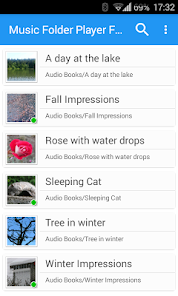
Music Folder Player was made for people who don't like to see music displayed based on artist, album, track or playlists. If you prefer organizing your audio tracks in folder this may be the right player for you.
Besides that it comes with a lot of unique features.
• Material Design
• Resume where you left. Stores for each folder where you left
• Show folders as a 'flat' list if you have a small collection
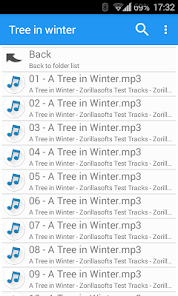
• Show folder hierarchy like in a file manager for larger collections
• Virtual folder with your favorite songs
• Playlists
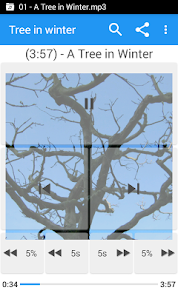
• Four configurable seek buttons. Very useful for seeking in podcasts or audio books
• Equalizer:
- 4 customizable settings
- 8 predefined settings like Bass Booster, Vocal Booster and Party setting
• Virtual room and reverb effect
• Speed control with pitch correction (OS 4.2+)
Increase or decrease the playback speed of your podcasts or audio books.
Speed control is not suitable for music. Please watch the video: http://youtu.be/d_0eWUXs6Yo
• Pre-amplifyer: Increase the volume of audio which was recorded with a low level. (OS 4.2+)
• 432 Hz playback mode. Please read this article for details: http://goo.gl/Oeg5hh (OS 4.2+)
• Car/Sports mode with big buttons
• Change volume and balance with two finger gesture. Video: http://goo.gl/9LXsIE
• Undo function: Undo actions if you accidentally touch a button or select another track
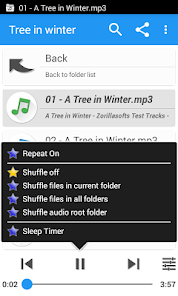
• Shuffle and repeat options (long tap on play/pause button)
• Delete and rename files (long tap on file)
• Sleep timer
• Headset button control (double and triple clicks)
• Search for files and folder
• Share files
Note: Since there are recently some complaints in the review section:
This app is an audio PLAYER, not a DOWNLOADER. If you search for an app to download new music, this app is NOT suitable for you. This player just handles audio files which are already on your device.
Don't worry about 'adware' warnings of some antivirus scanners. Of course the player is not a virus. This is just because the player shows advertisements. The full version is not affected by that.
Facebook: http://www.facebook.com/Zorillasoft
Permissions: Please take a look at the F.A.Q section on my homepage:
http://www.zorillasoft.de/MusicFolderPlayer-jp.html#faq
Besides that it comes with a lot of unique features.
• Material Design
• Resume where you left. Stores for each folder where you left
• Show folders as a 'flat' list if you have a small collection
• Show folder hierarchy like in a file manager for larger collections
• Virtual folder with your favorite songs
• Playlists
• Four configurable seek buttons. Very useful for seeking in podcasts or audio books
• Equalizer:
- 4 customizable settings
- 8 predefined settings like Bass Booster, Vocal Booster and Party setting
• Virtual room and reverb effect
• Speed control with pitch correction (OS 4.2+)
Increase or decrease the playback speed of your podcasts or audio books.
Speed control is not suitable for music. Please watch the video: http://youtu.be/d_0eWUXs6Yo
• Pre-amplifyer: Increase the volume of audio which was recorded with a low level. (OS 4.2+)
• 432 Hz playback mode. Please read this article for details: http://goo.gl/Oeg5hh (OS 4.2+)
• Car/Sports mode with big buttons
• Change volume and balance with two finger gesture. Video: http://goo.gl/9LXsIE
• Undo function: Undo actions if you accidentally touch a button or select another track
• Shuffle and repeat options (long tap on play/pause button)
• Delete and rename files (long tap on file)
• Sleep timer
• Headset button control (double and triple clicks)
• Search for files and folder
• Share files
Note: Since there are recently some complaints in the review section:
This app is an audio PLAYER, not a DOWNLOADER. If you search for an app to download new music, this app is NOT suitable for you. This player just handles audio files which are already on your device.
Don't worry about 'adware' warnings of some antivirus scanners. Of course the player is not a virus. This is just because the player shows advertisements. The full version is not affected by that.
Facebook: http://www.facebook.com/Zorillasoft
Permissions: Please take a look at the F.A.Q section on my homepage:
http://www.zorillasoft.de/MusicFolderPlayer-jp.html#faq
Updated on
Safety starts with understanding how developers collect and share your data. Data privacy and security practices may vary based on your use, region, and age. The developer provided this information and may update it over time.


Ratings and reviews
4.5
95.6K reviews

Andrew Hinton
- Flag inappropriate
- Show review history
May 16, 2024
I had this app on my previous phone and it was great. Used it to play music in my car via Bluetooth connection and it would stop when I turned the car off and resume from the same spot when I got in the car again. Now with the updated version that does not happen about 50% of the time. And I only realize this after I start driving, so I have to open the app to resume music but first have to dig through the library to find it, but only after I closed the ad that pops up. Was awesome. Not anymore.
2 people found this review helpful
ZorillaSoft
May 16, 2024
Not everything is always the fault of the app or developer. Can't tell what exactly happens on your side, but the new version only exists because Google put tons of stones in the way of us developers which made it necessary to develop version 3 to work around a lot of issues.

Lee Mowatt
- Flag inappropriate
- Show review history
July 13, 2024
I have been using this player for several years. Occasionally, I try other players, but always seem to return to this one. My primary feature is how it handles folder structures and remembers it last place from previous sessions or folders. Its settings and controls are many but clear. After trying many others, I always seem to return to this one. The latest version is a bit more intrusive in regards to its in-app ads. This is the only reason I couldn't give a full 5-start rating.
1 person found this review helpful
ZorillaSoft
July 13, 2024
There was no change on my side regarding ads, but Google made their ads worse over the years, for example by showing them at least for 5 seconds before you can dismiss it. I have no control over that.
What I really don't understand is why hesitate to purchase the full version without ads. It's a one-time payment of less than two dollars.

John Stroman
- Flag inappropriate
February 5, 2024
This app fills a serious gap in the music player market. I have many thousands of music files -- files that include music I've recorded and edited. I organize these files on the PC, carefully placing them in folders according to MY needs and preferences. This is in direct opposition to other players that destroy my file organization in favor of song tag information. The UI of this app is clean and simple. I couldn't be happier. Bring on a paid version!
12 people found this review helpful
What's new
v3.1.32
* Some fixes
v3.1.31
* Fixed app exiting when using undo button.
* A few other fixes and improvements.
* Some fixes
v3.1.31
* Fixed app exiting when using undo button.
* A few other fixes and improvements.


