
Slate Launcher
In-app purchases


Everyone
info
100+
Downloads


About this app
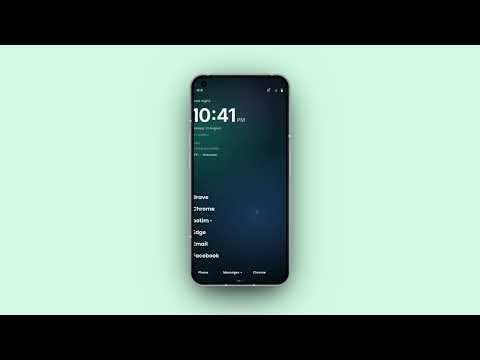
Make your Android home screen cleaner, calmer, and more personal with Slate Launcher.
Slate Launcher is a minimal, customizable Android launcher designed to help you stay organized and focus on what matters without giving up personalization.
Create a clean home screen, organize apps with Spaces, keep useful information close with Slate Hub, reduce distractions with Focus Profiles, and find apps quickly with a fast, customizable app drawer.
Whether you want a minimal launcher, a cleaner Android home screen, or a more organized way to use your phone, Slate gives you the flexibility to make it your own.
CLEAN & CUSTOMIZABLE HOME
Build your home screen around what matters to you.
• Favorite and Quick Apps
• Calendar events and notifications
• Weather and battery information
• Custom fonts and typography
• Wallpaper-aware colors
• Custom wallpapers
• Flexible appearance options
ORGANIZE WITH SPACES
Create Spaces for work, personal apps, entertainment, productivity, or anything else you need.
• Organize apps and links
• Create multiple Spaces
• Reorder content your way
• Keep important apps easy to reach
• Private Space for personal content
SLATE HUB
Keep useful information and tools together in one customizable place.
Add and organize widgets for tasks, notes, weather, Now Playing, bookmarks, health information, Quick Contacts, Smart Notifications, and more.
Resize and arrange your Hub to create a layout that works for you.
FOCUS WHEN YOU NEED IT
Focus Profiles help create a simpler environment when you want fewer distractions.
Choose the apps you need and quickly switch to a setup designed for working, studying, relaxing, or staying focused.
SMART NOTIFICATIONS
Keep notifications organized without turning your Home screen into another notification center.
• Organized notification categories
• Priority notifications
• Expandable previews
• Quick notification actions
• Notification indicators across Slate
FAST & FLEXIBLE APP DRAWER
Find your apps quickly with an app drawer built for speed and customization.
• Fast app search
• List, grid, and page layouts
• App categories and folders
• Alphabet navigation
• Recent and suggested apps
• Custom icon styles and icon packs
• Hide unwanted apps
MAKE SLATE YOURS
Personalize Slate with custom wallpapers, fonts, typography, colors, icon styles, folders, Home and App Drawer customization, gesture shortcuts, and light or dark appearance.
Keep it simple or make Slate completely your own.
SLATE BRIEF
Get a useful overview when you unlock your phone with Slate Brief. See relevant information at a glance without immediately diving into your apps.
BUILT FOR A CALMER, MORE ORGANIZED PHONE
Slate combines the simplicity of a minimal launcher with the flexibility of a customizable Android launcher.
No complicated home screen required. Just the apps, information, and tools that matter to you.
Less noise. More intention.
ACCESSIBILITY SERVICE DECLARATION
Slate Launcher uses the Android AccessibilityService API to deliver its core distraction-free features.
How the Accessibility API is used:
• Screen Unlock & Slate Brief: Detects lock and unlock events to display your customized Slate Brief summary immediately after unlocking your device.
• System Gesture Shortcuts: Enables quick-access gestures, such as opening the notification shade or recent apps, directly from your Slate home screen.
Privacy & Security Commitments:
• We DO NOT collect, record, store, or share any personal data, user inputs, or sensitive information through the AccessibilityService API.
• We DO NOT change device settings without your explicit permission or prevent you from disabling or uninstalling the app.
• We DO NOT perform remote audio recording or bypass Android privacy controls.
Accessibility permissions are requested only when enabling features that require them and can be enabled or disabled at any time in your device settings.
Slate Launcher is a minimal, customizable Android launcher designed to help you stay organized and focus on what matters without giving up personalization.
Create a clean home screen, organize apps with Spaces, keep useful information close with Slate Hub, reduce distractions with Focus Profiles, and find apps quickly with a fast, customizable app drawer.
Whether you want a minimal launcher, a cleaner Android home screen, or a more organized way to use your phone, Slate gives you the flexibility to make it your own.
CLEAN & CUSTOMIZABLE HOME
Build your home screen around what matters to you.
• Favorite and Quick Apps
• Calendar events and notifications
• Weather and battery information
• Custom fonts and typography
• Wallpaper-aware colors
• Custom wallpapers
• Flexible appearance options
ORGANIZE WITH SPACES
Create Spaces for work, personal apps, entertainment, productivity, or anything else you need.
• Organize apps and links
• Create multiple Spaces
• Reorder content your way
• Keep important apps easy to reach
• Private Space for personal content
SLATE HUB
Keep useful information and tools together in one customizable place.
Add and organize widgets for tasks, notes, weather, Now Playing, bookmarks, health information, Quick Contacts, Smart Notifications, and more.
Resize and arrange your Hub to create a layout that works for you.
FOCUS WHEN YOU NEED IT
Focus Profiles help create a simpler environment when you want fewer distractions.
Choose the apps you need and quickly switch to a setup designed for working, studying, relaxing, or staying focused.
SMART NOTIFICATIONS
Keep notifications organized without turning your Home screen into another notification center.
• Organized notification categories
• Priority notifications
• Expandable previews
• Quick notification actions
• Notification indicators across Slate
FAST & FLEXIBLE APP DRAWER
Find your apps quickly with an app drawer built for speed and customization.
• Fast app search
• List, grid, and page layouts
• App categories and folders
• Alphabet navigation
• Recent and suggested apps
• Custom icon styles and icon packs
• Hide unwanted apps
MAKE SLATE YOURS
Personalize Slate with custom wallpapers, fonts, typography, colors, icon styles, folders, Home and App Drawer customization, gesture shortcuts, and light or dark appearance.
Keep it simple or make Slate completely your own.
SLATE BRIEF
Get a useful overview when you unlock your phone with Slate Brief. See relevant information at a glance without immediately diving into your apps.
BUILT FOR A CALMER, MORE ORGANIZED PHONE
Slate combines the simplicity of a minimal launcher with the flexibility of a customizable Android launcher.
No complicated home screen required. Just the apps, information, and tools that matter to you.
Less noise. More intention.
ACCESSIBILITY SERVICE DECLARATION
Slate Launcher uses the Android AccessibilityService API to deliver its core distraction-free features.
How the Accessibility API is used:
• Screen Unlock & Slate Brief: Detects lock and unlock events to display your customized Slate Brief summary immediately after unlocking your device.
• System Gesture Shortcuts: Enables quick-access gestures, such as opening the notification shade or recent apps, directly from your Slate home screen.
Privacy & Security Commitments:
• We DO NOT collect, record, store, or share any personal data, user inputs, or sensitive information through the AccessibilityService API.
• We DO NOT change device settings without your explicit permission or prevent you from disabling or uninstalling the app.
• We DO NOT perform remote audio recording or bypass Android privacy controls.
Accessibility permissions are requested only when enabling features that require them and can be enabled or disabled at any time in your device settings.
A minimal, customizable Android launcher for a cleaner, focused home screen.
Updated on
Safety starts with understanding how developers collect and share your data. Data privacy and security practices may vary based on your use, region, and age. The developer provided this information and may update it over time.
- No data shared with third partiesLearn more about how developers declare sharing
- No data collectedLearn more about how developers declare collection


What’s new
[0.7.5]
Added
* Added new App Drawer designs with more layout and appearance options.
* Added new exclusive Slate wallpapers to the built-in wallpaper collection.
* Added a redesigned Colors page combining Accent Color and Slate Text Color controls.
* Added live color previews for easier theme customization.
Added
* Added new App Drawer designs with more layout and appearance options.
* Added new exclusive Slate wallpapers to the built-in wallpaper collection.
* Added a redesigned Colors page combining Accent Color and Slate Text Color controls.
* Added live color previews for easier theme customization.
App support
About the developer
Njaliath Devassy Globin
globinnjaliath@gmail.com
Mookkannoor po
Njaliath house
PO Ernakulam, Kerala 683577
India


