
Note Recognition – Trial
star
1.38K reviews

Everyone
info
100K+
Downloads

Everyone
Learn more



About this app
Note Recognition converts recorded melodies into notes.
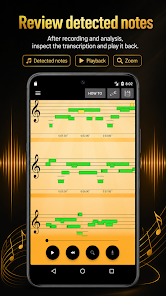
Record your instrument or voice with your phone's microphone. The app then analyzes the recording, detects the pitch of each note and displays your melody as easy-to-read sheet music in a simplified, alternative notation — no classical staff reading skills needed.
WHAT THE APP DOES
Records audio through your device's microphone
Analyzes the recording afterwards and detects the pitch of each played or sung note
Displays the detected melody in a clear, simplified sheet music view
Lets you adjust the playback speed to inspect tricky passages in detail
Lets you adjust the detection detail — from rough outline to fine-grained analysis
Exports your melody as a MIDI file for use in a DAW or notation software (e.g. MuseScore) to create classical sheet music
Works with monophonic (single-note) melodies from guitar, piano, ukulele, violin and vocals — humming works too
TYPICAL USES
Music students: compare what you meant to play with what the app detected and train your ear
Songwriters: record a melody idea, check the notes and take it further as MIDI
Producers: turn a hummed or played melody into MIDI for your DAW
Music teachers: show students which notes they actually played
Singers: see the notes you sang
HOW IT WORKS
Press the record button and play or sing your melody.
Stop the recording. The app analyzes the audio and performs pitch detection.
The detected notes are displayed. Adjust the detection detail, slow down the playback — and export as MIDI.
ABOUT THIS TRIAL VERSION
This is the trial version of Note Recognition. You can explore all features; some of them require the Pro upgrade — the app will let you know when a feature needs Pro.
IMPORTANT LIMITATIONS
The app is designed for clear, single notes (monophonic melodies). It does not transcribe chords, polyphonic music or multiple instruments playing at the same time. For the best detection results, place your phone close to the instrument and record in a quiet environment.
Record your instrument or voice with your phone's microphone. The app then analyzes the recording, detects the pitch of each note and displays your melody as easy-to-read sheet music in a simplified, alternative notation — no classical staff reading skills needed.
WHAT THE APP DOES
Records audio through your device's microphone
Analyzes the recording afterwards and detects the pitch of each played or sung note
Displays the detected melody in a clear, simplified sheet music view
Lets you adjust the playback speed to inspect tricky passages in detail
Lets you adjust the detection detail — from rough outline to fine-grained analysis
Exports your melody as a MIDI file for use in a DAW or notation software (e.g. MuseScore) to create classical sheet music
Works with monophonic (single-note) melodies from guitar, piano, ukulele, violin and vocals — humming works too
TYPICAL USES
Music students: compare what you meant to play with what the app detected and train your ear
Songwriters: record a melody idea, check the notes and take it further as MIDI
Producers: turn a hummed or played melody into MIDI for your DAW
Music teachers: show students which notes they actually played
Singers: see the notes you sang
HOW IT WORKS
Press the record button and play or sing your melody.
Stop the recording. The app analyzes the audio and performs pitch detection.
The detected notes are displayed. Adjust the detection detail, slow down the playback — and export as MIDI.
ABOUT THIS TRIAL VERSION
This is the trial version of Note Recognition. You can explore all features; some of them require the Pro upgrade — the app will let you know when a feature needs Pro.
IMPORTANT LIMITATIONS
The app is designed for clear, single notes (monophonic melodies). It does not transcribe chords, polyphonic music or multiple instruments playing at the same time. For the best detection results, place your phone close to the instrument and record in a quiet environment.
Try note recognition — record melodies, see them as notes and analyze the pitch
Updated on
Safety starts with understanding how developers collect and share your data. Data privacy and security practices may vary based on your use, region, and age. The developer provided this information and may update it over time.
- No data shared with third partiesLearn more about how developers declare sharing
- This app may collect these data typesApp activity
- Data is encrypted in transit


Ratings and reviews
1.33K reviews

Michael Erickson
- Flag inappropriate
January 12, 2022
I could get over the fact that it uses colored bars of varying lengths, if only those bars were accurate. I could even forgive the phantom notes it somehow hears, if only it weren't multiple notes in each measure. There is a chance it will hear your notes and show them correctly, but that's such a rarity, and the staff is so cluttered with notes you didn't play that you're better off using pen and paper.
15 people found this review helpful

Benton Ledbetter
- Flag inappropriate
September 2, 2026
it does not work at all. In complete silence and it'll make notes. when trying to make music is going to add a whole bunch of notes that weren't even played.
1 person found this review helpful

Kane Bowden
- Flag inappropriate
March 4, 2022
I would suggest that if it's possible to show the notes names, not just showing them on the stave. Not everyone has music theory or know how to read music. Much like guitar Tabs. Great concept this app. Hope it works well after I have tried it out properly.
15 people found this review helpful
Everyone
Learn moreApp support
About the developer
mystage.fm UG (haftungsbeschränkt)
mystage-google@mystage.fm
Rumfordstr. 21
80469 München
Germany
+49 1512 7080936


