Compax Watch Face
Contains adsIn-app purchases
4.4star
535 reviews
10K+
Downloads

Everyone
info


About this app
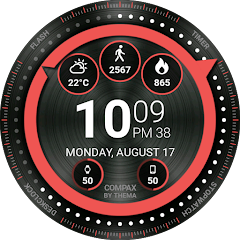
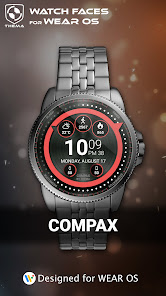
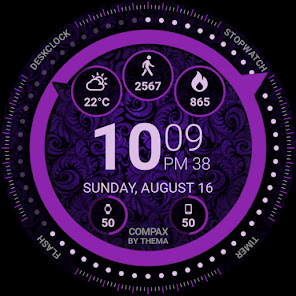
Compax Watch Face for Wear OS!
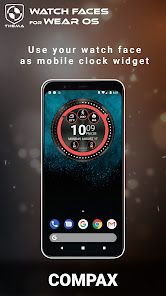
Don't have a Wear OS watch? You can still use this watch face as a clock widget on your mobile!
⛔️NOT FOR SAMSUNG GEAR S2 / GEAR S3 !! (running Tizen OS)⛔️
If you have one, do not install this application.
To find support and compatible applications with your watch, please go to http://www.themaapps.com/watch_on_tizen_os
★ Features of Compax Watch Face ★
- Clock Widget (No second hand due to battery consumption)
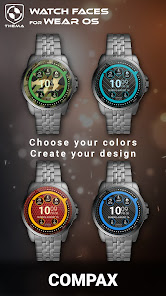
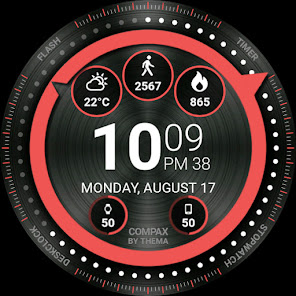
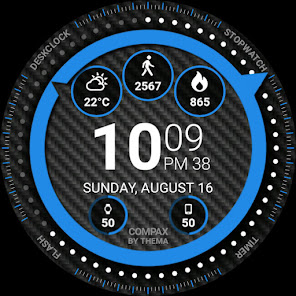
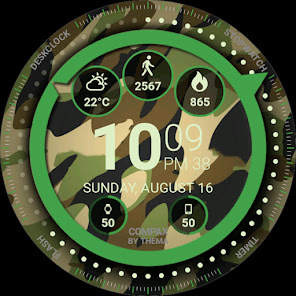
- Choose design colors
- Day & Month
- Watch battery
- Mobile battery (requires phone app)
- Weather (requires phone app)
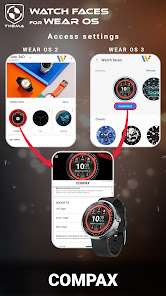
The settings of the watch face are located in the "Wear OS" app of your mobile.
Just hit the gear icon over the watch face preview and the settings screen will show up!
★ FREE Settings ★
- Choose design colors on watch & mobile
- Define heartbeat frequency refresh rate
- Define weather refresh rate
- Weather unit
- 12 / 24 hours mode
- Define interactive mode duration
- Choose the ambient mode b&w and eco luminosity
- Choose to display a leading zero on hours
- Display brand name or not
- Choose to display or not the seconds dots
★ PREMIUM Settings ★
- Choose your own title in place of "COMPAX"
- Switch between éco / simple b&w / full ambient mode
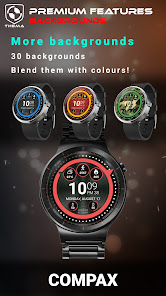
- Choose background among different styles
- Blend background with colors
- Define a secondary timezone for digital display
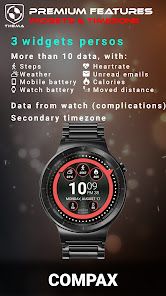
- Data:
+ Change the indicator to display on the 3 positions
+ Choose between up to 8 indicators (Daily step count, Heartbeat frequency, Unread Email from Gmail, etc...)
+ Complication (wear 2.0 & 3.0)
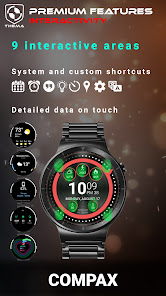
- Interactivity
+ Access to detailed data by touching a widget
+ Switch the displayed data by touching a widget
+ Change the shortcut to execute on the 4 positions
+ Choose your shortcut among all applications installed on your watch!
+ Choose to display the interactive areas
★ Additional settings on phone ★
The optional phone app is an easiest way to customize the watch face. It provides additional settings and data.
- Choose to switch between small/big/translucent/opaque cards (Wear 1.5x only)
- Choose between 2 weather providers (Yr & OpenWeatherMap)
- Define manual or automatic location
- Notifications for new designs
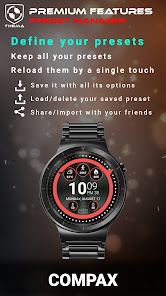
- Presets manager:
+ Save your preset with all its options (colors, backgrounds, data, features. EVERYTHING is saved!)
+ Load / delete one of your previously saved preset
+ Share / Import presets
★ Installation ★
Watch Face
Wear OS 1.X
This watch face will be installed automatically from your phone paired.
If it doesn't show up please go to the Wear OS App > Settings and Resync all apps.
Wear OS 2.X
A notification will be displayed on your watch, right after your mobile installation. You just have to hit it to start the installation process of the watch face.
If the notification did not display for some reason, you can still install the watch face by using the Google Play Store available on your watch: just search the watch face by its name.
Mobile clock widget
Just long press on your launcher, then select the application widget to drop it on your home screen of your mobile.
Customize the widget settings with the application.
★ More watch faces
Visit my watch faces collection for Wear OS on the Play Store at https://goo.gl/CRzXbS
** If you have any issues or questions, fill free to contact me by email (English or French language) before giving a bad rating. Thanks!
Website: https://www.themaapps.com/
Youtube: https://youtube.com/ThomasHemetri
Twitter: https://twitter.com/ThomasHemetri
Instagram: https://www.instagram.com/thema_watchfaces
Don't have a Wear OS watch? You can still use this watch face as a clock widget on your mobile!
⛔️NOT FOR SAMSUNG GEAR S2 / GEAR S3 !! (running Tizen OS)⛔️
If you have one, do not install this application.
To find support and compatible applications with your watch, please go to http://www.themaapps.com/watch_on_tizen_os
★ Features of Compax Watch Face ★
- Clock Widget (No second hand due to battery consumption)
- Choose design colors
- Day & Month
- Watch battery
- Mobile battery (requires phone app)
- Weather (requires phone app)
The settings of the watch face are located in the "Wear OS" app of your mobile.
Just hit the gear icon over the watch face preview and the settings screen will show up!
★ FREE Settings ★
- Choose design colors on watch & mobile
- Define heartbeat frequency refresh rate
- Define weather refresh rate
- Weather unit
- 12 / 24 hours mode
- Define interactive mode duration
- Choose the ambient mode b&w and eco luminosity
- Choose to display a leading zero on hours
- Display brand name or not
- Choose to display or not the seconds dots
★ PREMIUM Settings ★
- Choose your own title in place of "COMPAX"
- Switch between éco / simple b&w / full ambient mode
- Choose background among different styles
- Blend background with colors
- Define a secondary timezone for digital display
- Data:
+ Change the indicator to display on the 3 positions
+ Choose between up to 8 indicators (Daily step count, Heartbeat frequency, Unread Email from Gmail, etc...)
+ Complication (wear 2.0 & 3.0)
- Interactivity
+ Access to detailed data by touching a widget
+ Switch the displayed data by touching a widget
+ Change the shortcut to execute on the 4 positions
+ Choose your shortcut among all applications installed on your watch!
+ Choose to display the interactive areas
★ Additional settings on phone ★
The optional phone app is an easiest way to customize the watch face. It provides additional settings and data.
- Choose to switch between small/big/translucent/opaque cards (Wear 1.5x only)
- Choose between 2 weather providers (Yr & OpenWeatherMap)
- Define manual or automatic location
- Notifications for new designs
- Presets manager:
+ Save your preset with all its options (colors, backgrounds, data, features. EVERYTHING is saved!)
+ Load / delete one of your previously saved preset
+ Share / Import presets
★ Installation ★
Watch Face
Wear OS 1.X
This watch face will be installed automatically from your phone paired.
If it doesn't show up please go to the Wear OS App > Settings and Resync all apps.
Wear OS 2.X
A notification will be displayed on your watch, right after your mobile installation. You just have to hit it to start the installation process of the watch face.
If the notification did not display for some reason, you can still install the watch face by using the Google Play Store available on your watch: just search the watch face by its name.
Mobile clock widget
Just long press on your launcher, then select the application widget to drop it on your home screen of your mobile.
Customize the widget settings with the application.
★ More watch faces
Visit my watch faces collection for Wear OS on the Play Store at https://goo.gl/CRzXbS
** If you have any issues or questions, fill free to contact me by email (English or French language) before giving a bad rating. Thanks!
Website: https://www.themaapps.com/
Youtube: https://youtube.com/ThomasHemetri
Twitter: https://twitter.com/ThomasHemetri
Instagram: https://www.instagram.com/thema_watchfaces
Updated on
Safety starts with understanding how developers collect and share your data. Data privacy and security practices may vary based on your use, region, and age. The developer provided this information and may update it over time.

No data shared with third parties
Learn more about how developers declare sharing

This app may collect these data types
App activity and App info and performance

Data is encrypted in transit

Data can’t be deleted
Ratings and reviews
4.4
443 reviews

Matthew King
- Flag inappropriate
February 12, 2024
Works well and purchased the premium version for all options, but disappointed that several options aren't available. The font size is too small and can not be changed, battery displays are either on or off and can't be used for other information, tapping the steps counter only opens the Google fit app versus being able to open 'exercises' built into the watch. The face should give the option to use Google fit *or* Samsung Health, other faces do so it can be done. Hope the author fixes these.
1 person found this review helpful
thema
February 12, 2024
Hi. Did you try to select "complication external data" as data for a widget? It will allow you to display any external data provided by your watch. Your watch health data should be available among them. Please send me an email at thema.apps@gmail.com I'll be happy to help you

Dometalican
- Flag inappropriate
- Show review history
August 5, 2021
While a little laggy, these faces are absolutely fantastic. I love the amount of customizations you could pull with this (exact watch battery percentage is perfect for me). For those who went premium, it apparently takes a whole day for it to sync with the watch. Thought I would share that before you bury this developer. Lol
8 people found this review helpful

Phillip
- Flag inappropriate
January 8, 2024
The absolute best creator of watch faces on the app store. I would like to see more of a variety of backgrounds for these watch faces. It would create more of an appeal. It would be even better to be able to upload our own background pictures .
1 person found this review helpful
What's new
2.24.07.2118
- Targetsdk 34 and compatibility fixes
- Fixed translations
- Added specific settings visualization
- Bump libraries versions
Requires app update on both Watch & Mobile.
If you have any issue, please let me know by email at thema.apps@gmail.com
- Targetsdk 34 and compatibility fixes
- Fixed translations
- Added specific settings visualization
- Bump libraries versions
Requires app update on both Watch & Mobile.
If you have any issue, please let me know by email at thema.apps@gmail.com


