
Jonot Desk


Everyone
info
1+
Downloads

Everyone
Learn more


About this app
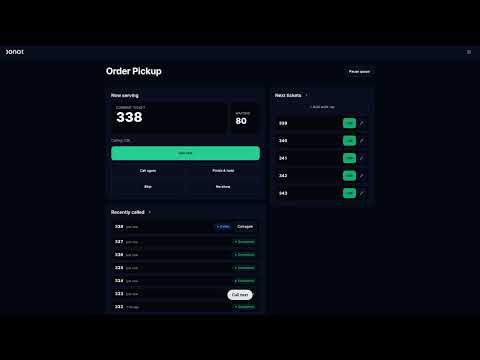
Jonot Desk turns any Android tablet into a dedicated counter-staff queue terminal. Staff call the next customer, complete or skip a ticket, and watch live queue stats — all on a locked-down tablet that cannot be used for anything else.
Designed to sit at every service counter in pharmacies, banks, clinics, repair shops, government offices, restaurants and any place where staff handle customers from a queue.
KEY FEATURES
• Counter-staff actions — call next, complete current, skip, recall.
• Live queue snapshot — current ticket, next ticket, position counts in real time over WebSocket.
• Locked-down kiosk mode — pinned full-screen, the home, recents and status bar are disabled so staff cannot leave the app.
• Auto-start on boot — the tablet powers on into desk mode without manager intervention.
• Manager escape hatch — five-tap corner unlocks a PIN-protected manager menu for exit and recovery.
• WebView error recovery — short network drops are absorbed with exponential-backoff reload and visible status.
• Immersive mode — system bars hidden so the entire screen is the desk UI.
WHO IT IS FOR
Service businesses with one or more staffed counters that already use the Jonot queue platform. The tablet stays locked to the desk app for the duration of a shift; managers unlock with a PIN to exit.
REQUIREMENTS
• Android 12 (API 31) or newer.
• Tablet form factor recommended (10" or larger).
• An active Jonot organization account at jonot.io with at least one location and one queue configured.
• A reliable Wi-Fi or mobile data connection — desk operations are real-time and require connectivity.
PRIVACY
The Jonot Desk app is a thin wrapper around the desk web app. The native app itself does not collect or store personal data; queue actions are recorded against the staff member's device session by the Jonot backend, not by the device locally.
SUPPORT
Documentation: jonot.io
Support email: info@jonot.io
Designed to sit at every service counter in pharmacies, banks, clinics, repair shops, government offices, restaurants and any place where staff handle customers from a queue.
KEY FEATURES
• Counter-staff actions — call next, complete current, skip, recall.
• Live queue snapshot — current ticket, next ticket, position counts in real time over WebSocket.
• Locked-down kiosk mode — pinned full-screen, the home, recents and status bar are disabled so staff cannot leave the app.
• Auto-start on boot — the tablet powers on into desk mode without manager intervention.
• Manager escape hatch — five-tap corner unlocks a PIN-protected manager menu for exit and recovery.
• WebView error recovery — short network drops are absorbed with exponential-backoff reload and visible status.
• Immersive mode — system bars hidden so the entire screen is the desk UI.
WHO IT IS FOR
Service businesses with one or more staffed counters that already use the Jonot queue platform. The tablet stays locked to the desk app for the duration of a shift; managers unlock with a PIN to exit.
REQUIREMENTS
• Android 12 (API 31) or newer.
• Tablet form factor recommended (10" or larger).
• An active Jonot organization account at jonot.io with at least one location and one queue configured.
• A reliable Wi-Fi or mobile data connection — desk operations are real-time and require connectivity.
PRIVACY
The Jonot Desk app is a thin wrapper around the desk web app. The native app itself does not collect or store personal data; queue actions are recorded against the staff member's device session by the Jonot backend, not by the device locally.
SUPPORT
Documentation: jonot.io
Support email: info@jonot.io
Counter-staff queue control. Call next, complete, skip. Tablet kiosk mode.
Updated on
Safety starts with understanding how developers collect and share your data. Data privacy and security practices may vary based on your use, region, and age. The developer provided this information and may update it over time.
- No data shared with third partiesLearn more about how developers declare sharing
- No data collectedLearn more about how developers declare collection


What’s new
Initial release. Locked-down counter-staff queue terminal with live snapshot updates, call-next / complete / skip actions, full-screen lock-task mode, auto-start on boot, and a 5-tap manager escape hatch.
Everyone
Learn moreApp support
phone
Phone number
+358503049886
About the developer
Jonot Oy
info@jonot.io
Tenavatie 11B
00760 HELSINKI
Finland
+358 50 3049886


