
Unexpected Keyboard

star
3.57K reviews

Everyone
info
500K+
Downloads

Everyone
Learn more


About this app
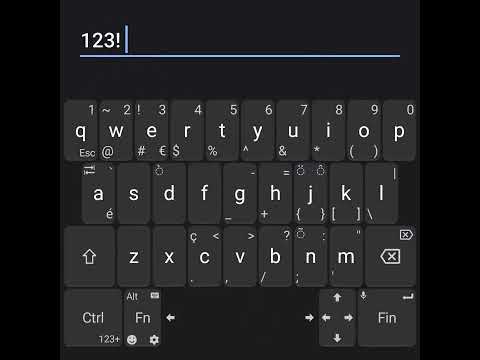
The main feature is that you can type more characters by swiping the keys towards the corners.
This application was originally designed for programmers using Termux.
Now perfect for everyday use.
This application contains no ads and is Open Source.
This application was originally designed for programmers using Termux.
Now perfect for everyday use.
This application contains no ads and is Open Source.
Lightweight and privacy-conscious virtual keyboard for Android.
Updated on
Safety starts with understanding how developers collect and share your data. Data privacy and security practices may vary based on your use, region, and age. The developer provided this information and may update it over time.
- No data shared with third partiesLearn more about how developers declare sharing
- No data collectedLearn more about how developers declare collection


Ratings and reviews
3.43K reviews

Dee C
- Flag inappropriate
- Show review history
June 20, 2024
My usual keyboard wouldn't work with my Android 14 2024 Moto g 5G so I looked for another that might offer simular features. This keyboard really was unexpected!! It has all sorts of useful editing functions. It takes some practice to learn how to access everything, but once I learned to swipe towards a symbol to type it, and how to adjust settings, great! It's well worth a try for those who do a lot of writing on phones. Check out the settings to see what it can do.
59 people found this review helpful

Sarah Bumpaous
- Flag inappropriate
- Show review history
August 19, 2025
Absolute gem! No ads, no fighting autocorrect, no fuss. It gives me all the things I miss from a computer keyboard: Ctrl, Esc, Tab, arrow keys, etc. Most of the special characters I use on a regular basis are easy to access too. A built-in, optional dictionary & spellcheck would be really nice, but even without that, this keyboard is a definite 5 stars for me.
46 people found this review helpful

jem
- Flag inappropriate
January 7, 2026
I found this looking for an alternative to Hacker's Keyboard and I love it. Only issue I have is the punctuation characters. I wish they weren't scattered around the keyboard and were confined to the number keys like with Hacker's Keyboard. Other than than that, I think it's pretty damn perfect. I thought I'd have issues with the whole "swipe on a key to reach the corner characters", and it does take some getting used to, but once you get the hang of it, it starts to feel almost intuitive.
30 people found this review helpful


