

Nanoleaf

3.8star
16.9K reviews
500K+
Downloads

Everyone
info

About this app
Design, set up, manage, and control your Nanoleaf lights all in one place. From the virtual Layout Assistant, to one-touch RGB presets, to full in-depth customization like you’ve never seen before, prepare for a lighting experience that is Smarter by Design.
Simple Control
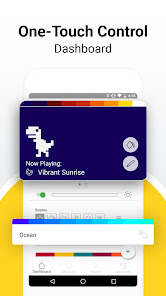
Use the App to scan your lights’ pairing code and get set up in seconds, then enjoy your smart light-switch. Remotely turn your lights on and off, adjust brightness (trust us they go BRIGHT), and select your color Scenes from anywhere within your home. Group your lights together for joint control with Group Scenes (because we love a team player), or segment by room to keep your lights as organized as you wish your life could be.
Complete Customization
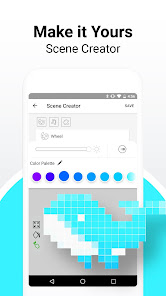
Create custom dynamic Scenes by selecting palettes and colors with the intuitive color wheel, adjusting ratios, and choosing animated motions. Try vibrant RGB hues to set a total vibe, or put the “fun” in functional lighting with the whole range of white color temperatures.
Advanced Automations
Set Schedules to automate your daily lighting needs, from gentle morning light-alarms, to gradually dimming nightly reminders that Holy **** it’s 2AM again, you need to wake up in 4 hours, PLEASE go to sleep.
Now You’re Talking
Connect your lights with your smart home assistant (Amazon Alexa, Google Assistant, or Samsung SmartThings) and use voice commands to control them hands-free. Just say “Ok Google, turn on my “TGIF” Scene” and instantly enter full relaxation-mode at the end of a long week. The best part of all, you don’t even have to say “Please”... but it’d still be nice if you did though :)
Join the Community
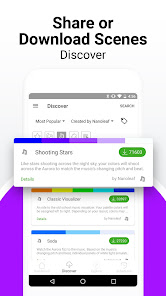
Explore the App’s “Discover” tab for a huge collection of incredible Scenes created by users like you. Well, like you, just more creative. But if you too are the creative type, share your own Scenes and show the community what you’ve got! There are endless Scenes to discover for every mood and occasion, all the way from “Ho Ho Holidays” to “Netflix and Chill”.
+ More
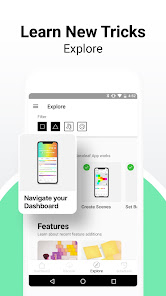
With a virtual AR Layout Assistant, curated Scenes and Playlists, and additional product information, the Nanoleaf App really is your smart lighting one-stop-shop.
The Nanoleaf App supports Nanoleaf Light Panels, Canvas, Shapes, Essentials, Elements, and Lines.
Enjoy it today on the ever superior Android operating system.
Simple Control
Use the App to scan your lights’ pairing code and get set up in seconds, then enjoy your smart light-switch. Remotely turn your lights on and off, adjust brightness (trust us they go BRIGHT), and select your color Scenes from anywhere within your home. Group your lights together for joint control with Group Scenes (because we love a team player), or segment by room to keep your lights as organized as you wish your life could be.
Complete Customization
Create custom dynamic Scenes by selecting palettes and colors with the intuitive color wheel, adjusting ratios, and choosing animated motions. Try vibrant RGB hues to set a total vibe, or put the “fun” in functional lighting with the whole range of white color temperatures.
Advanced Automations
Set Schedules to automate your daily lighting needs, from gentle morning light-alarms, to gradually dimming nightly reminders that Holy **** it’s 2AM again, you need to wake up in 4 hours, PLEASE go to sleep.
Now You’re Talking
Connect your lights with your smart home assistant (Amazon Alexa, Google Assistant, or Samsung SmartThings) and use voice commands to control them hands-free. Just say “Ok Google, turn on my “TGIF” Scene” and instantly enter full relaxation-mode at the end of a long week. The best part of all, you don’t even have to say “Please”... but it’d still be nice if you did though :)
Join the Community
Explore the App’s “Discover” tab for a huge collection of incredible Scenes created by users like you. Well, like you, just more creative. But if you too are the creative type, share your own Scenes and show the community what you’ve got! There are endless Scenes to discover for every mood and occasion, all the way from “Ho Ho Holidays” to “Netflix and Chill”.
+ More
With a virtual AR Layout Assistant, curated Scenes and Playlists, and additional product information, the Nanoleaf App really is your smart lighting one-stop-shop.
The Nanoleaf App supports Nanoleaf Light Panels, Canvas, Shapes, Essentials, Elements, and Lines.
Enjoy it today on the ever superior Android operating system.
Updated on
Safety starts with understanding how developers collect and share your data. Data privacy and security practices may vary based on your use, region, and age. The developer provided this information and may update it over time.

No data shared with third parties
Learn more about how developers declare sharing

This app may collect these data types
Personal info, App activity and 2 others

Data is encrypted in transit
Ratings and reviews
3.8
16.3K reviews

Jon Ralston
- Flag inappropriate
- Show review history
April 25, 2024
If the stupid high price tag doesn't keep you away, this horrible app should. Great, I have mediocre LED panels now that were easy to put on the wall. Too bad I can't control them. Schedule updates are painful. The scene selection screen is cluttered with endless colorful scenes that my device (Elements) can't even use. Half the time or more, the app totally freezes up when trying to adjust my scene (since my schedule never works as planned). I bet 4th graders can program a better app. Garbage
3 people found this review helpful

Taylor Barr
- Flag inappropriate
- Show review history
May 10, 2024
While the panels are physically great, the app is a bit clunky and schedules never function as designed. We continuously get a connection error which is just unacceptable for the price of these panels. Update: just doesn't work now. You could set your money on fire and the heat would give you more value. Expect no support help. This is a complete scam.
5 people found this review helpful
Nanoleaf
December 7, 2021
Hello Taylor, we’re really sorry to hear about your experience and the inconvenience this has caused you. This is definitely not on par with our standards. Please follow up with your support ticket and we will notify our Support Team to get back to you. Thanks for understanding.

Luis R Berrios
- Flag inappropriate
May 9, 2024
I read some bad reviews of the app. I did too have some hiccups setting it up. Then I remember the lights work with WiFi 2.4. I was on WiFi 5. I moved away far enough for my phone to connect to 2.4. Once I did that the set up went smoothly and have not had any issues with disconnects. All works good.
What's new
What's Changed:
- Improved in-app customer support feature
- Minor UI/UX fixes
- Minor bug fixes
- Added support for new Nanoleaf Essentials Outdoor String Lights
- Improved in-app customer support feature
- Minor UI/UX fixes
- Minor bug fixes
- Added support for new Nanoleaf Essentials Outdoor String Lights


