
Messages
Contains ads


Everyone
info
1K+
Downloads


About this app
Welcome to Messages, the simple solution for all your Text SMS and messaging needs. This reliable Messenger app provides a seamless way to send and receive every message or SMS instantly. Whether you want a clean chat interface or tools to organize your Text SMS inbox, Messages is the messaging platform built for you.
Stay connected with a fast Messenger that puts your communication first. With Messages, handling every Text SMS and message is easy, ensuring you stay in touch through a secure messaging experience. Use Messages to start a chat and send a Text SMS with confidence at any time.
Key Features of Messages
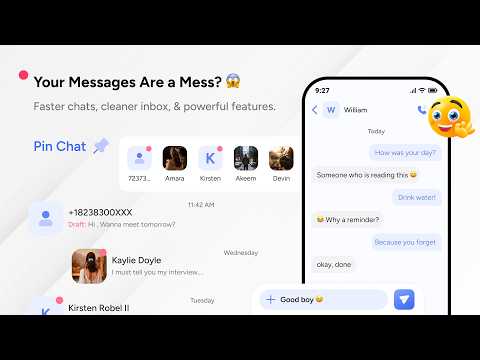
- Send and receive SMS: Enjoy a smooth chat experience with reliable Text SMS delivery in Messages.
- Schedule messages: Plan your messaging by scheduling a Text SMS to be sent exactly when you need it.
- Archive messages: Declutter your Messenger inbox by moving any chat or message to the archive section.
- Block numbers: Protect your messaging space in Messages by blocking any number from sending a Text SMS.
- Mark as read/unread: Keep track of every important chat by marking a message as read or unread in your SMS list.
- Swipe actions: Customize your messaging flow with swipes to archive, delete, block, or mark a message as read or unread.
- Multiple language support: Use this Messenger in your preferred language for a global chat and messaging experience.
- After call feature gives you helpful options right after your call ends
Why Choose This Messaging App?
- Personalized Chat View: Adjust your message font size from small, normal, large, to extra large for better messaging.
- Flexible Themes: Match your messaging style by choosing light, dark, or system themes for your Messenger.
- Organized SMS Inbox: Use Messages to manage your Text SMS and chat history with a simple layout.
- Efficient Messaging: Send a quick Text SMS or start a new chat with a few taps in the Messages interface.
How It Works
1. Launch the Messages app on your phone to see your chat list.
2. View your existing Text SMS and messaging threads instantly.
3. Tap to open any message or SMS to read and reply to your chat.
4. Use the schedule feature to prepare a Text SMS for later messaging.
5. Swipe on any message to archive or block numbers from your messaging list.
Permissions & Data Safety
We require these core permissions for the app to function:
- Read Messages (READ_SMS): Necessary for the app to display all your existing and incoming Text SMS and messages.
- Send Messages (WRITE_SMS): Allows the app to send Text SMS on your behalf, enabling the app's core features.
Data Safety: We do not collect or share your personal data on our servers. Any profile details you save (Such as Name, Phone, and email address) are stored locally on your phone. For additional information, users can see details in the app’s privacy policy on Google Play.
Start your daily messaging with a dependable Messenger. Download Messages today for a better Text SMS and chat experience. Messages is built for your everyday message and SMS needs.
Stay connected with a fast Messenger that puts your communication first. With Messages, handling every Text SMS and message is easy, ensuring you stay in touch through a secure messaging experience. Use Messages to start a chat and send a Text SMS with confidence at any time.
Key Features of Messages
- Send and receive SMS: Enjoy a smooth chat experience with reliable Text SMS delivery in Messages.
- Schedule messages: Plan your messaging by scheduling a Text SMS to be sent exactly when you need it.
- Archive messages: Declutter your Messenger inbox by moving any chat or message to the archive section.
- Block numbers: Protect your messaging space in Messages by blocking any number from sending a Text SMS.
- Mark as read/unread: Keep track of every important chat by marking a message as read or unread in your SMS list.
- Swipe actions: Customize your messaging flow with swipes to archive, delete, block, or mark a message as read or unread.
- Multiple language support: Use this Messenger in your preferred language for a global chat and messaging experience.
- After call feature gives you helpful options right after your call ends
Why Choose This Messaging App?
- Personalized Chat View: Adjust your message font size from small, normal, large, to extra large for better messaging.
- Flexible Themes: Match your messaging style by choosing light, dark, or system themes for your Messenger.
- Organized SMS Inbox: Use Messages to manage your Text SMS and chat history with a simple layout.
- Efficient Messaging: Send a quick Text SMS or start a new chat with a few taps in the Messages interface.
How It Works
1. Launch the Messages app on your phone to see your chat list.
2. View your existing Text SMS and messaging threads instantly.
3. Tap to open any message or SMS to read and reply to your chat.
4. Use the schedule feature to prepare a Text SMS for later messaging.
5. Swipe on any message to archive or block numbers from your messaging list.
Permissions & Data Safety
We require these core permissions for the app to function:
- Read Messages (READ_SMS): Necessary for the app to display all your existing and incoming Text SMS and messages.
- Send Messages (WRITE_SMS): Allows the app to send Text SMS on your behalf, enabling the app's core features.
Data Safety: We do not collect or share your personal data on our servers. Any profile details you save (Such as Name, Phone, and email address) are stored locally on your phone. For additional information, users can see details in the app’s privacy policy on Google Play.
Start your daily messaging with a dependable Messenger. Download Messages today for a better Text SMS and chat experience. Messages is built for your everyday message and SMS needs.
Updated on
Safety starts with understanding how developers collect and share your data. Data privacy and security practices may vary based on your use, region, and age. The developer provided this information and may update it over time.

No data shared with third parties
Learn more about how developers declare sharing

This app may collect these data types
Messages, Contacts and 3 others

Data isn’t encrypted
What’s new
📴 Call end support added
🛠️ Crash fixes & improved stability
🎨 Cleaner and simplified UI design
⚡ Faster and smoother performance
🛠️ Crash fixes & improved stability
🎨 Cleaner and simplified UI design
⚡ Faster and smoother performance
App support
About the developer
YOGESH BHASKARBHAI PUROHIT
bhumilandinfo@gmail.com
India


