
Hearing Test
4.8star
13.8K reviews
1M+
Downloads

Everyone
info


About this app
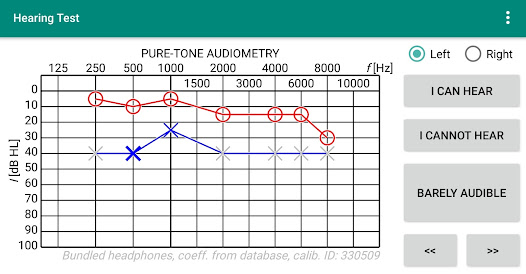
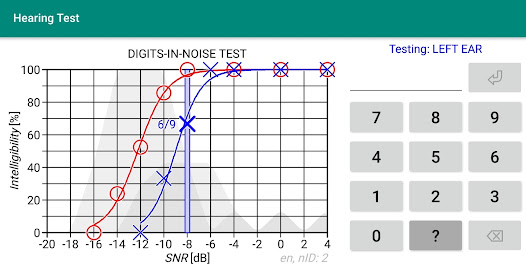
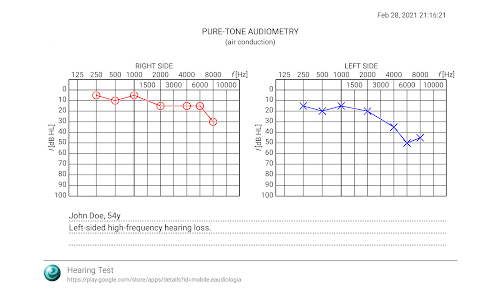
The app provides two basic hearing test: pure-tone audiometry and the speech intelligibility test (the digits-in-noise).
Pure-tone audiometry determines the degree of hearing loss in relation to the sound frequency. The test consists in determining the quietest sound that you are able to hear, thus determining your hearing threshold. The digits-in-noise test evaluates speech intelligibility and consists of recognition of the digits in the noise.
The features of the Hearing Test app:
* pure-tone audiometry (using bundled headphones and predefined calibration coefficients from the database),
* the digits-in-noise test for speech intelligibility measurements,
* noise meter to measure background noise during the test,
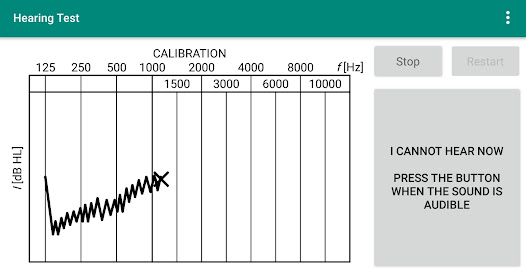
* calibration of the device (in the case of lack of predefined calibration or for headphones other than bundled).
Additional features:
* high-frequency audiometry,
* classification of the hearing loss,
* comparison with age norms,
* printing of the tests results,
* adding notes,
* calibration adjustment (calibration coefficients may be adjusted on the basis of your results obtained using clinical audiometer),
* verification of calibration coefficients.
Pro version features:
* local database (offline access to tests results, without connecting to the server),
* synchronization (your tests results can be stored in a cloud; data are easy to recover, can be transferred between devices and accessed on different devices).
Pure-tone audiometry determines the degree of hearing loss in relation to the sound frequency. The test consists in determining the quietest sound that you are able to hear, thus determining your hearing threshold. The digits-in-noise test evaluates speech intelligibility and consists of recognition of the digits in the noise.
The features of the Hearing Test app:
* pure-tone audiometry (using bundled headphones and predefined calibration coefficients from the database),
* the digits-in-noise test for speech intelligibility measurements,
* noise meter to measure background noise during the test,
* calibration of the device (in the case of lack of predefined calibration or for headphones other than bundled).
Additional features:
* high-frequency audiometry,
* classification of the hearing loss,
* comparison with age norms,
* printing of the tests results,
* adding notes,
* calibration adjustment (calibration coefficients may be adjusted on the basis of your results obtained using clinical audiometer),
* verification of calibration coefficients.
Pro version features:
* local database (offline access to tests results, without connecting to the server),
* synchronization (your tests results can be stored in a cloud; data are easy to recover, can be transferred between devices and accessed on different devices).
Updated on
Safety starts with understanding how developers collect and share your data. Data privacy and security practices may vary based on your use, region, and age. The developer provided this information and may update it over time.

No data shared with third parties
Learn more about how developers declare sharing

This app may collect these data types
Health and fitness and Device or other IDs

Data is encrypted in transit

You can request that data be deleted
Ratings and reviews
4.8
12.9K reviews

Eric Zagaroli
- Flag inappropriate
- Show review history
April 7, 2024
This app is pretty close to the real deal when using my earphones that came with my phone and had a calibration. I compared the results from this app, to a work audiogram, and audiologist audiogram and was pleased. The low end results where off a bit, but for some one taking in noise, the high frequency results were striking dang near spot on and if taking in noise your high end results is what you want anyways.
6 people found this review helpful

Al Rea
- Flag inappropriate
September 8, 2023
Recommended by my ear doctor, not as a substitute for professional audiology tests, but to supplement them. I did a test on this app right after going to the audiologist and compared results. This app is accurate. Use it to monitor your hearing for changes. If you experience a sudden hearing loss, get in to see a specialist right away, within 2 weeks. They might be able to treat you and reverse the hearing loss. They said after 2 weeks the treatment is less likely to work. Take it seriously!
38 people found this review helpful

A Google user
- Flag inappropriate
- Show review history
June 26, 2019
First off, this is the best free hearing test app available. No doubt about that, and a comparison to my actual hearing test from my audiologist shows a startling accuracy that I was not expecting. This app does however have a couple of areas where improvements can be made, including server connectivity problems and occasional loud hissing/static if the Hz are out of your device's threshold. But seriously, if used correctly, this app is incredibly accurate, especially for no money! Recommended.
195 people found this review helpful
What's new
* Improved support for Bluetooth headphones added.
The predefined calibration is currently available for the Sennheiser HD 450BT headphones. More wireless headphone models will be added to the database soon.
* Added antiphasic stimulus to Digits-in-Noise test.
* Minor bug fixes and improvements.
The predefined calibration is currently available for the Sennheiser HD 450BT headphones. More wireless headphone models will be added to the database soon.
* Added antiphasic stimulus to Digits-in-Noise test.
* Minor bug fixes and improvements.
App support
About the developer
Marcin Masalski
masalskim@gmail.com
Henryka Jareckiego 22e
52-129 Wrocław
Poland
undefined


