MyLifeOrganized: To-Do List
In-app purchases
4.6star
5.68K reviews
500K+
Downloads

Everyone
info



About this app
MyLifeOrganized (MLO) is the most flexible and powerful task management software for getting your to-dos finally done.
Why MLO is what you need
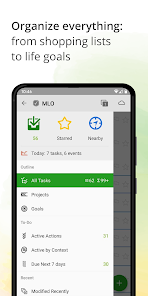
MLO leads to a new level of productivity — you can manage not only tasks but projects, habits and even life goals. Designed to strike a balance between the simple and the complex, MLO comes with optional contexts, tags, stars, flags, reminders, dates, priorities, completely customizable filters and views that make MLO flexible enough to adapt to your own system for managing your tasks. It is particularly suited for those who are truly serious about personal task management.
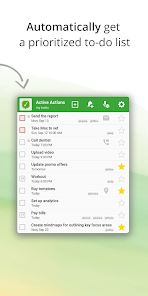
Once loaded with your information, MyLifeOrganized goes to work and generates a simple list containing only the next actions that require your immediate attention. This list is updated auto-magically once you complete a task, drive to a new location, or simply if it is dinner time.
Sync across mobile and desktop
Add even more power to your task management — use MLO Cloud service* to sync automatically with the world-class Desktop version of MyLifeOrganized**. You can sync your to-do lists with multiple devices, share a single task list, or collaborate with other people. Join the users who sync more than 65 million of their to-dos via the secure and robust MyLifeOrganized Cloud Sync Service! Alternatively, sync directly over your own private Wi-Fi or work completely offline.
Most MLO features are FREE forever:
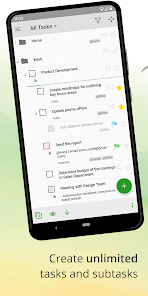
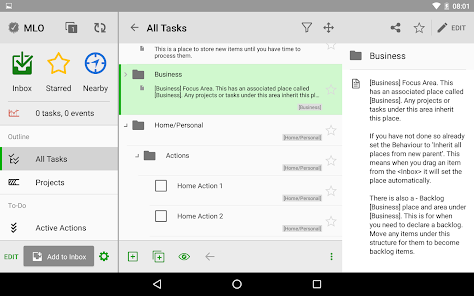
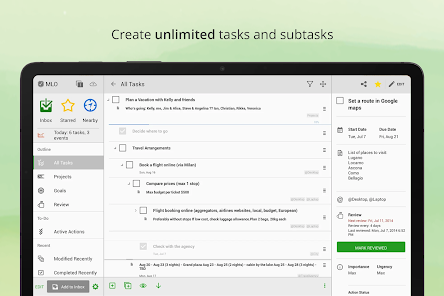
• Unlimited hierarchy of tasks and subtasks: organize your tasks into projects and break down large tasks until you have reasonably sized actions
• Full GTD® (Getting Things Done®) support
• Next Actions: automatically get a list of tasks that require your attention now
• MLO Smart To-Do List Sorting using the priorities of the task and its parents
• Filter actions by context
• Inbox for rapid task entry
• Starred tasks
• Zoom: focus on a specific branch of tasks
• Reminders
• Templates for a quick start with different task management systems such as GTD®, FranklinCovey and Do-It-Tomorrow
PRO features, FREE for the first 21 days:
• Complete tasks from your list in a specific order
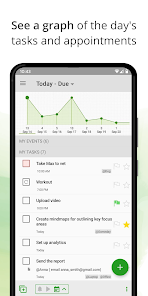
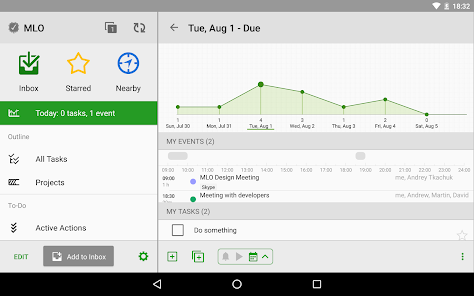
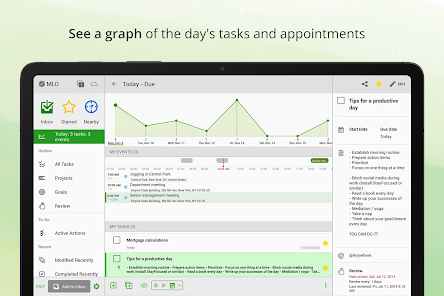
• Calendar view: measure your daily workload
• Project tracking
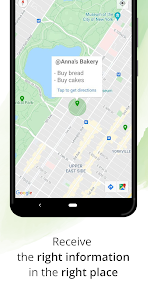
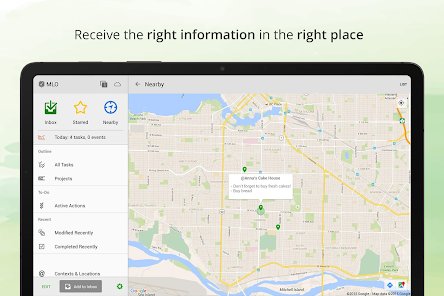
• Nearby view: get a list of actions for your current GPS location, with reminders as you reach or leave the location
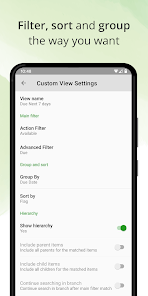
• Custom views with filtering, sorting and grouping, to match the system that works for you
• Recurring and regenerating tasks
• Rapid task entry with advanced parsing: add tasks with ready-made properties using the app, widget or Google Assistant
• Workspaces (tabs): switch quickly between projects or views
• Dependencies: MLO can work with sequential and parallel projects, holding up tasks that can not start until other tasks are finished
• Review: flag tasks for regular review to add new subtasks or change priorities
• Floating Promoted Action Button: add a new task or perform another action from anywhere on the screen
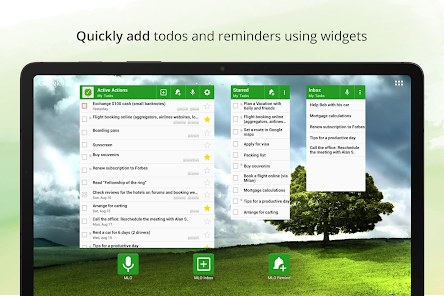
• Customizable widgets
• Actions from the notification area
• Password protection, and many more
Upgrade to PRO to continue using advanced features after the trial expires.
MLO offers free support at support@mylifeorganized.net and the active user forum on Google Groups. If you have any questions, our support team and members of the user group will be glad to help you!
Follow us for updates and useful tips:
twitter.com/MyLifeOrg
facebook.com/MyLifeOrganized
blog.mylifeorganized.net
*MLO Cloud is a low-cost, subscription-based service allowing you to sync your to-do lists wirelessly between different platforms.
**MyLifeOrganized for Desktop to-do list app is sold separately.
Why MLO is what you need
MLO leads to a new level of productivity — you can manage not only tasks but projects, habits and even life goals. Designed to strike a balance between the simple and the complex, MLO comes with optional contexts, tags, stars, flags, reminders, dates, priorities, completely customizable filters and views that make MLO flexible enough to adapt to your own system for managing your tasks. It is particularly suited for those who are truly serious about personal task management.
Once loaded with your information, MyLifeOrganized goes to work and generates a simple list containing only the next actions that require your immediate attention. This list is updated auto-magically once you complete a task, drive to a new location, or simply if it is dinner time.
Sync across mobile and desktop
Add even more power to your task management — use MLO Cloud service* to sync automatically with the world-class Desktop version of MyLifeOrganized**. You can sync your to-do lists with multiple devices, share a single task list, or collaborate with other people. Join the users who sync more than 65 million of their to-dos via the secure and robust MyLifeOrganized Cloud Sync Service! Alternatively, sync directly over your own private Wi-Fi or work completely offline.
Most MLO features are FREE forever:
• Unlimited hierarchy of tasks and subtasks: organize your tasks into projects and break down large tasks until you have reasonably sized actions
• Full GTD® (Getting Things Done®) support
• Next Actions: automatically get a list of tasks that require your attention now
• MLO Smart To-Do List Sorting using the priorities of the task and its parents
• Filter actions by context
• Inbox for rapid task entry
• Starred tasks
• Zoom: focus on a specific branch of tasks
• Reminders
• Templates for a quick start with different task management systems such as GTD®, FranklinCovey and Do-It-Tomorrow
PRO features, FREE for the first 21 days:
• Complete tasks from your list in a specific order
• Calendar view: measure your daily workload
• Project tracking
• Nearby view: get a list of actions for your current GPS location, with reminders as you reach or leave the location
• Custom views with filtering, sorting and grouping, to match the system that works for you
• Recurring and regenerating tasks
• Rapid task entry with advanced parsing: add tasks with ready-made properties using the app, widget or Google Assistant
• Workspaces (tabs): switch quickly between projects or views
• Dependencies: MLO can work with sequential and parallel projects, holding up tasks that can not start until other tasks are finished
• Review: flag tasks for regular review to add new subtasks or change priorities
• Floating Promoted Action Button: add a new task or perform another action from anywhere on the screen
• Customizable widgets
• Actions from the notification area
• Password protection, and many more
Upgrade to PRO to continue using advanced features after the trial expires.
MLO offers free support at support@mylifeorganized.net and the active user forum on Google Groups. If you have any questions, our support team and members of the user group will be glad to help you!
Follow us for updates and useful tips:
twitter.com/MyLifeOrg
facebook.com/MyLifeOrganized
blog.mylifeorganized.net
*MLO Cloud is a low-cost, subscription-based service allowing you to sync your to-do lists wirelessly between different platforms.
**MyLifeOrganized for Desktop to-do list app is sold separately.
Updated on
Safety starts with understanding how developers collect and share your data. Data privacy and security practices may vary based on your use, region, and age. The developer provided this information and may update it over time.

No data shared with third parties
Learn more about how developers declare sharing

This app may collect these data types
Personal info and App info and performance

Data is encrypted in transit

You can request that data be deleted
Ratings and reviews
4.6
5.2K reviews

Kenton Hensley
- Flag inappropriate
July 5, 2024
Do you have multiple projects? Do you believe that getting things done builds momentum and confidence? Does it help you to write down goals and the steps to get there? You really can't do better than what this customer-focused team has developed with MLO. It's customizability requires some perserverance, but it allows you to organize and plan in a way that works for you. The synchronization across Windows and Android, let you update tasks and checklist wherever is most convenient. Excellent.
2 people found this review helpful
www.mylifeorganized.net
July 5, 2024
Thank you so much for your thoughtful and detailed review! We're happy to hear that MLO is helping you stay organized and build momentum and confidence.

Jensen Soto
- Flag inappropriate
January 30, 2024
For so long I've been looking for a practical app/service for the Tasks on my Life, not just only general Tasks, I mean, personal tasks, business tasks, Goals, Bucket List, etc. I think I’ve finally found it. I love all the customization capabilities, for now the only thing I miss from the MLO Service is a better integration on Mobile, there are missing features between Windows/Android. Also, there’s no Trash, that should be added ASAP, mistakes happen. Let's see how things goes in the future.
40 people found this review helpful

Jon Fierstein (NightshadeInSF)
- Flag inappropriate
- Show review history
August 18, 2021
I've changed my rating from 5 stars to 1 stars. The programs are great, no doubt. A year ago I had to repurchase the android version and just repurchased the desktop version because I no longer had access to the email I had purchased them with and customer support wouldnt help. Now, just a short while later, they want me to pay more money for an minor feature update for the android version? No way. I have to draw the line. It's a great product, but I cant afford the demands for more money.
60 people found this review helpful
www.mylifeorganized.net
September 20, 2021
Jon, we're very sorry to hear about this unresolved issue. We can't seem to find your emails with this subject, and we ask you to contact us again at support@mylifeorganized.net. Please indicate all possible email addresses which could be used for the purchase of MLO for Windows. We will double-check the orders.
Thank you,
Alyona
What's new
* added new sorting fields for views
* long tap on a task in the search result will open a task preview
* added Due/Start title to the date and time picker dialog
* added Cancel and Try Again buttons to the preview screen after adding by voice
* added Prev/Next buttons to a task preview opened from widget
* added Traditional Chinese language
* fixed an issue with Home screen shortcuts
* fixed issues with gesture
* fixed issues with parsing
* bug fixes and stability improvements
* long tap on a task in the search result will open a task preview
* added Due/Start title to the date and time picker dialog
* added Cancel and Try Again buttons to the preview screen after adding by voice
* added Prev/Next buttons to a task preview opened from widget
* added Traditional Chinese language
* fixed an issue with Home screen shortcuts
* fixed issues with gesture
* fixed issues with parsing
* bug fixes and stability improvements
App support
About the developer
Andriy Tkachuk
support@mylifeorganized.net
Peremohy Avenue, 58А
Kharkiv
Харківська область
Ukraine
61202
undefined


