
aCalendar+ Calendar & Tasks
4.6star
37.7K reviews
500K+
Downloads

Everyone
info


About this app
aCalendar 2 is available NOW!
We improved everything but kept it familiar.
For questions or problems see our new help system at https://acalendar.tapirapps.de or contact our support at support@tapirapps.de
aCalendar+ is the premium version of aCalendar - with all features unlocked and no ads.
aCalendar+ gives you many additional calendar features and your purchase supports further development and helps protecting the endangered Mountain Tapir.
EXTRA FEATURES (aCalendar+ or as In-App-Purchase)
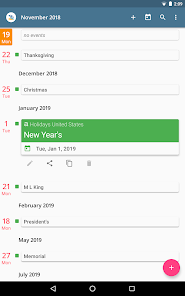
● Public holidays (and school holidays for some countries) - configurable in the calendar list
● More colors (theme/UI colors, background colors, calendar colors, event colors)
● Business features (Invite attendees, link contacts, free/busy, private, profiles, share as ICS)
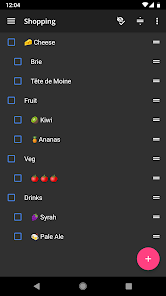
● Tasks (manage Google Tasks or tasks from CalDAV/OpenTasks)
● No ads (removes the occasional ad)
♥ Tapir Apps donates 10% of all revenue to rainforest conservation through our friends at World Land Trust
FEATURES
● intuitive navigation with smooth transitions
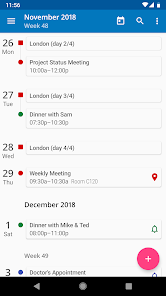
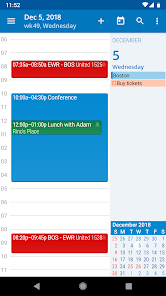
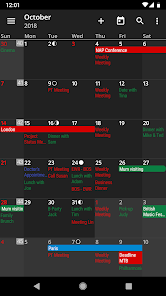
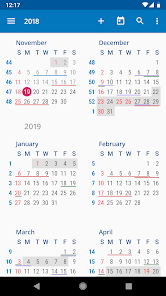
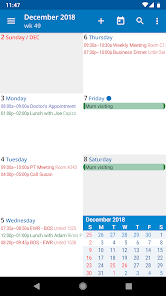
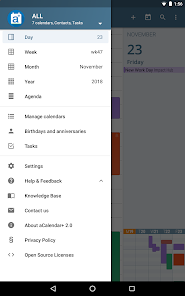
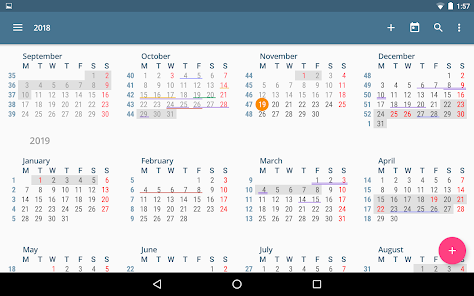
● day, week, month and year view
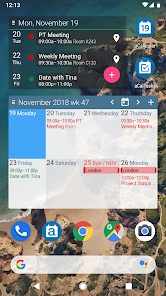
● Fullscreen widgets
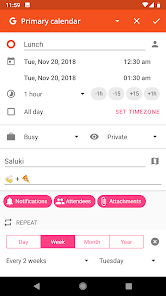
● flexible recurrences like every 3 weeks, every 17 days, or every Mon, Wed and Fri
● over 100 colors to choose from as calendar color
● per-event colors (even if not supported by the event's calendar)
● custom event font size
● birthdays & anniversaries with photos from your addressbook and editing
● uses Android's native calendar backend and synchronization
USAGE
● move forward and backward in the calendar by swiping vertically
● switch between calendar views with a horizontal swipe (opens the day or week you start the swipe gesture on) or double-tap for day view
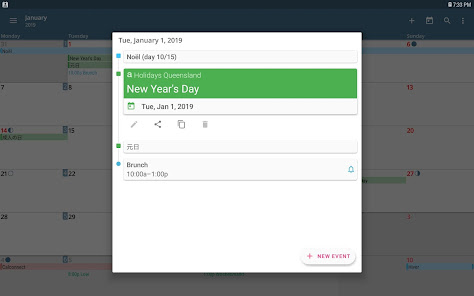
● tap to open a calendar event
● long-press to add new calendar event
● long-press on mini-month to go to today or jump to date
● configurable actions on 3-finger-tap, tap on title, volume buttons
● long press an event in day view to drag to a different time
PERMISSIONS
aCalendar only requests permissions needed for app functionality. aCalendar+ respects your privacy and will NEVER send any of your private data anywhere unless configured by YOU. Please contact us if you have questions about permissions.
TRANSLATIONS
aCalendar+ is translated into more than 30 languages, mostly by volunteers - please let us know if there is a bad translation somewhere or you want to add your language.
LOVE
♥ If you like aCalendar+, please show your support by leaving a good rating and recommending it to your friends ♥
We improved everything but kept it familiar.
For questions or problems see our new help system at https://acalendar.tapirapps.de or contact our support at support@tapirapps.de
aCalendar+ is the premium version of aCalendar - with all features unlocked and no ads.
aCalendar+ gives you many additional calendar features and your purchase supports further development and helps protecting the endangered Mountain Tapir.
EXTRA FEATURES (aCalendar+ or as In-App-Purchase)
● Public holidays (and school holidays for some countries) - configurable in the calendar list
● More colors (theme/UI colors, background colors, calendar colors, event colors)
● Business features (Invite attendees, link contacts, free/busy, private, profiles, share as ICS)
● Tasks (manage Google Tasks or tasks from CalDAV/OpenTasks)
● No ads (removes the occasional ad)
♥ Tapir Apps donates 10% of all revenue to rainforest conservation through our friends at World Land Trust
FEATURES
● intuitive navigation with smooth transitions
● day, week, month and year view
● Fullscreen widgets
● flexible recurrences like every 3 weeks, every 17 days, or every Mon, Wed and Fri
● over 100 colors to choose from as calendar color
● per-event colors (even if not supported by the event's calendar)
● custom event font size
● birthdays & anniversaries with photos from your addressbook and editing
● uses Android's native calendar backend and synchronization
USAGE
● move forward and backward in the calendar by swiping vertically
● switch between calendar views with a horizontal swipe (opens the day or week you start the swipe gesture on) or double-tap for day view
● tap to open a calendar event
● long-press to add new calendar event
● long-press on mini-month to go to today or jump to date
● configurable actions on 3-finger-tap, tap on title, volume buttons
● long press an event in day view to drag to a different time
PERMISSIONS
aCalendar only requests permissions needed for app functionality. aCalendar+ respects your privacy and will NEVER send any of your private data anywhere unless configured by YOU. Please contact us if you have questions about permissions.
TRANSLATIONS
aCalendar+ is translated into more than 30 languages, mostly by volunteers - please let us know if there is a bad translation somewhere or you want to add your language.
LOVE
♥ If you like aCalendar+, please show your support by leaving a good rating and recommending it to your friends ♥
Updated on
Safety starts with understanding how developers collect and share your data. Data privacy and security practices may vary based on your use, region, and age. The developer provided this information and may update it over time.

No data shared with third parties
Learn more about how developers declare sharing

This app may collect these data types
Files and docs and Calendar

Data is encrypted in transit

Data can’t be deleted
Ratings and reviews
4.6
34.6K reviews

T O
- Flag inappropriate
- Show review history
April 16, 2024
Needs Android Auto support!!! Needs Samsung watch support!!! Doesn't sync Google tasks anymore, no integration with other apps such as Microsoft Todo. A calendar+ could add themes! Needs contacts, maps, notes, integration!! Great calendar!!! I've switched to Samsung temp because Samsung apps and widgets look best. Functionally isn't the same though with Samsung. Samsung is simple.
7 people found this review helpful

A Google user
- Flag inappropriate
- Show review history
December 11, 2018
Update on earlier review: I still think it's the best calendar app that I have run across. I reduced it by one star because of the changes in the task UI of version 2. That is more cumbersome now, I really like being able to swipe back and forth to go from task list to task list. Every other tasks app did the other approach that's what made aCalendar+ better in my opinion. I tried to others tasks apps but they were all harder to use and lack the capabilities of aCalendar+. I felt This app had some real creativity in the design and it seemed ver. 2 was an attempt to try to conform to some "standard". I like the originality that was shown in version 1 better. I agree with other users In their comments about the task you I. In my earlier review I said: "Best calendar app that I have seen in all my years of working with cell phone calendaring applications and those preceding cell phones like earlier electronic handheld devices."
10 people found this review helpful

Trisha G
- Flag inappropriate
April 29, 2023
I have been using this app for years and years and absolutely love it. I got the paid version mainly to support the developer. I especially love the weekly view...originally because it simulated the style of physical day planner I used to buy. I also use multiple calendars (mostly google) and like to see the entries color coded in a single view. Sometimes I intentionally set up separate calendars just to see things color coded (ex. Gym class schedule on a separate calendar).
15 people found this review helpful
What's new
Welcome to aCalendar+ 2.8!
If you have any questions or problems, please go to MENU - HELP (or visit https://acalendar.tapirapps.de)!
As indie app studio we rely on good ratings, especially as all our upgrades are one-time purchases.
Full changelog: https://acalendar.tapirapps.de/en/support/solutions/articles/36000469282
If you have any questions or problems, please go to MENU - HELP (or visit https://acalendar.tapirapps.de)!
As indie app studio we rely on good ratings, especially as all our upgrades are one-time purchases.
Full changelog: https://acalendar.tapirapps.de/en/support/solutions/articles/36000469282


