
Color Splash Effect Photo Edit
Contains ads

4.3star
2.86K reviews
100K+
Downloads

Everyone
info




About this app
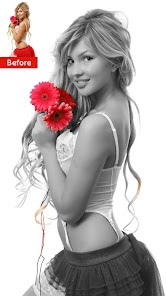
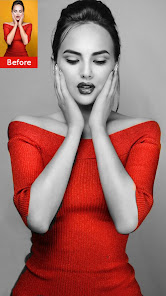
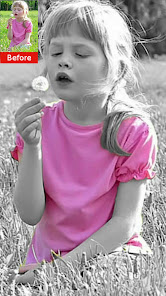
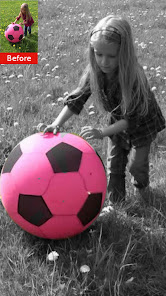
Color Splash effect photo editor is a great app to use when bringing out a specific part to focus on. Color Splash effect photo editor lets you selectively color your photo that is already turned into black and white (B&W) image.
Color Splash Effect Converts your photo into gorgeous black and white (B&W) image and makes your photos more artistic and vibrant. As a result your simple art of pics turn into stunning pieces of pics art.
The Color Splash technique allows you to create unique dramatic photos with selective colors. This effect draws the viewers' attention to the colored areas, creating striking images. Color splash effect is fun to use.
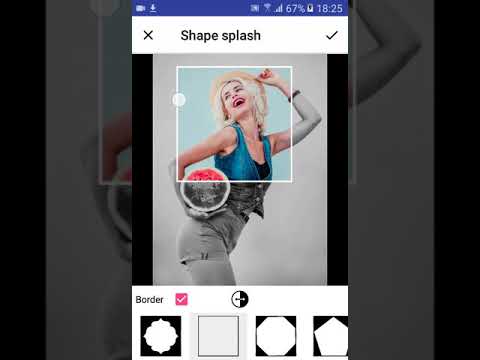
It has unique shape splash feature. Using shape splash feature highlight color with desired shape and get stunning color pop effect.
Color Splash effect is very popular among all ages people who love to retouch photo. Color Splash effect is frequently used by photographers and photo lovers.
Keeping all this things in mind we have created very user friendly and easy to use color splash effect photo editor.
Features:
- Select image from gallery or capture image with camera
- Initially image is converted to black and white (B&W) image
- Zoom image with two finger
- Undo functionality
- Change brush size
- Share photo to instagram,facebook, messenger and many other sharing platform
- Share your created photo on social media or use the app as storage.
Collage maker
The best photo editor to create amazing collages. Blend your photos with photo collage maker with just one tap. The picture editor will help you edit photos and selfies like a pro. Choose a beautiful photo from your photo lab. Add text with different fonts to make your photos more interesting. Try stylish collage layouts then share your work on Instagram, Facebook, Whatsapp.
With selfie filters and image effects, you will have dozens of beautiful photos to share. Instantly mount all your selfies with the photo collage editor. Just choose your favorite photos and let the photo collage maker do its magic. Blur the background or replace it with an amazing background image :).
Freestyle and Mirroring
Freestyle offers an amazing collage maker experience to make greeting cards completely free. Use the mirror feature to form a wonderful reflection of your photos. The images you choose are displayed in one image square, after which you can easily move and resize the images.
Photo filters and effects
Image filters make collage making even more fun. Apply filters and effects to images to create wonderful neon effect.
Photo collage editor is an amazing picture editor and collage maker app for your photo. Offers many templates, photo collages for your beautiful photo. Photo collage maker contains all the photo editing apps you need, including professional filters and background changer. Edit photos like a pro and share your work on Instagram, Facebook, Whatsapp.
Enjoy color splash effect photo editor and give your photo a glamorous look.
Feedback
- If you like our application please rate 5 stars for us
- If you find any problems with Color Splash Effect Photo Edit please E-mail us
Thanks for using Color Splash Effect Photo Edit.
Color Splash Effect Converts your photo into gorgeous black and white (B&W) image and makes your photos more artistic and vibrant. As a result your simple art of pics turn into stunning pieces of pics art.
The Color Splash technique allows you to create unique dramatic photos with selective colors. This effect draws the viewers' attention to the colored areas, creating striking images. Color splash effect is fun to use.
It has unique shape splash feature. Using shape splash feature highlight color with desired shape and get stunning color pop effect.
Color Splash effect is very popular among all ages people who love to retouch photo. Color Splash effect is frequently used by photographers and photo lovers.
Keeping all this things in mind we have created very user friendly and easy to use color splash effect photo editor.
Features:
- Select image from gallery or capture image with camera
- Initially image is converted to black and white (B&W) image
- Zoom image with two finger
- Undo functionality
- Change brush size
- Share photo to instagram,facebook, messenger and many other sharing platform
- Share your created photo on social media or use the app as storage.
Collage maker
The best photo editor to create amazing collages. Blend your photos with photo collage maker with just one tap. The picture editor will help you edit photos and selfies like a pro. Choose a beautiful photo from your photo lab. Add text with different fonts to make your photos more interesting. Try stylish collage layouts then share your work on Instagram, Facebook, Whatsapp.
With selfie filters and image effects, you will have dozens of beautiful photos to share. Instantly mount all your selfies with the photo collage editor. Just choose your favorite photos and let the photo collage maker do its magic. Blur the background or replace it with an amazing background image :).
Freestyle and Mirroring
Freestyle offers an amazing collage maker experience to make greeting cards completely free. Use the mirror feature to form a wonderful reflection of your photos. The images you choose are displayed in one image square, after which you can easily move and resize the images.
Photo filters and effects
Image filters make collage making even more fun. Apply filters and effects to images to create wonderful neon effect.
Photo collage editor is an amazing picture editor and collage maker app for your photo. Offers many templates, photo collages for your beautiful photo. Photo collage maker contains all the photo editing apps you need, including professional filters and background changer. Edit photos like a pro and share your work on Instagram, Facebook, Whatsapp.
Enjoy color splash effect photo editor and give your photo a glamorous look.
Feedback
- If you like our application please rate 5 stars for us
- If you find any problems with Color Splash Effect Photo Edit please E-mail us
Thanks for using Color Splash Effect Photo Edit.
Updated on
Safety starts with understanding how developers collect and share your data. Data privacy and security practices may vary based on your use, region, and age. The developer provided this information and may update it over time.

No data shared with third parties
Learn more about how developers declare sharing

No data collected
Learn more about how developers declare collection

Data is encrypted in transit

Data can’t be deleted
Ratings and reviews
4.2
2.77K reviews

Michael Wesson
- Flag inappropriate
September 16, 2025
I left a neutral review and I think it was worded in correctly I believe what these apps have is excellent the only issue I had is that the apps are very limited there color splash and b& w splash is exactly what you will find nothing more limited to only the two affects but what they have is wonderful if that what your looking for thank you . me

Barbra Bannon
- Flag inappropriate
November 8, 2025
quick and simple and gives me the exact features I want. best if all- free! love it!

A Google user
- Flag inappropriate
January 1, 2020
This App has really worked out for me, I did a ton of searching for color pop/splash apps and all of them either degraded the quality, or added a watermark to my creation, ruining the photo. But this one everything worked smooth, and easy. (The only thing I would add is it would be nice if they added color editing)
24 people found this review helpful
LeapZip
January 3, 2020
Thank you for downloading our app! We will keep working on it!
What’s new
Improvements
App support
About the developer
Artur Kokhlikyan
artur.kokhlikyan@gmail.com
Khorhurdneri 31
Dilijan 3901
Armenia
undefined


