
BedrockTogether (Pro)
4.7star
537 reviews
5K+
Downloads

Everyone
info
About this app
Ad-free version of BedrockTogether.
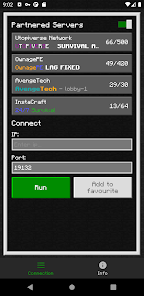
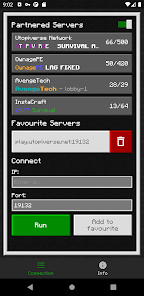
App allows any Bedrock Edition server to show up as a LAN server on Xbox or PlayStation clients running Minecraft Bedrock Edition and permits a simple connection without the use of DNS rerouting.
Realms and compatibility with Nintendo Switch are currently not supported while using Bedrock Together.
How to connect:
1. Enter your desired server IP and port.
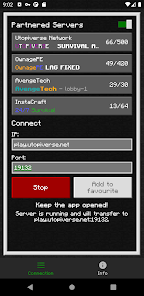
2. Click the “Run” button.
3. Open game and navigate to the “Friends” tab.
4. Connect to the server using the LAN tab.
5. Close the BedrockTogether app after the client has joined the server.
Troubleshooting:
Make sure that
1. Your gaming console and mobile device are connected to the same LAN network.
If you find any bugs, join the discord to report them in the #bugs channel:
https://discord.gg/3NxZEt8 or telegram: t.me/extollite
The application icon made by nataliagemel.pl
Disclaimer: BedrockTogether is a third-party application. BedrockTogether is not an endorsed extension of or affiliated with Minecraft, its creators or proprietors, Mojang AB, Microsoft, Xbox, or Xbox Live in any way.
App allows any Bedrock Edition server to show up as a LAN server on Xbox or PlayStation clients running Minecraft Bedrock Edition and permits a simple connection without the use of DNS rerouting.
Realms and compatibility with Nintendo Switch are currently not supported while using Bedrock Together.
How to connect:
1. Enter your desired server IP and port.
2. Click the “Run” button.
3. Open game and navigate to the “Friends” tab.
4. Connect to the server using the LAN tab.
5. Close the BedrockTogether app after the client has joined the server.
Troubleshooting:
Make sure that
1. Your gaming console and mobile device are connected to the same LAN network.
If you find any bugs, join the discord to report them in the #bugs channel:
https://discord.gg/3NxZEt8 or telegram: t.me/extollite
The application icon made by nataliagemel.pl
Disclaimer: BedrockTogether is a third-party application. BedrockTogether is not an endorsed extension of or affiliated with Minecraft, its creators or proprietors, Mojang AB, Microsoft, Xbox, or Xbox Live in any way.
Updated on
Safety starts with understanding how developers collect and share your data. Data privacy and security practices may vary based on your use, region, and age. The developer provided this information and may update it over time.

No data shared with third parties
Learn more about how developers declare sharing

This app may collect these data types
App activity and Device or other IDs

Data is encrypted in transit

Data can’t be deleted
Ratings and reviews
4.8
513 reviews

Stephen Pack
- Flag inappropriate
December 29, 2025
It shouldn't be necessary, and I don't really understand how it works, but it works well and I want to support the creators.
1 person found this review helpful
BedrockTogether
December 29, 2025
Thanks! Hope you will enjoy ad-free experience!

colx72
- Flag inappropriate
- Show review history
August 8, 2024
Used to let me in all the time, but now it'll show up maybe once in a blue moon. I use this for pokefind and for whatever reason it'll only connect to my system every once in a few days. I don't understand. I've deleted and reinstalled both applications and the main game itself. I've made sure the connection is on the same wifi and everything. I like the app and I like the content but it's damn near impossible to enjoy any of it if I cant access it.
4 people found this review helpful

Richard Taylor
- Flag inappropriate
- Show review history
December 23, 2023
Works exactly as expected. I'm hosting multiple servers on my Lan and needed a way to connect from Xbox. This has worked flawlessly for allowing connections to specific servers. DNS manipulation technique didn't work for me, THIS DOES. My only gripe is that we can't add Friendly names to servers that have IP addresses.
12 people found this review helpful
What’s new
- Support for 1.26.0
App support
About the developer
Extollite Jędrzej Racibor
mixupl84@gmail.com
Janusza Korczaka, nr 2, lok. 68
16-400 Suwałki
Poland


