
RuDesktop

star
241 reviews

Everyone
info
100K+
Downloads

Everyone
Learn more


About this app
Manage remote desktops where there is Internet access.
The RuDesktop mobile application is designed to organize sessions of secure access to remote desktops from a mobile device.
RuDesktop has successfully passed the "state registration of a computer program" and is included in the register of Russian software under No. 15913.
Functions:
• Providing access to smartphone management.
• Smartphone control of other remote devices: Android, Windows, macOS and Linux (Alt, Astra, Debian, RedOS, Ubuntu).
• Transfer files between devices without intermediaries: from the internal storage of one device to the storage of another.
• Manage Access Level: Only share the screen or grant access to controls and clipboards.
• Controlled access with a temporary password.
• Customizable uncontrolled access with a permanent password.
• The address book.
• List of recent connections.
• Flexible search for address book contacts by ID, device name, username, alias and tags.
• Customizable image quality.
• Support for multiple monitors.
• Disabled automatic recording of incoming sessions.
• Text chat.
Advantages:
• Russian development.
• No ads.
• Stack of modern technologies.
• Secure connection.
• Data encryption with modern protocols and algorithms.
• Flexible licensing and clear pricing.
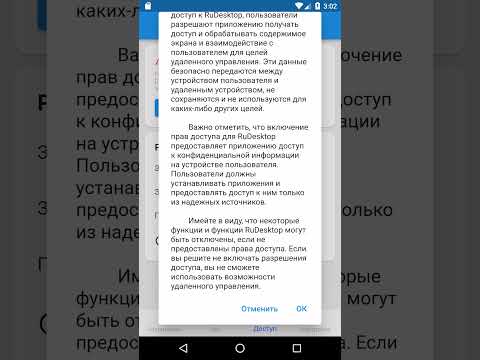
RuDesktop uses the Android Accessibility API to capture screen content and create gestures for remote control.
By granting RuDesktop permissions, users allow the application to access and process screen content and user interaction for remote control purposes. This data is securely transferred between the user's device and the remote device and is not stored or used for any other purpose.
It is important to note that enabling permissions for RuDesktop gives the app access to sensitive information on the user's device. Users should only install apps and share them from trusted sources.
Please be aware that some features and functionality of RuDesktop may be disabled if permissions are not granted. If you choose not to enable access permissions, you will not be able to use the remote management features.
The RuDesktop mobile application is designed to organize sessions of secure access to remote desktops from a mobile device.
RuDesktop has successfully passed the "state registration of a computer program" and is included in the register of Russian software under No. 15913.
Functions:
• Providing access to smartphone management.
• Smartphone control of other remote devices: Android, Windows, macOS and Linux (Alt, Astra, Debian, RedOS, Ubuntu).
• Transfer files between devices without intermediaries: from the internal storage of one device to the storage of another.
• Manage Access Level: Only share the screen or grant access to controls and clipboards.
• Controlled access with a temporary password.
• Customizable uncontrolled access with a permanent password.
• The address book.
• List of recent connections.
• Flexible search for address book contacts by ID, device name, username, alias and tags.
• Customizable image quality.
• Support for multiple monitors.
• Disabled automatic recording of incoming sessions.
• Text chat.
Advantages:
• Russian development.
• No ads.
• Stack of modern technologies.
• Secure connection.
• Data encryption with modern protocols and algorithms.
• Flexible licensing and clear pricing.
RuDesktop uses the Android Accessibility API to capture screen content and create gestures for remote control.
By granting RuDesktop permissions, users allow the application to access and process screen content and user interaction for remote control purposes. This data is securely transferred between the user's device and the remote device and is not stored or used for any other purpose.
It is important to note that enabling permissions for RuDesktop gives the app access to sensitive information on the user's device. Users should only install apps and share them from trusted sources.
Please be aware that some features and functionality of RuDesktop may be disabled if permissions are not granted. If you choose not to enable access permissions, you will not be able to use the remote management features.
Remote access
Updated on
Featured stories

Safety starts with understanding how developers collect and share your data. Data privacy and security practices may vary based on your use, region, and age. The developer provided this information and may update it over time.
- No data shared with third partiesLearn more about how developers declare sharing
- No data collectedLearn more about how developers declare collection


Ratings and reviews
224 reviews

Online Help
- Flag inappropriate
July 22, 2024
Do not connected screen 😭
5 people found this review helpful
RuDesktop
January 23, 2026
Здравствуйте, в случае технических сложностей Вам необходимо написать в техническую поддержку support@rudesktop.ru

Gaming Op
- Flag inappropriate
November 10, 2023
App not working
1 person found this review helpful
RuDesktop
January 23, 2026
Здравствуйте, работает

Pawel Pudelko
- Flag inappropriate
May 19, 2024
What a waste of time
2 people found this review helpful
RuDesktop
January 23, 2026
Здравствуйте, будем рады конструктивной критике
What’s new
Исправление ошибок, добавление нового функционала.
Полный список изменений можно посмотреть на сайте https://rudesktop.ru/static/help/html/changelog.html
Полный список изменений можно посмотреть на сайте https://rudesktop.ru/static/help/html/changelog.html
Everyone
Learn moreApp support
phone
Phone number
+78005006857
About the developer
PEREDOVYE TEKHNOLOGII, OOO
office@rudesktop.ru
d. 20 pom. 1/1 kom. 2 OFIS 11, ul. Bolshaya Gruzinskaya
Moscow
Москва
Russia
123242
+7 916 198-42-10


