
widgetopia: Widgets & Themes
Contains adsIn-app purchases

star
199K reviews

Everyone
info
10M+
Downloads

Everyone
Learn more


About this app
From the team behind WatchMaker, the world’s largest watch face community.
Make your home screen yours with Widgetopia.
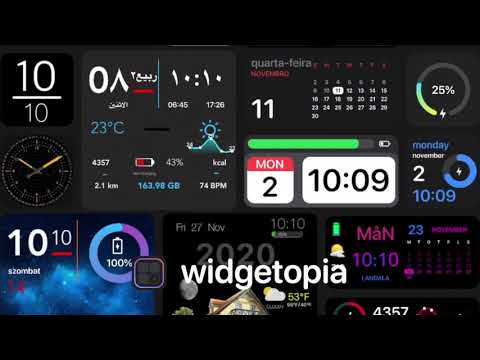
With more than 100,000 widgets to choose from, you can find something that fits your style — whether that’s clean and minimal, colourful and cute, anime, K-pop, photography, or something completely different.
And because Widgetopia is made by a community of designers, there’s always something new to discover.
100,000+ WIDGETS
Browse thousands of widgets created by the Widgetopia community, with new designs added every day.
• Clocks and time
• Weather
• Calendars and agendas
• Photos
• Anime and K-pop
• Cute and aesthetic designs
• Minimal widgets
• Animated widgets
• And much more
WIDGETS THAT MOVE
Why should widgets be static?
Add GIF and video widgets that actually play on your home screen.
DISCOVER SOMETHING NEW
Finding great widgets is easy.
• Daily Staff Picks from the Widgetopia team
• See what’s trending in the Top 100
• Search by style, colour and feature
• Like widgets you love
• Follow your favourite designers
MAKE YOUR OWN
Can’t find exactly what you want? Make it.
Build a widget from scratch or take an existing widget and make it your own.
Create clocks, weather widgets, calendars, photo widgets, countdowns, charts and more. Add your own photos, GIFs and videos, customise the colours and transparency, and add actions that open apps or links.
For advanced users, Widgetopia also supports JavaScript expressions and JSON data.
When you’re happy with your creation, publish it for the community or share it with friends.
THEMES
Give your home screen a whole new look.
Choose from 80+ themes that recolour your widgets in one tap.
WIDGETOPIA+
Widgetopia is free to download and use, with ads.
Free users can also unlock Widgetopia+ widgets by watching a short video.
Widgetopia+ gives you access to every widget and theme and removes ads. Choose a monthly or yearly subscription through Google Play and cancel anytime.
If you purchased the one-off upgrade in an earlier version of Widgetopia, you keep Widgetopia+.
PERMISSIONS
Widgetopia only asks for permissions when a widget you choose needs them.
• Location — for local weather
• Calendar — to show your events
• Physical activity — to show your step count
• Notifications — for new widget and app updates (optional)
Privacy Policy: https://widgetopia.io/privacy
Terms of Use: https://widgetopia.io/terms
Make your home screen yours with Widgetopia.
With more than 100,000 widgets to choose from, you can find something that fits your style — whether that’s clean and minimal, colourful and cute, anime, K-pop, photography, or something completely different.
And because Widgetopia is made by a community of designers, there’s always something new to discover.
100,000+ WIDGETS
Browse thousands of widgets created by the Widgetopia community, with new designs added every day.
• Clocks and time
• Weather
• Calendars and agendas
• Photos
• Anime and K-pop
• Cute and aesthetic designs
• Minimal widgets
• Animated widgets
• And much more
WIDGETS THAT MOVE
Why should widgets be static?
Add GIF and video widgets that actually play on your home screen.
DISCOVER SOMETHING NEW
Finding great widgets is easy.
• Daily Staff Picks from the Widgetopia team
• See what’s trending in the Top 100
• Search by style, colour and feature
• Like widgets you love
• Follow your favourite designers
MAKE YOUR OWN
Can’t find exactly what you want? Make it.
Build a widget from scratch or take an existing widget and make it your own.
Create clocks, weather widgets, calendars, photo widgets, countdowns, charts and more. Add your own photos, GIFs and videos, customise the colours and transparency, and add actions that open apps or links.
For advanced users, Widgetopia also supports JavaScript expressions and JSON data.
When you’re happy with your creation, publish it for the community or share it with friends.
THEMES
Give your home screen a whole new look.
Choose from 80+ themes that recolour your widgets in one tap.
WIDGETOPIA+
Widgetopia is free to download and use, with ads.
Free users can also unlock Widgetopia+ widgets by watching a short video.
Widgetopia+ gives you access to every widget and theme and removes ads. Choose a monthly or yearly subscription through Google Play and cancel anytime.
If you purchased the one-off upgrade in an earlier version of Widgetopia, you keep Widgetopia+.
PERMISSIONS
Widgetopia only asks for permissions when a widget you choose needs them.
• Location — for local weather
• Calendar — to show your events
• Physical activity — to show your step count
• Notifications — for new widget and app updates (optional)
Privacy Policy: https://widgetopia.io/privacy
Terms of Use: https://widgetopia.io/terms
Add Color Widgets easily. Customize your home screen with widgets iOS 27 style.
Updated on
Safety starts with understanding how developers collect and share your data. Data privacy and security practices may vary based on your use, region, and age. The developer provided this information and may update it over time.


Ratings and reviews
190K reviews

Anthony Zed
- Flag inappropriate
February 5, 2024
This app might be amazing. I wouldn't know because every time I opened it to see if it had the functions I was looking for (and would be more than happy to pay premium for) it would badger me to pay $17 until I closed it. Enable the option for a little "try before you buy" if all features. If the free version is just going to be "GIVE ME MONEY!!!“ every time I click a button, then you just lost a potential customer.
226 people found this review helpful

Farah Kantar
- Flag inappropriate
- Show review history
November 12, 2021
A few issues, sometimes the widgets never load so I could put a photo onto them. They just say 'loading...' on my homescreen. Other than that, this app is amazing! Infinite customization, and no ads whatsoever. It was a huge help in making my homescreen look great. Overall, I definitely recommend this! (Okay, so after I posted this review I had to lower it down to three stars. After you shut down your phone and turn it back on, the widgets don't load. Even if you try to make new ones.)
258 people found this review helpful
androidslide
December 6, 2021
Thank you for downloading our app. We'd love to help you with this issue. Widgetopia is the largest widget app in the world now with over 18000 widgets included in the app.

Darskoma
- Flag inappropriate
December 11, 2023
It's nice app, sure, but I hate how the widget size is bigger than the widget itself. I would switch to a different app, because it can take up to half of my wallpaper with only two widgets, but I love the search bar (unlike other ones which don't have it at all) and the fact that there's many widgets for my interests. All I'm asking for is the widget sizes to shrinken a bit, please. <3
137 people found this review helpful
What’s new
**Widgetopia 3.0 – completely rebuilt!**
• Brand-new design, faster and smoother
• Powerful new editor with more layers
• 100,000+ community widgets with smarter search
• Follow your favourite designers
• Wallpapers and icon themes
• Smooth video & GIF widgets
• Existing widgets and purchases carry over automatically
Thanks for using Widgetopia! 💚
• Brand-new design, faster and smoother
• Powerful new editor with more layers
• 100,000+ community widgets with smarter search
• Follow your favourite designers
• Wallpapers and icon themes
• Smooth video & GIF widgets
• Existing widgets and purchases carry over automatically
Thanks for using Widgetopia! 💚
Everyone
Learn moreApp support
About the developer
WATCH FACES & WIDGETS LIMITED
admin.androidslide@gmail.com
68 GRAFTON WAY
LONDON
W1T 5DS
United Kingdom
+44 7544 003016


