Notesnook Secure Private Notes
In-app purchases
4.2star
5.39K reviews
100K+
Downloads

Everyone
info
About this app
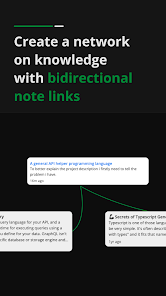
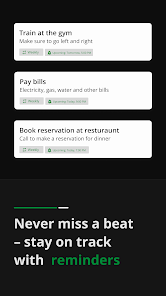
✍🏼 Notesnook is a life-changing private note taking app. With privacy at it's core, all your memos are secure and end-to-end encrypted by default. Write and keep notes & save ideas with freedom. Make text, photo & color notes easily. Stay organized and never miss a beat with our reminder feature!
Unlike other privacy-focused productivity apps, our online notebook app has excellent features while being 100% private. Make daily notes, outlines, set a reminder, and organize them by your preference!
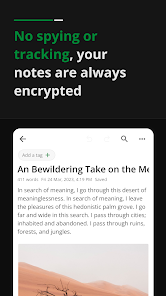
⭐SECURE NOTES - NO SPYING OR TRACKING⭐
Great, secure, and simple note taking experience. Be focused and productive by boosting your workflow. Keep tasks, ideas & lists in one place.
✔️ Zero trackers or ads
✔️ 100% cross-platform notes app
✔️ Encryption & privacy-friendly
⭐TAKE NOTES ON ANY DEVICE⭐
Access your memos from anywhere. Keep your notes app on any device. Make daily notes, outlines & task lists. Your private digital notepad makes your workflow productive & organized.
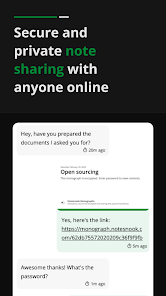
⭐MONOGRAPHS - ENCRYPTED NOTE SHARING⭐
Sharing notes is easier than ever with our app. You can lock important notes with a password before sharing them as a public link with anyone.
⭐TO DO LISTS & TASKS⭐
Manage your day-to-day tasks and stay organized. Use our app to make to do lists, grocery & shopping lists, outlines, and record memos. Share lists with your friends, family, or colleagues. Make lists for any purpose.
✔️ Shopping list
✔️ Grocery list
✔️ Task management
✔️ Taking notes
✔️ Make lists for ideas & tasks
⭐RICH NOTE TAKING EXPERIENCE⭐
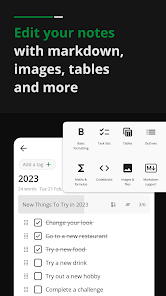
Write notes with full control. Keep notes simple or add photos, tables, embeds, lists, and even embeds & files. Take memos with math & chemistry formulas. Personalize your note taking by configuring the toolbar.
✔️ Photos, embeds & videos
✔️ Make memos with file attachments
✔️ Tables, task lists & outline lists
✔️ Full Math and Chemistry Formula support.
✔️ Full markdown editor - Most markdown shortcuts are supported
✔️ Code blocks with support for all programming languages
✔️ Written Notes history
✔️ Powerful search
⭐NOTEBOOK WITH OFFLINE SUPPORT⭐
Write notes offline. Jot down your ideas anytime even without the internet. Sync your written notes when you open the notebook online instantly.
⭐ORGANIZER & PLANNER⭐
Create multiple notebooks in our notepad app. Organize & make notes and task lists in topics. Create shortcuts to access them quickly.
⭐COLOR NOTES - ADD TAGS⭐
Make your Notesnook colorful. Color notes and add tags to quickly find similar or related ideas in one place. They also appear in the side menu so they are easy to access.
⭐LOCK NOTES - PROTECT PRIVACY⭐
Lock your online notepad with a privacy lock. No one can open the app even if your phone is left unlocked. We are protecting your privacy. You can also lock notes with a password.
⭐SIMPLE PRIVATE NOTES⭐
A good notes app is one that doesn't spy on you. It's as simple as, "No one should be able to read my memos, even the possibility that someone can open my online notebook is scary".
⭐OPEN SOURCE APP⭐
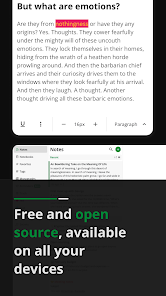
Any privacy-respecting service should be open source. Our app is no different. We are soon going fully open-source and are working on open-sourcing all our app clients.
⭐EXPORT NOTES ANYTIME⭐
Export your memos & data from our online notebook as PDF, HTML, markdown or plain text. We have a zero lock-in policy. You can take your data anywhere, anytime.
⭐PRIVACY⭐
Choose privacy today for your memos and never look back. We are here for you. The online notepad that protects you and your data.
Organize your thoughts, capture moments, and stay on top of your tasks with ease. Embark on a journey of productivity & creativity!
➡️➡️➡️ Download our simple note-taking app and start making all kinds of memos - Text, photo & color notes! Make them safe and secure - Unlock the full potential with our digital notepad app! Write & keep notes - Fast & easy!
Unlike other privacy-focused productivity apps, our online notebook app has excellent features while being 100% private. Make daily notes, outlines, set a reminder, and organize them by your preference!
⭐SECURE NOTES - NO SPYING OR TRACKING⭐
Great, secure, and simple note taking experience. Be focused and productive by boosting your workflow. Keep tasks, ideas & lists in one place.
✔️ Zero trackers or ads
✔️ 100% cross-platform notes app
✔️ Encryption & privacy-friendly
⭐TAKE NOTES ON ANY DEVICE⭐
Access your memos from anywhere. Keep your notes app on any device. Make daily notes, outlines & task lists. Your private digital notepad makes your workflow productive & organized.
⭐MONOGRAPHS - ENCRYPTED NOTE SHARING⭐
Sharing notes is easier than ever with our app. You can lock important notes with a password before sharing them as a public link with anyone.
⭐TO DO LISTS & TASKS⭐
Manage your day-to-day tasks and stay organized. Use our app to make to do lists, grocery & shopping lists, outlines, and record memos. Share lists with your friends, family, or colleagues. Make lists for any purpose.
✔️ Shopping list
✔️ Grocery list
✔️ Task management
✔️ Taking notes
✔️ Make lists for ideas & tasks
⭐RICH NOTE TAKING EXPERIENCE⭐
Write notes with full control. Keep notes simple or add photos, tables, embeds, lists, and even embeds & files. Take memos with math & chemistry formulas. Personalize your note taking by configuring the toolbar.
✔️ Photos, embeds & videos
✔️ Make memos with file attachments
✔️ Tables, task lists & outline lists
✔️ Full Math and Chemistry Formula support.
✔️ Full markdown editor - Most markdown shortcuts are supported
✔️ Code blocks with support for all programming languages
✔️ Written Notes history
✔️ Powerful search
⭐NOTEBOOK WITH OFFLINE SUPPORT⭐
Write notes offline. Jot down your ideas anytime even without the internet. Sync your written notes when you open the notebook online instantly.
⭐ORGANIZER & PLANNER⭐
Create multiple notebooks in our notepad app. Organize & make notes and task lists in topics. Create shortcuts to access them quickly.
⭐COLOR NOTES - ADD TAGS⭐
Make your Notesnook colorful. Color notes and add tags to quickly find similar or related ideas in one place. They also appear in the side menu so they are easy to access.
⭐LOCK NOTES - PROTECT PRIVACY⭐
Lock your online notepad with a privacy lock. No one can open the app even if your phone is left unlocked. We are protecting your privacy. You can also lock notes with a password.
⭐SIMPLE PRIVATE NOTES⭐
A good notes app is one that doesn't spy on you. It's as simple as, "No one should be able to read my memos, even the possibility that someone can open my online notebook is scary".
⭐OPEN SOURCE APP⭐
Any privacy-respecting service should be open source. Our app is no different. We are soon going fully open-source and are working on open-sourcing all our app clients.
⭐EXPORT NOTES ANYTIME⭐
Export your memos & data from our online notebook as PDF, HTML, markdown or plain text. We have a zero lock-in policy. You can take your data anywhere, anytime.
⭐PRIVACY⭐
Choose privacy today for your memos and never look back. We are here for you. The online notepad that protects you and your data.
Organize your thoughts, capture moments, and stay on top of your tasks with ease. Embark on a journey of productivity & creativity!
➡️➡️➡️ Download our simple note-taking app and start making all kinds of memos - Text, photo & color notes! Make them safe and secure - Unlock the full potential with our digital notepad app! Write & keep notes - Fast & easy!
Updated on
Safety starts with understanding how developers collect and share your data. Data privacy and security practices may vary based on your use, region and age. The developer provided this information and may update it over time.

No data shared with third parties
Learn more about how developers declare sharing

This app may collect these data types
Personal info and App activity

Data is encrypted in transit

You can request that data be deleted
Ratings and reviews
4.2
5.17K reviews

Amy Meyer
- Flag inappropriate
26 December 2024
I'm trying the free version on an android. It crashes when I try to set a reminder. It doesn't tell you a function is premium until you try it. Since I don't remember the limits that's frustrating. They need to be indicated some way. One I didn't realize right away from the documentation was no photos. One thing I miss about Google Keep is being able to see the content without opening the note.
26 people found this review helpful

Craig Rockey
- Flag inappropriate
25 October 2025
I use this every day for my business notes, research, and journaling. End to end encryption is why I tried it in the first place. I'll keep using it as long as it has the priority goal of privacy. I use the headers, check boxes, numbered and bullited lists, callouts, web links, internal links, and picture import. It has good file organization and search. It has good export options.
16 people found this review helpful

Jeff Rowley
- Flag inappropriate
28 October 2025
VERY good notes app. Notesnook has a better feature set than anything else out there for basic note taking and synching across devices. Better than OneNote by miles. Feature set is strong, but missing some basic editing & features I would like (indenting, locking/unlocking an entire Notebook with one PW/Biometric). I would pay to get additional features (AppLock, Images) but the subscription price for those is way too high (almost $6/mo.) I would love to see a one time purchase, or $1/month.
7 people found this review helpful
What's new
- Bug fixes and minor improvements
Thank you for using Notesnook!
Thank you for using Notesnook!
App support
About the developer
STREETWRITERS (PRIVATE) LIMITED
support@streetwriters.co
1st Floor, Valley Plaza, Mardowal Chowk, Tehsil Naushera
Khushab, 41100
Pakistan
+92 318 0046323


