

QuickEdit Text Editor Pro

4.4star
4.09K reviews

Everyone
info
100K+
Downloads
Free with a Play Pass subscription Learn more

Everyone
Learn more




About this app
QuickEdit text editor is a fast, stable and full featured text editor. It has been optimized for using on both phones and tablets.
QuickEdit text editor can be used as standard text editor for plain text files, or as a code editor for programming files. It is suitable for both general and professional use.
QuickEdit text editor includes a number of performance optimizations and user experience tweaks. The speed and responsiveness of the app are much better than other text editor apps commonly found on Google Play.
Features:
✓ Enhanced notepad application with numerous improvements.
✓ Code editor and syntax highlight for 170+ languages (C++, C#, Java, XML, Javascript, Markdown, PHP, Perl, Python, Ruby, Smali, Swift, etc).
✓ Include online compiler, can compile and run over 30 common languages (Python, PHP, Java, JS/NodeJS, C/C++, Rust, Pascal, Haskell, Ruby, etc).
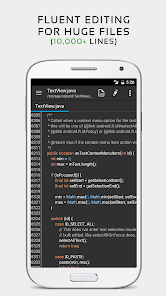
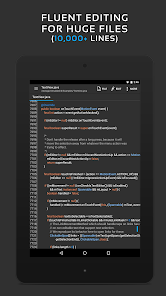
✓ High performance with no lag, even on large text files (more than 10,000 lines).
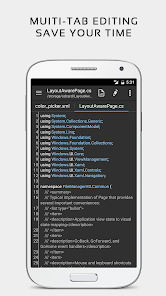
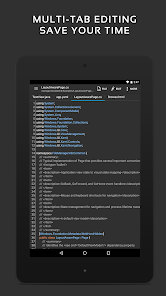
✓ Easily navigate between multiple open tabs.
✓ Show or hide line numbers.
✓ Undo and redo changes without limit.
✓ Display, increase, or decrease line indentations.
✓ Fast selecting and editing abilities.
✓ Physical keyboard support, including key combinations.
✓ Smooth scrolling both vertically and horizontally.
✓ Directly target any specified line number.
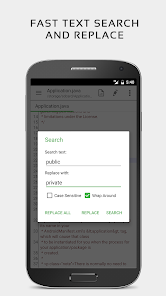
✓ Quickly search and replace content.
✓ Easily input hex color values.
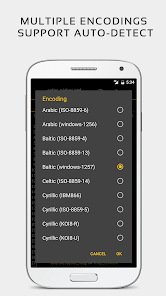
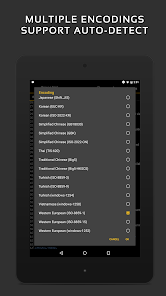
✓ Automatically detect charset and encoding.
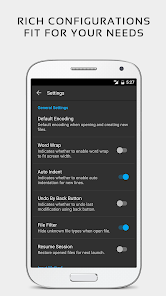
✓ Automatically indent new lines.
✓ Various fonts and sizes.
✓ Preview HTML, CSS, AsciiDoc and markdown files.
✓ Open files from recently opened or added file collections.
✓ Ability to edit system files on rooted devices.
✓ Access files from FTP, Google Drive, Dropbox, and OneDrive.
✓ Handy tool to edit INI, LOG, TXT files and hack games.
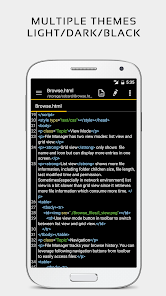
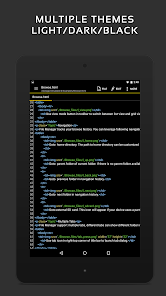
✓ Supports both light and dark themes.
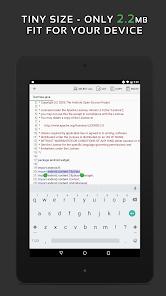
✓ Optimized usage for phones and tablets.
✓ Ad-free version.
If you can help to translate this application to your native language, please contact our email: support@rhmsoft.com.
If you run into any issues or have any suggestions, please feel free to contact us: support@rhmsoft.com
You can also share your comments with the QuickEdit thread on xda-developers:
http://forum.xda-developers.com/android/apps-games/app-quickedit-text-editor-t2899385
Thanks for using QuickEdit!
QuickEdit text editor can be used as standard text editor for plain text files, or as a code editor for programming files. It is suitable for both general and professional use.
QuickEdit text editor includes a number of performance optimizations and user experience tweaks. The speed and responsiveness of the app are much better than other text editor apps commonly found on Google Play.
Features:
✓ Enhanced notepad application with numerous improvements.
✓ Code editor and syntax highlight for 170+ languages (C++, C#, Java, XML, Javascript, Markdown, PHP, Perl, Python, Ruby, Smali, Swift, etc).
✓ Include online compiler, can compile and run over 30 common languages (Python, PHP, Java, JS/NodeJS, C/C++, Rust, Pascal, Haskell, Ruby, etc).
✓ High performance with no lag, even on large text files (more than 10,000 lines).
✓ Easily navigate between multiple open tabs.
✓ Show or hide line numbers.
✓ Undo and redo changes without limit.
✓ Display, increase, or decrease line indentations.
✓ Fast selecting and editing abilities.
✓ Physical keyboard support, including key combinations.
✓ Smooth scrolling both vertically and horizontally.
✓ Directly target any specified line number.
✓ Quickly search and replace content.
✓ Easily input hex color values.
✓ Automatically detect charset and encoding.
✓ Automatically indent new lines.
✓ Various fonts and sizes.
✓ Preview HTML, CSS, AsciiDoc and markdown files.
✓ Open files from recently opened or added file collections.
✓ Ability to edit system files on rooted devices.
✓ Access files from FTP, Google Drive, Dropbox, and OneDrive.
✓ Handy tool to edit INI, LOG, TXT files and hack games.
✓ Supports both light and dark themes.
✓ Optimized usage for phones and tablets.
✓ Ad-free version.
If you can help to translate this application to your native language, please contact our email: support@rhmsoft.com.
If you run into any issues or have any suggestions, please feel free to contact us: support@rhmsoft.com
You can also share your comments with the QuickEdit thread on xda-developers:
http://forum.xda-developers.com/android/apps-games/app-quickedit-text-editor-t2899385
Thanks for using QuickEdit!
Updated on
Safety starts with understanding how developers collect and share your data. Data privacy and security practices may vary based on your use, region, and age. The developer provided this information and may update it over time.

No data shared with third parties
Learn more about how developers declare sharing

No data collected
Learn more about how developers declare collection

Data is encrypted in transit

Data can’t be deleted
Ratings and reviews
4.3
3.5K reviews

Peter C. Frank (NiteStar)
- Flag inappropriate
September 2, 2025
Does exactly what it sets out to do: provides a simple, fast, lightweight next editor with just the features you need. Can save files using any extension to practically any folder where you can obtain write permissions from the Android OS Version you're using. The Pro version removes ads and is a great way to support the developers. A truly nice little well-developed and thought out utility application.
20 people found this review helpful

Sean G. Douglas
- Flag inappropriate
April 30, 2026
Been reasonably reliable for at least 8 years that I've been using it... aside from the surprise from a couple years ago that an internet connection was suddenly required to even use the app. But, sometime in the past couple days... all the open tabs I maintained in the app, many with critical info I use every day, are now gone without warning. Of course, I have this info backed up but, still... sure is inconvenient to find this and now I have restore it all. C'mon... do better, guys!

Jourdan Clark
- Flag inappropriate
April 29, 2024
There needs to be a way to disable the timeout When you run a script, it will kill it after around 10 seconds. They need to add a way to disable the timeout. It would also be great to see live output, rather than only displaying output at the end of execution (if it doesn't timeout). It has many issues when used with a mouse/keyboard. The most annoying is refreshing the app and switching the tab when you disconnect/reconnect a keyboard/mouse. Best editor for Android that I have used so far
8 people found this review helpful
What’s new
✓ Added support for additional languages: Embedded Ruby (ERB), Clean, Flix, LLVM IR, and WebAssembly.
✓ Improved printing performance and stability.
✓ Improved printing performance and stability.
Everyone
Learn moreApp support
About the developer
Rhythm Software
support@rhmsoft.com
2108 N St Ste N
Sacramento, CA 95816-5712
United States
+1 657-234-3602


