


PEGI 3
Learn more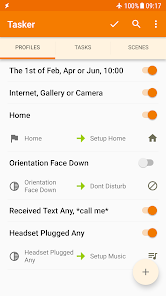
About this app
⚙No repetitive tasks for you, let your Android device handle it!⚙ Total Automation, From Settings to SMS.
Here are only some of the things you could do with Tasker. Its real power is the flexibility to combine contexts and tasks however you wish: https://tasker.joaoapps.com/exampleuses.html
☑ Automations
Make your phone a true smart phone! Why remember to change the volume every day when you leave home when your phone can do it for you?
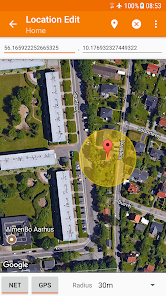
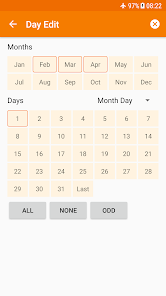
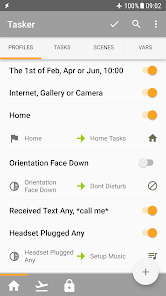
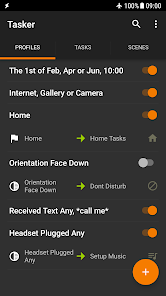
Automate stuff based on the app you're in, the time of day, your location, your Wi-Fi network, Received SMS or Calls, the currently playing song and many other (130+) states and events!
Check out how easy it is to create an automation: https://www.youtube.com/watch?v=s6EAbLW5WSk
☑ Actions
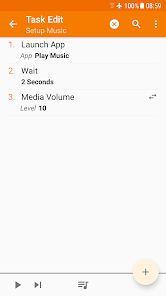
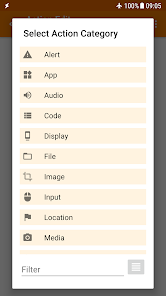
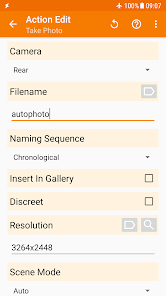
350+ actions allow you to truly customize your phone like never before! Send SMS, create notifications, change almost any system setting like Wifi Tether, Dark Mode, Always On Display, change any volume, control Do Not Disturb, open apps, file manipulation, control music playback, get your location... you get the idea. If you can think of it, Tasker can probably do it for you!
Note: root is NOT (I repeat NOT) required for majority of the functions. However, a few of the actions (like the Kill App and Mobile Data action on some devices) require root. This is because of Android security policies that developers cannot work around.
☑ Automatic File Backups
If you set it up to do so, Tasker can automatically backup your files to a specific folder on the device, SD card, USB key or even Google Drive! This is useful if you want to keep your files safe even if you lose your phone.
☑ Download and Install APKs directly
By your request (if you set up a task to do so), Tasker can automatically check a website for updated APKs, receive those APKs from said websites and initiate installation of any files!
☑ Other Triggers
Manually trigger your actions via launcher shortcuts, quick setting tiles, widgets, long-pressing volume buttons, media buttons (like the ones on your BT headsets or headphones), Bixby button, Navigation Bar, Notifications and more!
☑ Join - Remote Tasker
Adding Join (https://play.google.com/store/apps/details?id=com.joaomgcd.join) to the mix will even allow you to trigger tasks from another Android device or PC!
☑ Scenes
Design your own UI and use it to display any info you want or trigger any task!
☑ App Creation
Create your own standalone apps to share or sell with the Tasker App Factory : https://play.google.com/store/apps/details?id=net.dinglisch.android.appfactory
☑ Developer Friendly
Many 3rd party developers already allow you to perform actions in their apps and listen to their events/states through Tasker!
Check out some of them: https://tasker.joaoapps.com/pluginlist.html
You can also call most of the Web APIs from Tasker with the powerful HTTP Auth and HTTP Request actions! Check out an example Video of HTTP Auth and Request: https://youtu.be/yAt2D1XmgUI.
☑ 7 day trial - one time payment to unlock
Get it here: https://tasker.joaoapps.com/download.html
☑ Useful Links
Privacy Policy: https://tasker.joaoapps.com/privacy.html
Starter Guides: https://tasker.joaoapps.com/guides.html
Pre-made projects: https://forum.joaoapps.com/index.php?resources/
Official Support Forum: https://groups.google.com/forum/#!forum/tasker
Tasker Community: https://www.reddit.com/r/tasker/
It's not possible to fix problems reported via Play Store Comments so please use the "Report Issue To Developer" option in the app > Menu to do so.
Note 1: Tasker uses the BIND_DEVICE_ADMIN permission in order to provide the System Lock functionality
Note 2: Tasker uses an accessibility service for some of its features like closing the notification tray, checking which app is currently opened and more.
Here are only some of the things you could do with Tasker. Its real power is the flexibility to combine contexts and tasks however you wish: https://tasker.joaoapps.com/exampleuses.html
☑ Automations
Make your phone a true smart phone! Why remember to change the volume every day when you leave home when your phone can do it for you?
Automate stuff based on the app you're in, the time of day, your location, your Wi-Fi network, Received SMS or Calls, the currently playing song and many other (130+) states and events!
Check out how easy it is to create an automation: https://www.youtube.com/watch?v=s6EAbLW5WSk
☑ Actions
350+ actions allow you to truly customize your phone like never before! Send SMS, create notifications, change almost any system setting like Wifi Tether, Dark Mode, Always On Display, change any volume, control Do Not Disturb, open apps, file manipulation, control music playback, get your location... you get the idea. If you can think of it, Tasker can probably do it for you!
Note: root is NOT (I repeat NOT) required for majority of the functions. However, a few of the actions (like the Kill App and Mobile Data action on some devices) require root. This is because of Android security policies that developers cannot work around.
☑ Automatic File Backups
If you set it up to do so, Tasker can automatically backup your files to a specific folder on the device, SD card, USB key or even Google Drive! This is useful if you want to keep your files safe even if you lose your phone.
☑ Download and Install APKs directly
By your request (if you set up a task to do so), Tasker can automatically check a website for updated APKs, receive those APKs from said websites and initiate installation of any files!
☑ Other Triggers
Manually trigger your actions via launcher shortcuts, quick setting tiles, widgets, long-pressing volume buttons, media buttons (like the ones on your BT headsets or headphones), Bixby button, Navigation Bar, Notifications and more!
☑ Join - Remote Tasker
Adding Join (https://play.google.com/store/apps/details?id=com.joaomgcd.join) to the mix will even allow you to trigger tasks from another Android device or PC!
☑ Scenes
Design your own UI and use it to display any info you want or trigger any task!
☑ App Creation
Create your own standalone apps to share or sell with the Tasker App Factory : https://play.google.com/store/apps/details?id=net.dinglisch.android.appfactory
☑ Developer Friendly
Many 3rd party developers already allow you to perform actions in their apps and listen to their events/states through Tasker!
Check out some of them: https://tasker.joaoapps.com/pluginlist.html
You can also call most of the Web APIs from Tasker with the powerful HTTP Auth and HTTP Request actions! Check out an example Video of HTTP Auth and Request: https://youtu.be/yAt2D1XmgUI.
☑ 7 day trial - one time payment to unlock
Get it here: https://tasker.joaoapps.com/download.html
☑ Useful Links
Privacy Policy: https://tasker.joaoapps.com/privacy.html
Starter Guides: https://tasker.joaoapps.com/guides.html
Pre-made projects: https://forum.joaoapps.com/index.php?resources/
Official Support Forum: https://groups.google.com/forum/#!forum/tasker
Tasker Community: https://www.reddit.com/r/tasker/
It's not possible to fix problems reported via Play Store Comments so please use the "Report Issue To Developer" option in the app > Menu to do so.
Note 1: Tasker uses the BIND_DEVICE_ADMIN permission in order to provide the System Lock functionality
Note 2: Tasker uses an accessibility service for some of its features like closing the notification tray, checking which app is currently opened and more.
Updated on
Safety starts with understanding how developers collect and share your data. Data privacy and security practices may vary based on your use, region, and age. The developer provided this information and may update it over time.


Ratings and reviews
4.3
53.3K reviews

Andy Bayley
- Flag inappropriate
- Show review history
March 31, 2026
This app might 'automate everything' but it involves downloading other add-ons (which are pretty vague) to enable it to work properly. I've downloaded some of the 'easy' automations and they don't work without extra bits of software. I now find that I get random 'No tasker profile selected' messages popping up on my phone so I'll uninstall it. I also get notifications warning of Tasker using too much battery. Make sure you use the 7 day trial. I didn't and have wasted my money.
9 people found this review helpful
joaomgcd
March 31, 2026
Hi there.
I have developed all my plugins before I was Tasker's developer. I have recently acquired it (https://groups.google.com/forum/#!topic/tasker/SkCtZxnts4Y) and have been working relentlessly to update it as much as I can. Please don't think I'm trying to break up the app since that is very far from the truth.
Hope you understand.

Tom D
- Flag inappropriate
- Show review history
March 12, 2026
I've used this app for many, many years. This is a very powerful app that can automate your phone. It does have a learning curve, but it is worth it. If you are a developer it is pretty straightforward. There are a lot of useful example that you can download and modify/learn from. This is worth every penny, if you want to automate your phone.
32 people found this review helpful
joaomgcd
February 17, 2020
Thank you very much for your 5-star review!!!

Mike Edge
- Flag inappropriate
- Show review history
April 16, 2026
This app used to work great but for some reason it doesn't auto connect to hotspot when in my car anymore?? Once I set the auto hotspot in tasker I never have to touch anything on my phone coz tasker would do it automatically but now I have to do it manually even tho I've set it in tasker... Also the software in this app has changed after android's update to 16 where as now because of this I need to download another app called shitutzu which I might add is totally useless to access tasker!!!
2 people found this review helpful
joaomgcd
April 16, 2026
Hi. That's not my fault Mike. That's a system restriction. The only alternative would be to make it not work at all. That would just be worse, right?
What’s new
Release Video: https://bit.ly/tasker6_6_video
Comment/More: https://bit.ly/tasker6_6_comment
- Shizuku: Root power without root! Logcat is back!
- Java Code: Future Proofed Tasker: Write full Java Code actions with access to native APIs with built-in AI assistant!
- Offline Sunrise/Sunset: Automate with the sun!
- Enhanced Notifications: Status bar chips & group control!
- Extra Triggers: Standalone apps for Bixby, Home & more!
Comment/More: https://bit.ly/tasker6_6_comment
- Shizuku: Root power without root! Logcat is back!
- Java Code: Future Proofed Tasker: Write full Java Code actions with access to native APIs with built-in AI assistant!
- Offline Sunrise/Sunset: Automate with the sun!
- Enhanced Notifications: Status bar chips & group control!
- Extra Triggers: Standalone apps for Bixby, Home & more!
PEGI 3
Learn moreApp support
About the developer
KITXOO
support@joaoapps.com
Rua Elias Garcia
n17 4A
2700-310 Amadora
Portugal
+351 969 390 591


