
CellMapper
Contains adsIn-app purchases

star
3.6K reviewsinfo

USK: All ages
info
1M+
Downloads

USK: All ages
Learn more


About this app
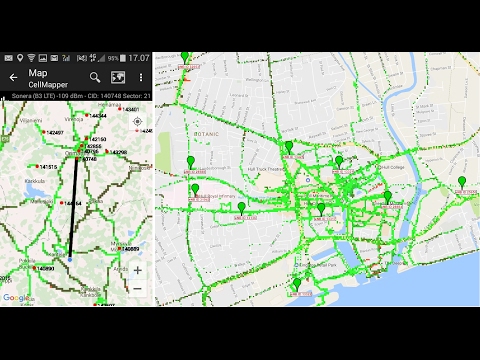
CellMapper displays advanced 2G/3G/4G/5G (NSA and SA) cellular network information and can also record this data to allow you to contribute to our crowd-sourced coverage maps.
CellMapper works on both tablets and phones running Android 7.0 or higher.
Features
- Displays low level cellular network information data along with frequency band calculations (for some providers)
- Reads cellular frequencies and bandwidths on supported Android 7.0+ devices
- Displays a map of both coverage and individual tower sector coverage and bands
- Supports Dual SIMs devices
- Frequency calculator (GSM, iDEN, CDMA, UMTS, LTE, and NR)
Note: The data on the site and within the app is generated shortly after it is uploaded, it may take up to a few days to appear.
Currently supported networks:
- GSM
- UMTS
- CDMA
- LTE
- NR
Visit and follow us:
Reddit
Facebook
Twitter
Visit our our website cellmapper.net.
Permissions
Why does CellMapper need so many permissions?
"make and manage phone calls" - This is required to get low level network data from your device
"access to device location" - In order to map and contribute, we will need to know where the data was recorded from your device.
Older versions of Android:
android.permission.ACCESS_COARSE_LOCATION - To get CellID information
android.permission.ACCESS_FINE_LOCATION - To get GPS location
android.permission.ACCESS_NETWORK_STATE - To get Cellular network information
android.permission.INTERNET - To connect to server to download map data / upload data
android.permission.READ_EXTERNAL_STORAGE - To write external CSV file if no internet connection
android.permission.READ_LOGS - To read Samsung Field Test Mode data on Android 4.1 and earlier (despite what the dialog says, the app cannot read your browsing history unless your browser write it to the system log)
android.permission.READ_PHONE_STATE - To read info about airplane mode / network settings
android.permission.RECEIVE_BOOT_COMPLETED - To start at boot time (if enabled)
android.permission.VIBRATE - To vibrate on CellID change (if enabled)
android.permission.WAKE_LOCK - For phones that do not support 4.2+ CellID Support, to ensure they report correct data
android.permission.WRITE_EXTERNAL_STORAGE - To write external CSV file and debug report
CellMapper works on both tablets and phones running Android 7.0 or higher.
Features
- Displays low level cellular network information data along with frequency band calculations (for some providers)
- Reads cellular frequencies and bandwidths on supported Android 7.0+ devices
- Displays a map of both coverage and individual tower sector coverage and bands
- Supports Dual SIMs devices
- Frequency calculator (GSM, iDEN, CDMA, UMTS, LTE, and NR)
Note: The data on the site and within the app is generated shortly after it is uploaded, it may take up to a few days to appear.
Currently supported networks:
- GSM
- UMTS
- CDMA
- LTE
- NR
Visit and follow us:
Visit our our website cellmapper.net.
Permissions
Why does CellMapper need so many permissions?
"make and manage phone calls" - This is required to get low level network data from your device
"access to device location" - In order to map and contribute, we will need to know where the data was recorded from your device.
Older versions of Android:
android.permission.ACCESS_COARSE_LOCATION - To get CellID information
android.permission.ACCESS_FINE_LOCATION - To get GPS location
android.permission.ACCESS_NETWORK_STATE - To get Cellular network information
android.permission.INTERNET - To connect to server to download map data / upload data
android.permission.READ_EXTERNAL_STORAGE - To write external CSV file if no internet connection
android.permission.READ_LOGS - To read Samsung Field Test Mode data on Android 4.1 and earlier (despite what the dialog says, the app cannot read your browsing history unless your browser write it to the system log)
android.permission.READ_PHONE_STATE - To read info about airplane mode / network settings
android.permission.RECEIVE_BOOT_COMPLETED - To start at boot time (if enabled)
android.permission.VIBRATE - To vibrate on CellID change (if enabled)
android.permission.WAKE_LOCK - For phones that do not support 4.2+ CellID Support, to ensure they report correct data
android.permission.WRITE_EXTERNAL_STORAGE - To write external CSV file and debug report
Advanced network information and crowd sourced cellular coverage and tower maps
Updated on
Safety starts with understanding how developers collect and share your data. Data privacy and security practices may vary based on your use, region, and age. The developer provided this information and may update it over time.
- No data shared with third partiesLearn more about how developers declare sharing
- This app may collect these data typesLocation and Device or other IDs
- Data is encrypted in transit
- You can request that data be deleted


Ratings and reviews
3.49K reviews

L Z
- Flag inappropriate
August 31, 2026
Functionally it's very good. But the UI makes it unpleasant to use. The whole register and login process is not clear. And the app login is at the bottom of the screen where it is blocked by the phone keyboard. The biggest issue is that it doesn't play nice with VPNs. That's why the captchas are so horrendous. If I turn off my VPN the issue goes away. Also, I have only seen a banner ad at the bottom and it was not obtrusive at all.

Heinrich Gerber
- Flag inappropriate
- Show review history
November 28, 2024
Using for 4 months. Sometimes it records locations and cells, then stops for no apparent reason. Restart and it works fine. Sometimes doesn't want to connect to the server to log in. Many technical features not for me as someone who just wants to log tower locations and determine signal strength in our area. I won't get the paid version because it will not be more reliable or stable, just less adds. Would like to see signal strength from all service providers at once, but no Dev response
16 people found this review helpful

Ricky Mesa
- Flag inappropriate
August 29, 2024
I've used this app for better part of over a year. I've been on on Road trips over 40,000 miles traveled within one year. This has always ran in the background on my phone to try to capture data. Unfortunately sometimes it seems to not capture data accurately, or doesn't log data at all. But when it is able to it's spot on. I give the app the best opportunity possible to run. No battery optimizations, or background restrictions and no data restrictions. Great app when it works correctly
22 people found this review helpful
What’s new
- Fixed n41 showing up when n38/n7 used
- Fixed wrong 5G gNB ID lengths for some providers
- Updated libraries
- Updated translations
- Fixed wrong 5G gNB ID lengths for some providers
- Updated libraries
- Updated translations
USK: All ages
Learn moreApp support
About the developer
CellMapper Services Limited
contact@cellmapper.net
1158 English Bluff Rd
Delta, BC V4M 2N6
Canada
+1 604-441-7909


