
idealista
In-app purchases

4.6star
425K reviewsinfo
10M+
Downloads

PEGI 3
info


About this app
At idealista, we offer the most comprehensive app for buying, selling or renting any type of property in Spain, Italy and Portugal.
If you want to sell or rent out a property using our app, you'll have all the tools you need to list it and find a buyer or tenant in record time. And if you're on the hunt for a home, parking space, room to rent or another type of property, we have over a million listings ready for you to explore.
Here are just a few of the things you can do with our app if you're searching for a property:
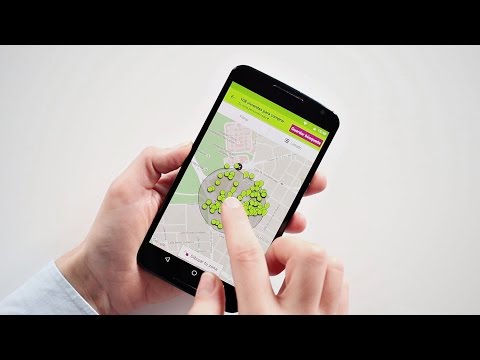
• Draw your preferred area directly on the map. Open the idealista map and draw with your finger the area where you'd like to live. All available listings will appear instantly, along with their prices, so you can compare them at a glance. It's that simple.
• Find properties available near your current location.
• Save your favourite homes and properties. And with our collaborative lists, you can share your favourites with friends and family. Everyone can add notes, suggest new favourites or remove the ones you're no longer interested in.
• Set up alerts and be the first to know. If you're looking for a room or a new home, you know how important it is to act quickly. Once you've saved a search, turn on instant alerts — that way, every time a new listing matches your criteria or a property drops in price, you'll get a notification straight to your phone.
• Chat directly with advertisers to ask questions or arrange a viewing.
• Create a tenant profile. Advertisers tend to prioritise tenants with a completed profile, giving you a better chance of landing the property you want.
Give our app a try!
If you want to sell or rent out a property using our app, you'll have all the tools you need to list it and find a buyer or tenant in record time. And if you're on the hunt for a home, parking space, room to rent or another type of property, we have over a million listings ready for you to explore.
Here are just a few of the things you can do with our app if you're searching for a property:
• Draw your preferred area directly on the map. Open the idealista map and draw with your finger the area where you'd like to live. All available listings will appear instantly, along with their prices, so you can compare them at a glance. It's that simple.
• Find properties available near your current location.
• Save your favourite homes and properties. And with our collaborative lists, you can share your favourites with friends and family. Everyone can add notes, suggest new favourites or remove the ones you're no longer interested in.
• Set up alerts and be the first to know. If you're looking for a room or a new home, you know how important it is to act quickly. Once you've saved a search, turn on instant alerts — that way, every time a new listing matches your criteria or a property drops in price, you'll get a notification straight to your phone.
• Chat directly with advertisers to ask questions or arrange a viewing.
• Create a tenant profile. Advertisers tend to prioritise tenants with a completed profile, giving you a better chance of landing the property you want.
Give our app a try!
Updated on
Safety starts with understanding how developers collect and share your data. Data privacy and security practices may vary based on your use, region, and age. The developer provided this information and may update it over time.


Ratings and reviews
4.6
409K reviews

Ann Scott
- Flag inappropriate
- Show review history
October 26, 2022
The app is good but there's room for improvement. There are a lot of filters missing. For example, to filter by length of the rental (short term, long term), included things within each room (for example, oven in the kitchen, given that a lot of Spanish apartments don't have ovens). Also, would like to see a definitive "pets" or "no pets" as often they allow pets but don't post it, so screening for pets doesn't work. Also like to choose where I want notifications sent.
38 people found this review helpful
idealista
October 27, 2022
Hello! Thank you for your feedback :-) we've taken note of your comments and will keep working hard to improve our app so that next time you think we deserve 5 stars. Best wishes, the idealista team

Matt Blair
- Flag inappropriate
January 6, 2026
Easy to use, you can find what you are looking for. There are several features I like about this app. You can draw your interest area on a map. You can pick your max and minimum prices, size, type of house. Makes it possible to narrow down what you like. The daily email updates come in handy too.
2 people found this review helpful

Kiron R
- Flag inappropriate
November 17, 2025
oct 2025 update: this app is just awesome. geolocation, search by telephone, draft contracts, reports are all excellent feature. wishlist is search by image. I want to take a picture of a building and ask if there are any apartments available or likely to be available soon. Coming from windowsphone I can't tell you how grateful I am for this app. I can deal with a few random crashes although I personally haven't experienced any. The 4.3 rating is not fair it deserves a 5
9 people found this review helpful
What’s new
At idealista, we take the security of your data very seriously. That’s why we’ve enabled two-step verification to provide extra protection for your account. Simply go to your idealista profile, select “Protect your account”, and add your phone number. This way, whenever we detect any unusual activity on your account, we’ll send a code to your phone for you to verify. Simple and secure!
App support
phone
Phone number
+34917014030
About the developer
IDEALISTA SAU
android@idealista.com
PLAZA CORTES, 2 - 5ª PLANTA
28014 MADRID
Spain
+34 637 11 14 53


