
Messages
Contains ads
4.2star
184K reviews
10M+
Downloads

Everyone
info
About this app
Messages – Fast & Secure SMS & MMS App
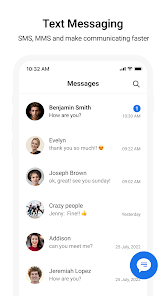
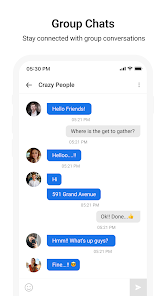
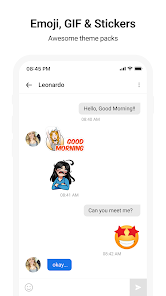
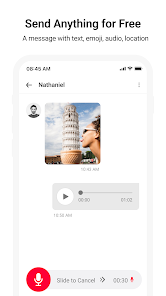
Stay connected with your loved ones using Messages, a reliable and secure text messaging app designed for seamless communication. Whether you're sending SMS or MMS, Messages makes it easy to share texts, photos, stickers, and more.
Key Features:
● Send SMS and MMS: Enjoy fast and efficient messaging to all your contacts. Requires an active mobile network connection.
● After Call Actions: Quickly reply to messages, set reminders, or check missed messages during and after a call.
● Location-Based Notifications: Get notified to send messages when you arrive at or leave specific locations. (Requires user permission for location access.)
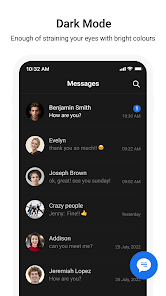
● Customization Options: Personalize your chat experience with customizable themes, backgrounds, and chat bubbles.
● Spam Protection: Block unwanted SMS and stay free from spam messages.
● Backup and Restore: Safeguard your conversations with easy backup and restore options.
● Scheduled Messaging: Plan and send messages at the right time with the built-in scheduler.
Simple, Smart and Secure:
● User-friendly interface designed for effortless navigation.
● Supports multiple languages for global users.
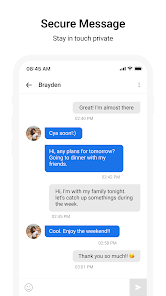
● Privacy-focused: Your messages remain private and secure.
Why Choose Messages?
● Lightweight and fast messaging app for all Android devices.
● Compatible with dual-SIM phones for easy management.
● No internet required for SMS functionality (requires carrier network).
Permissions Required:
● Location Access: To enable location-based message notifications.
● Contacts Access: To identify and send messages to saved contacts.
● Call Log Access: To enable After Call Actions (used only to enhance functionality).
Note: All permissions are optional and used solely to enhance the app's features. Users have complete control over their data and can revoke permissions at any time through their device settings.
Stay connected with your loved ones using Messages, a reliable and secure text messaging app designed for seamless communication. Whether you're sending SMS or MMS, Messages makes it easy to share texts, photos, stickers, and more.
Key Features:
● Send SMS and MMS: Enjoy fast and efficient messaging to all your contacts. Requires an active mobile network connection.
● After Call Actions: Quickly reply to messages, set reminders, or check missed messages during and after a call.
● Location-Based Notifications: Get notified to send messages when you arrive at or leave specific locations. (Requires user permission for location access.)
● Customization Options: Personalize your chat experience with customizable themes, backgrounds, and chat bubbles.
● Spam Protection: Block unwanted SMS and stay free from spam messages.
● Backup and Restore: Safeguard your conversations with easy backup and restore options.
● Scheduled Messaging: Plan and send messages at the right time with the built-in scheduler.
Simple, Smart and Secure:
● User-friendly interface designed for effortless navigation.
● Supports multiple languages for global users.
● Privacy-focused: Your messages remain private and secure.
Why Choose Messages?
● Lightweight and fast messaging app for all Android devices.
● Compatible with dual-SIM phones for easy management.
● No internet required for SMS functionality (requires carrier network).
Permissions Required:
● Location Access: To enable location-based message notifications.
● Contacts Access: To identify and send messages to saved contacts.
● Call Log Access: To enable After Call Actions (used only to enhance functionality).
Note: All permissions are optional and used solely to enhance the app's features. Users have complete control over their data and can revoke permissions at any time through their device settings.
Updated on
Safety starts with understanding how developers collect and share your data. Data privacy and security practices may vary based on your use, region, and age. The developer provided this information and may update it over time.

This app may share these data types with third parties
Location and App info and performance

No data collected
Learn more about how developers declare collection

Data is encrypted in transit

Data can’t be deleted
Ratings and reviews
4.2
179K reviews

Wayne
- Flag inappropriate
November 20, 2025
When I complete a text I expect to be able to hit the return button at the bottom of my screen and go back to my home screen unfortunately you have advertising there and I can't do that so I'm really not at all in favor of this app! I don't like being forced to see ads that I don't want and if I don't want to see ads I've got to upgrade and or move to another platform! this is a pure case of a corporate control of their customer base.
136 people found this review helpful

S. Gomez
- Flag inappropriate
December 28, 2025
I lost all my apps & the way that organized in my front page. now they are all upfront completely all over pages, not in the back. its complicated all all them were in order. I don't have back más important on front and many of my apps are unusable. this cell is my life line, please help, thank you!
18 people found this review helpful

Frazier Manning
- Flag inappropriate
December 14, 2025
limited use. can't copy and paste after messages have been sent. often because predictive text messes up my message I have to copy it then delete it for everyone and paste it and correct it then resend it.
18 people found this review helpful
App support
About the developer
Monikaben Nikulkumar Hirpara
applockthemefree@gmail.com
D-1201, KRISHNA RESIDANCY, LAXMIKANT ASHRAM ROAD, KATARGAM, SURAT
Surat, Gujarat 395004
India


