
Sunsama
3.7star
328 reviews
50K+
Downloads

Everyone
info

About this app
Companion app to the desktop app
You can use the Sunsama mobile app once you’ve planned your first day from the Sunsama desktop app. If you don’t have a Sunsama account yet, get started from your desktop by visiting https://sunsama.com.
This mobile app is built as a companion to the desktop app to help you stay in sync when you’re away from your desk, not as a standalone replacement.
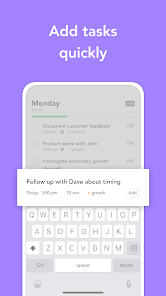
Add tasks quickly
When a new tasks comes up and you’re not at your desk, quickly add it to your task list. You can schedule it onto your calendar and move it to the right spot on your list to work on it later.
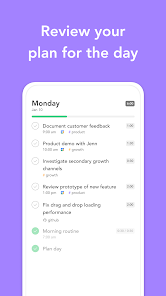
Stay true to your plan
Review what you planned for the day. Create a calm, focused space to stay on top of your workload.
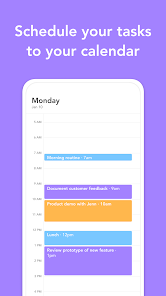
Synced with your calendar
Browse both your tasks and calendar events each day. Synced with Google Calendar and Outlook Calendar.
You can use the Sunsama mobile app once you’ve planned your first day from the Sunsama desktop app. If you don’t have a Sunsama account yet, get started from your desktop by visiting https://sunsama.com.
This mobile app is built as a companion to the desktop app to help you stay in sync when you’re away from your desk, not as a standalone replacement.
Add tasks quickly
When a new tasks comes up and you’re not at your desk, quickly add it to your task list. You can schedule it onto your calendar and move it to the right spot on your list to work on it later.
Stay true to your plan
Review what you planned for the day. Create a calm, focused space to stay on top of your workload.
Synced with your calendar
Browse both your tasks and calendar events each day. Synced with Google Calendar and Outlook Calendar.
Updated on
Safety starts with understanding how developers collect and share your data. Data privacy and security practices may vary based on your use, region, and age. The developer provided this information and may update it over time.


Ratings and reviews
3.7
314 reviews

Larry Waddell
- Flag inappropriate
February 3, 2023
I LOVE the desktop app. 3 days into the free trial and I've already noticed a step function increase productivity. Only 3 days, but I've been going to bed an hour earlier than typical for me. I'm paying when the trial ends! But the mobile app is kinda bad. Limited functionality and mildly glitchy on my Galaxy Note. It's basically just for entering tasks. When I type the keyboard covers the entry box so I type blind. Is there a Google Tasks integration so I can just use that for tasks on the go?
28 people found this review helpful
Sunsama
March 7, 2023
Hi Larry, the mobile app is just a companion app to the desktop/web app so you are correct in saying it's limited. The functionality is made for when you're away from your desk. This does mean basic actions like, indeed, entering tasks. When you say the keyboard covering the entry box, is this still the case on the latest version? -Joseph

Stephanie Mbelu
- Flag inappropriate
- Show review history
December 28, 2022
The app is just ok. It's only good for reviewing your day. You can't really use the app to plan your day in the same way you can with the desktop version. For the price, I expected full functionality on all platforms. I love the desktop app, but I hate that I can't plan or shutdown my day on my phone (Android) or my iPad.
13 people found this review helpful

Nate
- Flag inappropriate
October 27, 2025
The app loaded once, beyond that point anytime I tried to open the app it froze on the opening screen. I tried reinstalling the app, clearing cache, tried opening through a browser, etc. with no success. I also tried the app on 4 separate android devices and none worked. pretty amazing that an app this expensive can have this type of issue.
8 people found this review helpful
What’s new
Bug fixes.
App support
About the developer
Summay, Inc
support@sunsama.com
555 10th St Apt 425
Oakland, CA 94607
United States
+1 703-725-9158


