
Web Cloner- Dual App Scanner
Contains adsIn-app purchases
4.2star
33K reviews
5M+
Downloads

Everyone
info
About this app
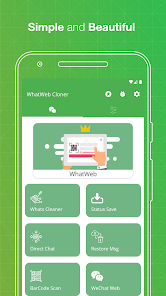
Web Cloner & Clonapp Messenger – the all-in-one dual app and web scanner for managing multiple accounts on one device.
Scan the QR code, sync your chats instantly, and stay connected from any phone or tablet. Fast, stable, and secure — Web Cloner avoids unexpected logouts and keeps your messages synced in real time.
Whether you need dual accounts on a single phone or the same account on multiple devices, Web Cloner makes it effortless with just one click.
🔗 Web Scanner & Clone Messenger
Open and manage multiple accounts using our powerful web scanner. Scan the QR code from linked devices and instantly mirror all your conversations. Web Cloner delivers a fast, stable connection so you never miss a message.
👥 Dual Accounts & Multiple Devices
Use two numbers on the same phone or access one account across multiple devices. Perfect for separating work and personal chats without switching phones. Web Cloner is your ultimate dual app solution.
💬 Recover Deleted Messages
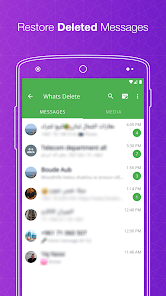
Never lose important conversations again. Web Cloner restores deleted text messages, photos, videos, voice notes, and documents — works like WAMR and Auto RDM.
⏬ Status Saver & Downloader
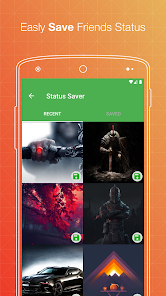
Save and download any image, GIF, or video status directly to your device. Repost or share saved statuses with friends on any platform.
📱 Direct Chat
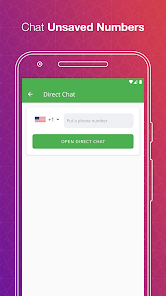
Send messages to any number without saving it to your contacts. Start conversations instantly on your favorite chat apps or business accounts.
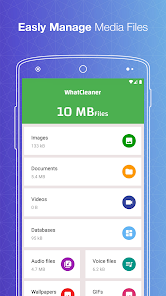
🧹 Cleaner – Free Up Space
Remove old media, junk files, and unnecessary downloads to free up storage. Keep your device running fast and clean.
🔒 Secret Text Tool
Hide one message inside another for private sharing. Send confidential messages that only the intended recipient can read.
🔁 Text Repeater
Generate and send repeated text with one tap. Great for fun messages, announcements, or creative texts.
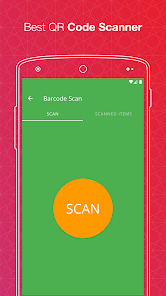
📷 QR & Barcode Scanner
Scan, save, and manage any QR code or barcode. Works instantly with your camera — no extra app needed.
📁 Manage Saved Files
All downloaded files from cloned accounts are organized in one place. View, share, or delete images, videos, and documents easily.
📝 How to Use Web Cloner
Step 1: Open Web Cloner on your device
Step 2: Go to your chat app → Tap Settings → Linked Devices
Step 3: Tap "Link a Device" and scan the QR code shown in Web Cloner
Step 4: Done! All messages sync instantly. Read, reply, and download anytime.
✨ Why Choose Web Cloner?
✔ Fast, simple, and easy-to-use web scanner
✔ Clone and dual accounts with one click
✔ Automatically sync all messages in real time
✔ Recover deleted messages and media
✔ Free status saver and downloader
✔ Lightweight, secure, and battery-friendly
✔ Works perfectly on smartphones and tablets
✔ Dark mode supported
⚖️ Legal Notice:
Web Cloner is an independent application developed by Riki Apps Developer Inc. It is not affiliated with, endorsed by, or connected to WhatsApp Inc., Meta Platforms, or any third-party messaging service. All trademarks belong to their respective owners.
Scan the QR code, sync your chats instantly, and stay connected from any phone or tablet. Fast, stable, and secure — Web Cloner avoids unexpected logouts and keeps your messages synced in real time.
Whether you need dual accounts on a single phone or the same account on multiple devices, Web Cloner makes it effortless with just one click.
🔗 Web Scanner & Clone Messenger
Open and manage multiple accounts using our powerful web scanner. Scan the QR code from linked devices and instantly mirror all your conversations. Web Cloner delivers a fast, stable connection so you never miss a message.
👥 Dual Accounts & Multiple Devices
Use two numbers on the same phone or access one account across multiple devices. Perfect for separating work and personal chats without switching phones. Web Cloner is your ultimate dual app solution.
💬 Recover Deleted Messages
Never lose important conversations again. Web Cloner restores deleted text messages, photos, videos, voice notes, and documents — works like WAMR and Auto RDM.
⏬ Status Saver & Downloader
Save and download any image, GIF, or video status directly to your device. Repost or share saved statuses with friends on any platform.
📱 Direct Chat
Send messages to any number without saving it to your contacts. Start conversations instantly on your favorite chat apps or business accounts.
🧹 Cleaner – Free Up Space
Remove old media, junk files, and unnecessary downloads to free up storage. Keep your device running fast and clean.
🔒 Secret Text Tool
Hide one message inside another for private sharing. Send confidential messages that only the intended recipient can read.
🔁 Text Repeater
Generate and send repeated text with one tap. Great for fun messages, announcements, or creative texts.
📷 QR & Barcode Scanner
Scan, save, and manage any QR code or barcode. Works instantly with your camera — no extra app needed.
📁 Manage Saved Files
All downloaded files from cloned accounts are organized in one place. View, share, or delete images, videos, and documents easily.
📝 How to Use Web Cloner
Step 1: Open Web Cloner on your device
Step 2: Go to your chat app → Tap Settings → Linked Devices
Step 3: Tap "Link a Device" and scan the QR code shown in Web Cloner
Step 4: Done! All messages sync instantly. Read, reply, and download anytime.
✨ Why Choose Web Cloner?
✔ Fast, simple, and easy-to-use web scanner
✔ Clone and dual accounts with one click
✔ Automatically sync all messages in real time
✔ Recover deleted messages and media
✔ Free status saver and downloader
✔ Lightweight, secure, and battery-friendly
✔ Works perfectly on smartphones and tablets
✔ Dark mode supported
⚖️ Legal Notice:
Web Cloner is an independent application developed by Riki Apps Developer Inc. It is not affiliated with, endorsed by, or connected to WhatsApp Inc., Meta Platforms, or any third-party messaging service. All trademarks belong to their respective owners.
Updated on
Safety starts with understanding how developers collect and share your data. Data privacy and security practices may vary based on your use, region, and age. The developer provided this information and may update it over time.

No data shared with third parties
Learn more about how developers declare sharing

No data collected
Learn more about how developers declare collection

Data is encrypted in transit
Ratings and reviews
4.2
32.4K reviews

Obikili Lynda
- Flag inappropriate
- Show review history
March 14, 2026
Seriously🙁 am not happy again, for example if l link a phone in the night, the next day it will disconnect and this has been happening since last month and it wasn't like this before please u guys should help me ooooooooooo please someone should help me with another App, Please what could be the cause? mine keeps disconnecting each time I linked a device

Sunil khatri
- Flag inappropriate
- Show review history
November 20, 2025
recent update is good but the replication of call log is still missing. that should also be made live. also there should be some option where the deleted messeges are visible on the app even if they have been deleted from the main app.. it would surely be a five star then
57 people found this review helpful

casper kutu
- Flag inappropriate
October 26, 2025
some issues have encountered on this app are , when you link WhatsApp you can't upload status, you can't change WhatsApp dp, and whn someone calss you can't see the call displayed
What’s new
🌍 We speak your language now! Added multi-language support, faster performance, and squashed some pesky bugs.
We've identified and fixed a bug that prevented proper subscription recognition in some cases.
• Fix: Now back button in Settings works
• Improved app stability and performance
• Enhanced user experience
• Bug fixes and optimizations
We've identified and fixed a bug that prevented proper subscription recognition in some cases.
• Fix: Now back button in Settings works
• Improved app stability and performance
• Enhanced user experience
• Bug fixes and optimizations
App support
About the developer
Bachir El Etri
rikiappsdeveloper@gmail.com
73A Edna Ave
Merrylands West NSW 2160
Australia


