Interval Timer Machine
In-app purchases
4.6star
1.48K reviews

Everyone
info
50K+
Downloads

Everyone
Learn more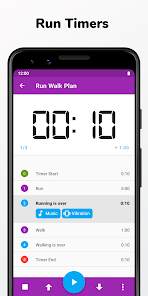


About this app
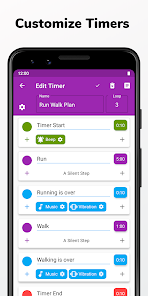
TimeR Machine is a free interval timer for not just workout and exercise, but also any situations you need to construct personalized, multi-stage timer plans. It's highly customizable and able to create almost whatever kind of timer you need.
Open-sourced at Github: https://github.com/timer-machine/timer-machine-android
Suitable for all kinds of activities, including:
* HIIT (High-Intensity Interval Training) workout
* Tabata workout
* Gym workout
* Run, jog, walk exercise
* Other sports workouts like cycling, running, stretching, boxing, MMA, circuit training, at-home bodyweight training workouts, cross fit, weightlifting, yoga...
This app can serve as:
* HIIT Timer
* Tabata Timer
* Gym Timer
* Sport Timer
* Round Timer
* Productivity Timer
* Continuous Timer
* Repeating Timer
* Custom Countdown Timer
* Interval Traning App
* ...
Not just exercise, this app can help you:
* Cultivate a habit
* Complete daily routine
* Finish game loop
* Presentation
* Study
* ...
Customize Reminders
🎵 Music feedback. Play any sound on your device as a reminder and pause other sounds to remind you.
💬 Voice feedback backed by Text-to-speech. Let your phone speak anything you want.
📳 Vibration feedback. Pick different vibration pattern for different events.
⭐ Fullscreen notification
⌚ Stopwatch support for the indeterminate event
🔊 Beep sound
🚩 Half-way reminder
⏱ Countdown seconds
📌 App notification
You can:
🕛 Enjoy this free app with no intrusive Ads.
🕧 Create any number of timers for free.
🕐 Set timer names, loops, warm-up, and cool-down reminders.
🕜 Add groups as sub-timers.
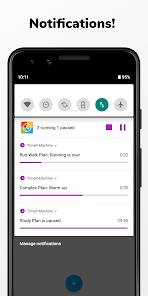
🕑 Let timers work in the background and show the current progress in a notification.
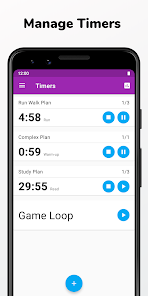
🕝 Start and control many timers at the same time.
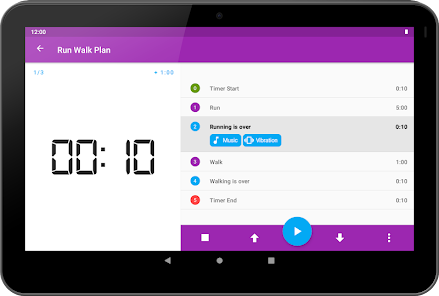
🕒 View timers in a list and jump to another stage with a double tap.
🕞 Enter Picture In Picture mode and choose to show a floating window..
🕓 Create timer shortcuts to start them in one click from the launcher.
🕟 Customize action buttons that are shown on the timer screen.
🕔 Show a timing bar!
🕠 Lock the screen while a timer is running.
🕕 Plus or minus time from current timer time.
🕡 Customize how much time to plus or minus.
🕖 Check activities records and history.
🕢 Schedule a timer to be run at a specific time.
🕗 Repeat a timer every week or every few days.
🕣 Back up your timers and settings.
🕘 Pick an app theme from 9 pre-defined themes + night mode or Use any color as your theme.
🕤 Automatically change to night mode.
🕙 Choose to play sound only in the headphones or globally.
🕥 Pause timers on phone calls.
🕚 Enjoy nice material design with animations.
🕦 Support for Tasker, Automate, etc.
If you wish to download the app APK and install manually, search the app in APKPure or check this link: https://bit.ly/36sZP7U. You can also find this link in the app [Help & Feedback] - [Q&A] - [Google Play APK].
You can contact me in the app through [Help & Feedback] - [Feedback] or email directly at ligrsidfd@gmail.com.
Privacy Policy:
https://github.com/DeweyReed/Grocery/blob/master/tm-pp.md
You can find all the info above and more info in the app.
*About Subscription Billing*:
If you choose to purchase the subscription, payment will be charged to your Google Play account, and your account will be charged for renewal within 24-hours prior to the end of the current period. You can turn off auto-renew in your Google Play settings any time after purchase.
Open-sourced at Github: https://github.com/timer-machine/timer-machine-android
Suitable for all kinds of activities, including:
* HIIT (High-Intensity Interval Training) workout
* Tabata workout
* Gym workout
* Run, jog, walk exercise
* Other sports workouts like cycling, running, stretching, boxing, MMA, circuit training, at-home bodyweight training workouts, cross fit, weightlifting, yoga...
This app can serve as:
* HIIT Timer
* Tabata Timer
* Gym Timer
* Sport Timer
* Round Timer
* Productivity Timer
* Continuous Timer
* Repeating Timer
* Custom Countdown Timer
* Interval Traning App
* ...
Not just exercise, this app can help you:
* Cultivate a habit
* Complete daily routine
* Finish game loop
* Presentation
* Study
* ...
Customize Reminders
🎵 Music feedback. Play any sound on your device as a reminder and pause other sounds to remind you.
💬 Voice feedback backed by Text-to-speech. Let your phone speak anything you want.
📳 Vibration feedback. Pick different vibration pattern for different events.
⭐ Fullscreen notification
⌚ Stopwatch support for the indeterminate event
🔊 Beep sound
🚩 Half-way reminder
⏱ Countdown seconds
📌 App notification
You can:
🕛 Enjoy this free app with no intrusive Ads.
🕧 Create any number of timers for free.
🕐 Set timer names, loops, warm-up, and cool-down reminders.
🕜 Add groups as sub-timers.
🕑 Let timers work in the background and show the current progress in a notification.
🕝 Start and control many timers at the same time.
🕒 View timers in a list and jump to another stage with a double tap.
🕞 Enter Picture In Picture mode and choose to show a floating window..
🕓 Create timer shortcuts to start them in one click from the launcher.
🕟 Customize action buttons that are shown on the timer screen.
🕔 Show a timing bar!
🕠 Lock the screen while a timer is running.
🕕 Plus or minus time from current timer time.
🕡 Customize how much time to plus or minus.
🕖 Check activities records and history.
🕢 Schedule a timer to be run at a specific time.
🕗 Repeat a timer every week or every few days.
🕣 Back up your timers and settings.
🕘 Pick an app theme from 9 pre-defined themes + night mode or Use any color as your theme.
🕤 Automatically change to night mode.
🕙 Choose to play sound only in the headphones or globally.
🕥 Pause timers on phone calls.
🕚 Enjoy nice material design with animations.
🕦 Support for Tasker, Automate, etc.
If you wish to download the app APK and install manually, search the app in APKPure or check this link: https://bit.ly/36sZP7U. You can also find this link in the app [Help & Feedback] - [Q&A] - [Google Play APK].
You can contact me in the app through [Help & Feedback] - [Feedback] or email directly at ligrsidfd@gmail.com.
Privacy Policy:
https://github.com/DeweyReed/Grocery/blob/master/tm-pp.md
You can find all the info above and more info in the app.
*About Subscription Billing*:
If you choose to purchase the subscription, payment will be charged to your Google Play account, and your account will be charged for renewal within 24-hours prior to the end of the current period. You can turn off auto-renew in your Google Play settings any time after purchase.
Updated on
Safety starts with understanding how developers collect and share your data. Data privacy and security practices may vary based on your use, region, and age. The developer provided this information and may update it over time.


Ratings and reviews
4.6
1.44K reviews

Black Rod
- Flag inappropriate
- Show review history
July 19, 2025
I suddenly have a high-pitched voice notifier. really annoying and can barely hear. can't figure out how to change it. Help! This is a GREAT timer. my Garmin broke and have been using it for my interval workouts on my bike. I am also now using it for meditation sessions. Try to get the hang of the options it offers to make personalizing workouts faster. Looking forward to updates. I do have some suggestions such as combining different workouts to roll from one to the other. Solid App.
2 people found this review helpful

purple wowies
- Flag inappropriate
October 19, 2021
Was looking for a replacement for a guided task app on my old phone that doesn't alarm reliably on this one. This app is just about perfect and very customizable! My phone aggressively memory manages no matter how many things I disable, but the scheduler even sort of worked! Just gotta figure out how to keep it working consistently (and hopefully it's not one of those handful of apps that needs the trick of a widget...).
2 people found this review helpful

A Google user
- Flag inappropriate
February 9, 2020
Does most of what I need it do (intervals for exercise and studying), but the tutorials seemed like too much info all at once so I skipped them. It's worked out so far. I just wish there were more flexibility for notification during a routine step rather than (halftime, and countdown). I just break it down further, as needed.
1 person found this review helpful
Dewey Reed
February 10, 2020
Thanks for your feedback.
It's impressive that you can figure out how the app works without tutorials.
As for more flexibility for notification, adding many detailed settings to behavior is not only complicated but also error-prone. So I decided to only add common behavior(half, count, etc) and leave more complex jobs to the combination of steps.
What’s new
- Added: Skip reminder that skips a step under certain conditions
- Added: A menu item for screen brightness setting to the timer-running screen
- Added: Open source licenses
- Added: French translation. Thanks to J. Lavoie and Christian Gallioz!
- Added: Italian translation. Thanks to @NiaJ3oE2LM, @anicetus-duck, and Giovanni Fortezze!
- Added: Russian translation. Thanks to @D-iva, v1s7, and @Xapitonov!
- Improved: Keep the enabled schedulers enabled after editing
- Fixed: ...
- Added: A menu item for screen brightness setting to the timer-running screen
- Added: Open source licenses
- Added: French translation. Thanks to J. Lavoie and Christian Gallioz!
- Added: Italian translation. Thanks to @NiaJ3oE2LM, @anicetus-duck, and Giovanni Fortezze!
- Added: Russian translation. Thanks to @D-iva, v1s7, and @Xapitonov!
- Improved: Keep the enabled schedulers enabled after editing
- Fixed: ...
Everyone
Learn moreApp support
About the developer
庞树
ligrsidfd@gmail.com
黄埔保利鱼珠港S1栋24层2420
黄埔区, 广州市, 广东省
China
510000


