
DW Contacts & Phone & SMS

star
5.29K reviews

Everyone
info
50K+
Downloads

Everyone
Learn more


About this app
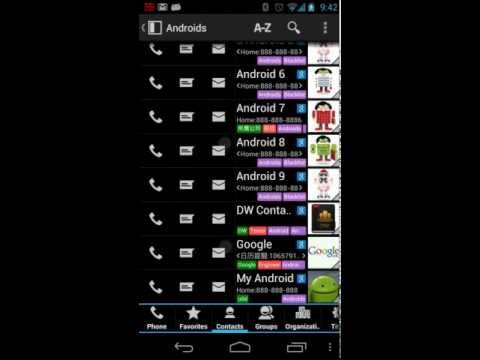
DW Contacts & Phone & SMS is a powerful app for replacing your phone's original Phone, Contacts, and SMS apps.
KEY FEATURES
------------
SMS
+ Complete SMS support
* Scheduled to send
* Automatically send blessing SMS on contact birthday/anniversary
* Template-based bulk SMS sending automatically inserts contact names
Contacts
+ Search all fields of the contact (notes, addresses, emails, relationships...)
+ Group-based contact management and support nesting of groups
* Contact-based reminders and task lists
+ Share contacts by text and allow selection of fields to share
+ Filter contacts through their group, company, position, province, city, zip code...
+ Flexible multi-select mode, you can combine different contact filtering methods to select contacts. For selected contacts, you can send them messages, emails, export, share, set ringtones, etc.
+ Configurable contact list view, which displays the contact's nickname, company, position, number, notes... And multiple sorting methods
+ Show all information in the contact detail. Including: SMS, call history, call statistics, related events and tasks. You can also connect custom data to contacts
+ Contains HD avatar and group information when backing up and restoring contacts via vCard
* Notify you before your contact birthday/anniversary
Phone
* Unlimited call history, you can add notes to each call record to track work progress
+ Voice broadcast caller ID and contact name
* Automatic redial
* Long press the dial button to call the installed VoIP software to dial
+ Based on the contact group's incoming call firewall, can be defined to take effect at specific time periods, intercepting strange calls or business calls during non-working hours
+ During the ringing, the In call widget displays the caller's details and past call notes, so that you can know the other party in time, and you can write notes and add task reminders for the call after the call ends.
+ Call statistics can calculate the length of the call and notify you before the end of the free call time
+ T9 dialing through contact name search contacts let you quickly find the contact you need
* Up to 10,000 quick action storage, you can define actions to dial, send text messages or send mail. Enter a "storage location plus a # sign" on the dial pad to perform a quick action, such as 100#
+ Adjustable dial height and left and right position for one-handed operation
+ Dual card support
* Group-based dialing prefix automatic addition, call record automatic deletion, ringtone
* Flexible appearance configuration, you can customize font size, color and transparency
+ Accessibility compatible: TalkBack
If you have any suggestions and ideas, please post to the forum: http://forum.dw-p.net or send us an email.
For more tips and tricks, please go to http://wiki.dw-p.net/view/DWC:Tips_%26_Tricks
Please try our software and recommend it to your friends.
Free version of the feature limit
Contains ads
Limited appearance customization
Multi-select mode limits 5 items
Can only create one application widget
Features that begin with * are not supported
KEY FEATURES
------------
SMS
+ Complete SMS support
* Scheduled to send
* Automatically send blessing SMS on contact birthday/anniversary
* Template-based bulk SMS sending automatically inserts contact names
Contacts
+ Search all fields of the contact (notes, addresses, emails, relationships...)
+ Group-based contact management and support nesting of groups
* Contact-based reminders and task lists
+ Share contacts by text and allow selection of fields to share
+ Filter contacts through their group, company, position, province, city, zip code...
+ Flexible multi-select mode, you can combine different contact filtering methods to select contacts. For selected contacts, you can send them messages, emails, export, share, set ringtones, etc.
+ Configurable contact list view, which displays the contact's nickname, company, position, number, notes... And multiple sorting methods
+ Show all information in the contact detail. Including: SMS, call history, call statistics, related events and tasks. You can also connect custom data to contacts
+ Contains HD avatar and group information when backing up and restoring contacts via vCard
* Notify you before your contact birthday/anniversary
Phone
* Unlimited call history, you can add notes to each call record to track work progress
+ Voice broadcast caller ID and contact name
* Automatic redial
* Long press the dial button to call the installed VoIP software to dial
+ Based on the contact group's incoming call firewall, can be defined to take effect at specific time periods, intercepting strange calls or business calls during non-working hours
+ During the ringing, the In call widget displays the caller's details and past call notes, so that you can know the other party in time, and you can write notes and add task reminders for the call after the call ends.
+ Call statistics can calculate the length of the call and notify you before the end of the free call time
+ T9 dialing through contact name search contacts let you quickly find the contact you need
* Up to 10,000 quick action storage, you can define actions to dial, send text messages or send mail. Enter a "storage location plus a # sign" on the dial pad to perform a quick action, such as 100#
+ Adjustable dial height and left and right position for one-handed operation
+ Dual card support
* Group-based dialing prefix automatic addition, call record automatic deletion, ringtone
* Flexible appearance configuration, you can customize font size, color and transparency
+ Accessibility compatible: TalkBack
If you have any suggestions and ideas, please post to the forum: http://forum.dw-p.net or send us an email.
For more tips and tricks, please go to http://wiki.dw-p.net/view/DWC:Tips_%26_Tricks
Please try our software and recommend it to your friends.
Free version of the feature limit
Contains ads
Limited appearance customization
Multi-select mode limits 5 items
Can only create one application widget
Features that begin with * are not supported
This is a powerful application. Our goal is to improve your productivity!
Updated on
Safety starts with understanding how developers collect and share your data. Data privacy and security practices may vary based on your use, region, and age. The developer provided this information and may update it over time.
- No data shared with third partiesLearn more about how developers declare sharing
- No data collectedLearn more about how developers declare collection


Ratings and reviews
5.12K reviews

Lula Glover
- Flag inappropriate
- Show review history
June 29, 2026
why is it that you cannot add a contact to the list? it is no way that you can create a contact to your contact list I have tried so many times and it failed. I love this app so please tell me how to do it. it use to be very easy to do but it jus want happen anymore.
7 people found this review helpful

Tim Backer
- Flag inappropriate
- Show review history
August 1, 2026
Very torn on this app. It's excellent for business use, customization, and just getting things done. It allows you to see a list by company, which almost zero Android dialer apps do. However, it is disappointing in that it still does not have (and probably never will) it's own contact adding / editing capability. Go to edit, and it will open whatever other stock contacts app you have to do so. Dialer also just hands off to stock dialer.
16 people found this review helpful

Cam
- Flag inappropriate
- Show review history
January 11, 2022
The customizable aspect of the UI is okay. You can change the colour and choose some visual identifiers you want. However I'd like to change the indent from the left on lists, the names and numbers are too close too the edge of the phone/phone case. For what's available, it seems pointless. The phone app doesn't work and crashes all the time. The home screen icons are ugly as hell. The messages app crashed and didn't send a few messages, and the visual aid for drafts is un-moddable, and poor.
50 people found this review helpful
What’s new
Enable configuration of whether to turn on speakerphone before auto redial starts
Apply the system-configured SIM card color to the in-call interface
Fix the issue where the message list cannot open conversations when TalkBack is enabled
Fix the issue where TalkBack cannot scroll in the call log
Fix the issue where contact backup cannot be canceled midway
Fix application crash issues
Apply the system-configured SIM card color to the in-call interface
Fix the issue where the message list cannot open conversations when TalkBack is enabled
Fix the issue where TalkBack cannot scroll in the call log
Fix the issue where contact backup cannot be canceled midway
Fix application crash issues
Everyone
Learn moreApp support
About the developer
杨德王
support@dw-p.net
五合乡三包村3组
简阳市, 资阳市, 四川省
China
641400


