
Clip Stack - Clipboard Manager
In-app purchases
4.4star
7.08K reviewsinfo
500K+
Downloads

PEGI 3
info



About this app
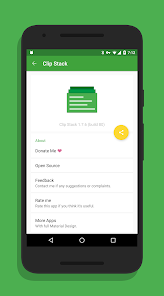
Clip Stack The easiest way to extend multi clipboard for Android.
Android 10 Special Tips:
Since Android 10 background clipboard access has been limited so you have to grant these ADB permissions to Clip Stack on your computer:
adb -d shell appops set com.catchingnow.tinyclipboardmanager SYSTEM_ALERT_WINDOW allow;
adb -d shell pm grant com.catchingnow.tinyclipboardmanager android.permission.READ_LOGS;
adb -d shell am force-stop com.catchingnow.tinyclipboardmanager;
There is no impact on the version below android 10 and can be used directly.
************
- XDA-Developers: The developer offers up an app that allows you to control your clipboard and easily store multiple links and copies.
- Droid Views: After extensively using this app I must say this app is a true winner in actually making it easier for us to freely copy text and then use it some other time.
************
🌐 Unlimited Clipboards
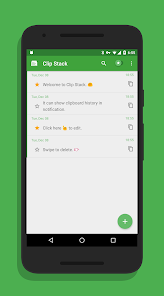
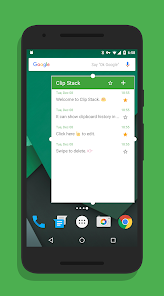
Clip Stack can remember all your clipboard history and recover text after reboot. It's a clipboard manager, a user friendly notebook, and maybe a tiny GTD manager.
You can easily copy, share, star, delete, and merge every text.
🌐 Works Everywhere
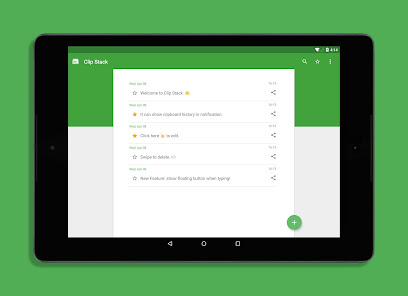
Whatever phone or tablet, all Android devices are supported.
🌐 Powerful Notification
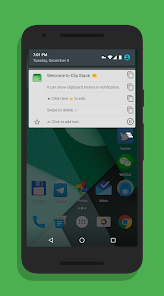
Clip stack's notification is simple and powerful. You can switch the recent 5 texts just in notification.
Notification will be displayed only when copying new text and you can dismiss it by swipe or even disable it by long press.
🌐 Permission Usage
RECEIVE_BOOT_COMPLETED: Start a background service to listen the system clipboard. It only cost 6M - 10M RAM. You can close it in Settings if you really don't want it.
WRITE_EXTERNAL_STORAGE and READ_EXTERNAL_STORAGE: For export clipboard history. This app won't write any other files to your SD card.
VENDING.BILLING: Only for donate. Clip stack is a free app.
SYSTEM_ALERT_WINDOW and READ_LOGS: For Android 10's background clipboard limitation and will not be used on other systems.
Android 10 Special Tips:
Since Android 10 background clipboard access has been limited so you have to grant these ADB permissions to Clip Stack on your computer:
adb -d shell appops set com.catchingnow.tinyclipboardmanager SYSTEM_ALERT_WINDOW allow;
adb -d shell pm grant com.catchingnow.tinyclipboardmanager android.permission.READ_LOGS;
adb -d shell am force-stop com.catchingnow.tinyclipboardmanager;
There is no impact on the version below android 10 and can be used directly.
************
- XDA-Developers: The developer offers up an app that allows you to control your clipboard and easily store multiple links and copies.
- Droid Views: After extensively using this app I must say this app is a true winner in actually making it easier for us to freely copy text and then use it some other time.
************
🌐 Unlimited Clipboards
Clip Stack can remember all your clipboard history and recover text after reboot. It's a clipboard manager, a user friendly notebook, and maybe a tiny GTD manager.
You can easily copy, share, star, delete, and merge every text.
🌐 Works Everywhere
Whatever phone or tablet, all Android devices are supported.
🌐 Powerful Notification
Clip stack's notification is simple and powerful. You can switch the recent 5 texts just in notification.
Notification will be displayed only when copying new text and you can dismiss it by swipe or even disable it by long press.
🌐 Permission Usage
RECEIVE_BOOT_COMPLETED: Start a background service to listen the system clipboard. It only cost 6M - 10M RAM. You can close it in Settings if you really don't want it.
WRITE_EXTERNAL_STORAGE and READ_EXTERNAL_STORAGE: For export clipboard history. This app won't write any other files to your SD card.
VENDING.BILLING: Only for donate. Clip stack is a free app.
SYSTEM_ALERT_WINDOW and READ_LOGS: For Android 10's background clipboard limitation and will not be used on other systems.
Updated on
Safety starts with understanding how developers collect and share your data. Data privacy and security practices may vary based on your use, region, and age. The developer provided this information and may update it over time.

No data shared with third parties
Learn more about how developers declare sharing

No data collected
Learn more about how developers declare collection
Ratings and reviews
4.5
6.64K reviews

A Google user
- Flag inappropriate
- Show review history
January 22, 2019
Love having this app! For someone who does a lot of reading and research, I frequently come across info I want to keep track of. I used to have a running document to store it all, but it was tedious having to navigate away from my material, switch apps, paste every note, remember to save it, etc. This is a major time saver! Can't give 5 stars because it sometimes fails to create a new entry for what I've copied and it takes a couple tries, but it's not often and is still very efficient
44 people found this review helpful

Krista
- Flag inappropriate
November 18, 2025
So sorry this app no longer works and I am not computer literate enough to run the work around. I'm giving 5 stars for the years of great service before Google made the privacy changes. It looks like this may be the perfect opportunity for you to make a beast of a keyboard that surpasses SwiftKey that went down hill since being taken over by Microsoft.
A Google user
- Flag inappropriate
May 14, 2019
On my phone the service sometimes stops which makes the app not register the clipboard each time I copy something. It seems to be an issue with the phone rather than the app though. It works well as a scratchpad. Whenever I have something I want to save for later in the clipboard I open the app and star the topmost item. Would love to have more categories for starring notes. For example by long pressing the star mark by the note. But generally I'm satisfied with the app, it does the job well.
8 people found this review helpful
What’s new
- Support Android 10.
App support
About the developer
Ruoxin He
support@catchingnow.com
天府新区
华阳大道南段846号
双流县, 成都市, 四川省
China
610000


