
DroidCam Webcam & OBS Camera
Contains adsIn-app purchases

3.9star
11.2K reviewsinfo
1M+
Downloads

PEGI 3
info




About this app
Use your phone as an advanced webcam for video calls, live streaming, and video production.
- Chat using "DroidCam Webcam" on your computer, including Sound and Picture.
- Direct OBS Studio integration via DroidCam OBS plugin (see below).
- Free unlimited usage at standard definition (640x480).
- Up to 1080p Full-HD as a PC Webcam, and up to 4K UHD as an OBS Camera (see below).
- Both WiFi and USB connections supported*.
- HW assisted coding (if possible) and multiple video format options.
- DSLR -like features including exposure, white balance, and focus controls.
- Works with the phone screen off and in the background for extra efficiency.
PC WEBCAM – droidcam.app
Get the DroidCam PC Client to use your phone as a webcam. The client is available for Windows & Linux systems, and works with Zoom, Skype, Discord, and most other programs.
👉 Go to https://droidcam.app/ on your computer to download and install the DroidCam Client, and to learn more about usage.
OBS CAMERA – droidcam.app/obs
Use DroidCam DIRECTLY in OBS Studio by getting the DroidCam OBS plugin, no need for a separate client. The DroidCam OBS plugin is available for Windows, Mac, and Linux (Flatpak) systems, and seamlessly integrates your phone to your setup.
👉 Go to droidcam.app/obs on your computer to download, install, and learn more about usage.
Bonus: You can use the 'OBS Virtual Camera' for Zoom/Skype/Discord integration, still no need for extra client software!
Simple & Efficient
DroidCam is designed with simplicity and efficiency in mind. What you see is what you get. The app is free to use at standard definition with no time limits. You can try HD video, but will need to purchase the pro upgrade to remove watermarks.
Pro Upgrade
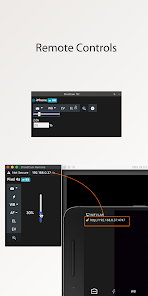
The pro upgrade includes more than just HD video. Unlock all options, manual camera controls and PC remote controls, remove advertising, and get the most from your phone camera. Check the in-app Upgrade and Settings pages for more.
A Bargain!
With optimized power usage and low-latency video transfer, DroidCam can replace webcams and capture cards saving you $100s. Use it for remote work, remote learning, teaching, and content creation.
ℹ️ Note: If you are having trouble with the pro license, make sure the app is installed with the correct Play Store profile and your device can access https://www.dev47apps.com.
*USB connection may require additional setup. Consult droidcam.app/help for usb setup information.
- Chat using "DroidCam Webcam" on your computer, including Sound and Picture.
- Direct OBS Studio integration via DroidCam OBS plugin (see below).
- Free unlimited usage at standard definition (640x480).
- Up to 1080p Full-HD as a PC Webcam, and up to 4K UHD as an OBS Camera (see below).
- Both WiFi and USB connections supported*.
- HW assisted coding (if possible) and multiple video format options.
- DSLR -like features including exposure, white balance, and focus controls.
- Works with the phone screen off and in the background for extra efficiency.
PC WEBCAM – droidcam.app
Get the DroidCam PC Client to use your phone as a webcam. The client is available for Windows & Linux systems, and works with Zoom, Skype, Discord, and most other programs.
👉 Go to https://droidcam.app/ on your computer to download and install the DroidCam Client, and to learn more about usage.
OBS CAMERA – droidcam.app/obs
Use DroidCam DIRECTLY in OBS Studio by getting the DroidCam OBS plugin, no need for a separate client. The DroidCam OBS plugin is available for Windows, Mac, and Linux (Flatpak) systems, and seamlessly integrates your phone to your setup.
👉 Go to droidcam.app/obs on your computer to download, install, and learn more about usage.
Bonus: You can use the 'OBS Virtual Camera' for Zoom/Skype/Discord integration, still no need for extra client software!
Simple & Efficient
DroidCam is designed with simplicity and efficiency in mind. What you see is what you get. The app is free to use at standard definition with no time limits. You can try HD video, but will need to purchase the pro upgrade to remove watermarks.
Pro Upgrade
The pro upgrade includes more than just HD video. Unlock all options, manual camera controls and PC remote controls, remove advertising, and get the most from your phone camera. Check the in-app Upgrade and Settings pages for more.
A Bargain!
With optimized power usage and low-latency video transfer, DroidCam can replace webcams and capture cards saving you $100s. Use it for remote work, remote learning, teaching, and content creation.
ℹ️ Note: If you are having trouble with the pro license, make sure the app is installed with the correct Play Store profile and your device can access https://www.dev47apps.com.
*USB connection may require additional setup. Consult droidcam.app/help for usb setup information.
Updated on
Safety starts with understanding how developers collect and share your data. Data privacy and security practices may vary based on your use, region, and age. The developer provided this information and may update it over time.


Ratings and reviews
3.9
10.9K reviews

Jeff Goebel
- Flag inappropriate
- Show review history
November 7, 2024
The fact it has USB and good Wifi and integrates directly with OBS makes this the best of the "use phone as webcam" tool out here. Some lag way too much. Some don't have great support. This one has been around. Version 7.1 is years old and well revised. I love it and use it daily. Plus - It's Canadian!
86 people found this review helpful

Katie Smith
- Flag inappropriate
November 14, 2025
This camera always connects. with other free ones I have the problem that no matter what I do it wont connect or they want 80 a year. It always works, and the price for pro is super cheap comparably, and i love u can pay yearly or once, and although I only just bought pro, the features it comes with are really nice and convenient. Also so easy to use, and i tested (obs plugin through wifi), it automatically reconnects without reconnecting every time, and if I needed to it isn't even hard to.
3 people found this review helpful

Bella
- Flag inappropriate
October 31, 2025
I didn't want to buy a Webcam, and have to constantly unplug and re-plug it in with my current setup. I knew my phone's camera was amazing, so I found this app! You can have the application running on your pc in the background, so that when you tap the app on your phone, it automatically connects. Super cool! The only thing I have found - which had me so confused - is the apps IP changes sometimes. Other than that, this is nice to have.
4 people found this review helpful
What’s new
Updated Google/Android libraries + changes for Android 16.
Fix remote control buttons not appearing correctly.
Tweaked permissions handling, Notifications are no longer forced (the app will lose background functionality when missing).
Some (potential) stability tweaks.
Fix remote control buttons not appearing correctly.
Tweaked permissions handling, Notifications are no longer forced (the app will lose background functionality when missing).
Some (potential) stability tweaks.
App support
About the developer
DEV47 APPS LTD.
hello@dev47apps.com
997 Seymour St Suite 250
Vancouver, BC V6B 3M1
Canada
+1 604-283-8022


