
Notification light for Pixel
In-app purchases
3.6star
1.66K reviewsinfo
100K+
Downloads

PEGI 3
info


About this app
You need a notification light / LED for your Pixel device?
With aodNotify you can easily add a notification light / LED to your Pixel phone!
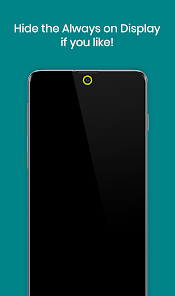
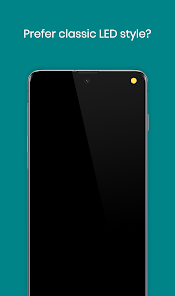
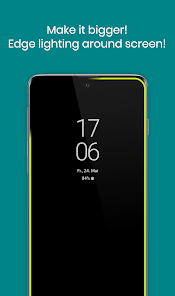
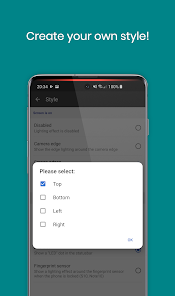
You can select different notification light styles and show the notification light around the camera cutout, screen edges or even simulate an notification LED light dot in the statusbar of your Pixel device!
As the notification light is integrated in Pixel's Always On Display it has minimal battery consumption and doesn't drain your battery like other apps which keep your phone awake!
If you don't need the Always On Display, the app can also activate the Always On Display (AOD) only on notifications or show the notification LED light even without the Always On Display!
With the notification preview feature you can directly see if you have important notifications without waking your Pixel!
MAIN FEATURES
• Notification light / LED for Pixel and others!
• Low energy notification preview (android 10+)
• Activate Always On Display (AOD) only on notifications
• Charging / Low battery light / LED
MORE FEATURES
• Get notified without notification sound!
• Notification light styles (around camera, screen, LED dot)
• Custom app / contact colors
• ECO animations to save battery
• Interval mode (on/off) to save battery
• Night times to save battery
• Minimal battery consumption
BATTERY USAGE PER HOUR ~
• LED - 3.0%
• LED & INTERVAL - 1.5%
• LED & ECO ANIMATION - 1.5%
• LED & ECO ANIMATION & INTERVAL - 1.0%
• NOTIFICATION PREVIEW - 0.5%
• ALWAYS ON DISPLAY - 0.5%
Without the LED notification light the app consumes almost 0% battery!
GOOGLE DEVICES
• All Pixel devices
• More in testing
NOTES
• Google may block this app with future updates!
• Please check if the app is compatible before updating phone software or always on display!
• Altough we never experienced any screen burn in issues on our test devices, we recommend to not keep the notification light / LED active for a long time! Use at you own responsibility!
Disclosure:
The app uses the AccessibilityService API to display the notification light using an overlay over the screen.
No data is collected or shared using the AccessibilityService API!
With aodNotify you can easily add a notification light / LED to your Pixel phone!
You can select different notification light styles and show the notification light around the camera cutout, screen edges or even simulate an notification LED light dot in the statusbar of your Pixel device!
As the notification light is integrated in Pixel's Always On Display it has minimal battery consumption and doesn't drain your battery like other apps which keep your phone awake!
If you don't need the Always On Display, the app can also activate the Always On Display (AOD) only on notifications or show the notification LED light even without the Always On Display!
With the notification preview feature you can directly see if you have important notifications without waking your Pixel!
MAIN FEATURES
• Notification light / LED for Pixel and others!
• Low energy notification preview (android 10+)
• Activate Always On Display (AOD) only on notifications
• Charging / Low battery light / LED
MORE FEATURES
• Get notified without notification sound!
• Notification light styles (around camera, screen, LED dot)
• Custom app / contact colors
• ECO animations to save battery
• Interval mode (on/off) to save battery
• Night times to save battery
• Minimal battery consumption
BATTERY USAGE PER HOUR ~
• LED - 3.0%
• LED & INTERVAL - 1.5%
• LED & ECO ANIMATION - 1.5%
• LED & ECO ANIMATION & INTERVAL - 1.0%
• NOTIFICATION PREVIEW - 0.5%
• ALWAYS ON DISPLAY - 0.5%
Without the LED notification light the app consumes almost 0% battery!
GOOGLE DEVICES
• All Pixel devices
• More in testing
NOTES
• Google may block this app with future updates!
• Please check if the app is compatible before updating phone software or always on display!
• Altough we never experienced any screen burn in issues on our test devices, we recommend to not keep the notification light / LED active for a long time! Use at you own responsibility!
Disclosure:
The app uses the AccessibilityService API to display the notification light using an overlay over the screen.
No data is collected or shared using the AccessibilityService API!
Updated on
Safety starts with understanding how developers collect and share your data. Data privacy and security practices may vary based on your use, region, and age. The developer provided this information and may update it over time.

No data shared with third parties
Learn more about how developers declare sharing

No data collected
Learn more about how developers declare collection
Ratings and reviews
3.6
1.66K reviews

Fox WU
- Flag inappropriate
December 4, 2025
latest version has a bug on not catching whatsapp message notification. Only whatsapp message not catched, all others notification have no problem

Steve Tamburro
- Flag inappropriate
- Show review history
December 2, 2025
The latest update fixed the android auto black screen bug. App is back to working perfectly.
8 people found this review helpful

Tony Macias
- Flag inappropriate
September 1, 2024
Definitely worth the 5 bucks. I would make one change, set it up so you can choose both a color and animation style to each type of notification instead of the animation being a global setting. For example, if I could set it so charging was a blue pulse, but fully charged was solid green, I could use a green pulse for something else. Hopefully this can be implemented in a future release.
7 people found this review helpful
What’s new
The app is now hides during Android Auto connection due to a bug on Pixel devices on Android 16.
• Translations updated
• Fixes & optimizations
• Translations updated
• Fixes & optimizations
App support
About the developer
Benjamin Wörner
jamworks.mobile@gmx.net
Bergstraße 8/2
70825 Korntal-Münchingen
Germany
undefined


