
CDisplayEx Comic Reader Lite
Contains ads
4.2star
13.9K reviewsinfo
1M+
Downloads

PEGI 3
info

About this app
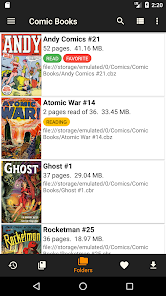
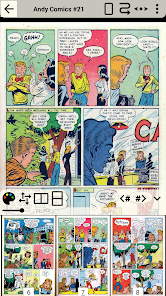
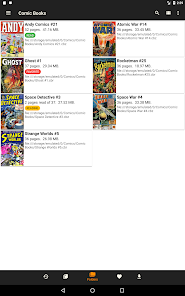
CDisplayEx is a light, efficient CBR Reader, and it is also the most popular comic book reader. It is able to read all comic book formats (.cbr file, .cbz, .pdf, etc..) and Manga. Everything is designed to give you the best reading experience, it load comic books immediately, reading is fluid and comfortable.
You can simply browse through your folders to find and read your comics, but if you need, the management of your library is integrated! simply indicate where your comics are, and the reader will group the comics by series or offer you the next album to read in your collection. An integrated search will allow you to find a volume instantly.
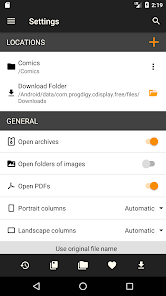
The reader also allows you to connect to network shares, preload files on your phone or tablet, and perform searches.
You can simply browse through your folders to find and read your comics, but if you need, the management of your library is integrated! simply indicate where your comics are, and the reader will group the comics by series or offer you the next album to read in your collection. An integrated search will allow you to find a volume instantly.
The reader also allows you to connect to network shares, preload files on your phone or tablet, and perform searches.
Updated on
Safety starts with understanding how developers collect and share your data. Data privacy and security practices may vary based on your use, region, and age. The developer provided this information and may update it over time.


Ratings and reviews
4.4
11.2K reviews

Alejo
- Flag inappropriate
- Show review history
August 22, 2025
Great app, with many options (confusing at first, but you figure eventually). Some caveats: * settings should be accessible while reading a comic, no need to return to the main page * scrolling distance is not working well in landscape: It's not really 100% (more like 60%), and it's capped at 100%, so I can't put a higher value to compensate. Edit: is worse than I thought: confusing and paywalled to work well
Progdigy Software
August 22, 2025
The scroll distance is actually a maximum value, and is used to calculate the number of steps required to scroll the height of the page. If the page height is more than twice that of the screen, then the distance will be divided into 3 steps. In premium version you can set the number of steps to 2 in height in the page adjustment options.

Jeff Stephenson
- Flag inappropriate
December 1, 2025
I understand needing ads to support a free app, but full screen video ads popping in every few pages while you're trying to read a comic is ridiculous. It completely breaks out of any immersion. There are better options. They're just trying to annoy you into paying for their full app. Instead, I'm uninstalling and finding a better reader.

Joseph Guigli (H3RM1T)
- Flag inappropriate
- Show review history
October 1, 2025
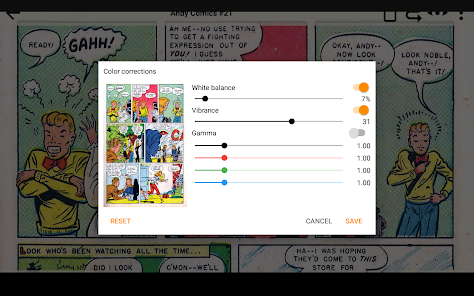
The only app anyone should download for viewing books in PDF, CBZ, etc... Color correction and format stylization is what makes the premium version of this app a must for anyone who wants perfect viewing options for any large format reading on their phone or tablet.
2 people found this review helpful
What’s new
Fixes interface bugs.
App support
About the developer
Progdigy Software S.à r.l.
hgourvest@progdigy.com
Rue de La Liberation 55
3511 Dudelange
Luxembourg
+33 6 09 64 61 83


