
Sharp Smart Control
4.0star
466 reviewsinfo
10K+
Downloads

PEGI 3
info
About this app
Sharp Smart Control is designed to control internet radio device using Magic M6/M7 platform.
It provides you easy and comfortable operation with Android device.
Features:
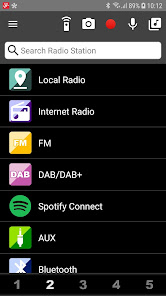
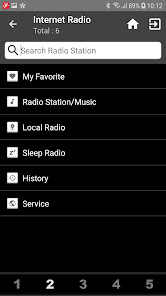
* Local Radio / Internet Radio / FM / DAB / AUX / Bluetooth
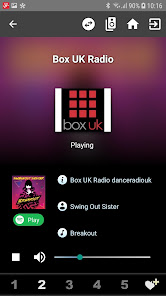
* Preset hotkey
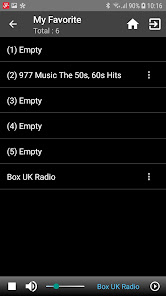
All of the stations you add will automatically save to "My Favorite".
* Edit "My Favorite" of the device
* Radio station search
* Automatic check with the software update for the device or you can check it manually on the settings.
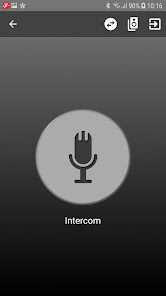
* Push to Talk
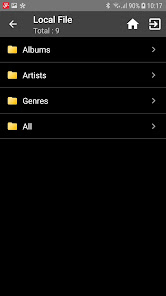
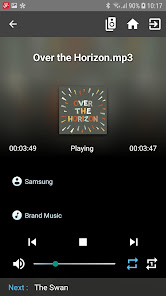
* Local File Support
* Change Startup Screen
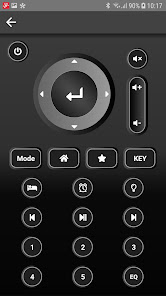
* Remote Control
* Multi (Device) Room Support
If you have one more device.
If it's failed to connect device, please restart the device or check the option "WLAN-Devices can communicate" of your wifi router is checked, then try it again.
If you have any problem, please feel free to contact us.
Thank you for all of your support and feedback.
contact@mediayou.net
It provides you easy and comfortable operation with Android device.
Features:
* Local Radio / Internet Radio / FM / DAB / AUX / Bluetooth
* Preset hotkey
All of the stations you add will automatically save to "My Favorite".
* Edit "My Favorite" of the device
* Radio station search
* Automatic check with the software update for the device or you can check it manually on the settings.
* Push to Talk
* Local File Support
* Change Startup Screen
* Remote Control
* Multi (Device) Room Support
If you have one more device.
If it's failed to connect device, please restart the device or check the option "WLAN-Devices can communicate" of your wifi router is checked, then try it again.
If you have any problem, please feel free to contact us.
Thank you for all of your support and feedback.
contact@mediayou.net
Updated on
Safety starts with understanding how developers collect and share your data. Data privacy and security practices may vary based on your use, region, and age. The developer provided this information and may update it over time.

No data shared with third parties
Learn more about how developers declare sharing

No data collected
Learn more about how developers declare collection

Data isn’t encrypted

You can request that data be deleted
Ratings and reviews
3.9
437 reviews

Przemysław Załużny
- Flag inappropriate
- Show review history
January 10, 2021
I can't connect to my DR-I470. Few months ago it worked and now it can find but can't connect to my radio. RE: The application sees my radio but can't connect your suggestion won't change anything moreover the setting is on. The application can't connect.
7 people found this review helpful
Frontier Smart Technologies
January 13, 2021
Thank you for your feedback, please reset your Wifi router, check the option "WLAN-Devices can communicate" of your wifi router is checked, then try it again. If it's not work, we suggest that you connect another router or mobile hotspot to test if it can connect to device. Any further questions welcome let us know: service@mediayou.net

Dalibor Dobes
- Flag inappropriate
February 2, 2022
Very convenient to use, but could be a bit faster and provide more possibilities for managing the radios: renaming, sorting, deleting, ...
Frontier Smart Technologies
February 7, 2022
You can operate it directly from device button and real remote control, if you use AirMusic control APP, please into remote control mode, and go to My Favorite list, select the station you want to change order, press right arrow button, then you’ll see following options: Delete / Shift Up / Shift Down / Rename / Play

Péter Pál Varga
- Flag inappropriate
April 26, 2021
Works, but the language on the radio has to be set to English, otherwise it won't connect, or when it connects, it changes the language. Both happened to me. Strange behaviour, but ok.
5 people found this review helpful
Frontier Smart Technologies
April 28, 2021
Thanks for feedback.
Please let us know what language on the radio cause it can't connect?
Radio would change to the language of APP device when connecting to APP, if radio can't support the language, radio would stay the same.
Any further suggestions welcome let us know: contact@mediayou.net
What’s new
Sharp Smart Control is designed to control Sharp internet radio device using Magic M6/M7 platform.
* Bug fixed
* Stability improvements
* Bug fixed
* Stability improvements
App support
About the developer
FRONTIER SMART TECHNOLOGIES LIMITED
appsupport@frontiersmart.atlassian.net
HARSTON MILL HARSTON
CAMBRIDGE
CB22 7GG
United Kingdom
+44 1223 837666


