
Android System Widgets
4.5star
783 reviews
50K+
Downloads

Everyone
info
About this app
System Widgets Collection – Monitor & Customize Your Phone
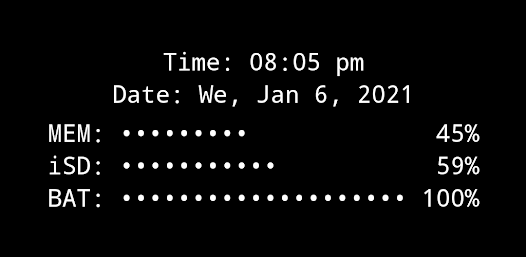
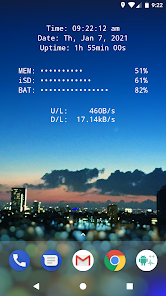
All essential info right on your home screen: Clock, Date, Uptime, RAM, Storage, Battery, Net Speed & Flashlight.
Included Widgets:
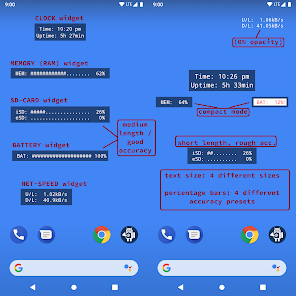
🕒 Clock / Uptime
📈 Memory (RAM) Usage – monitor free & used RAM
💾 Storage / SD-Card Usage – available & used space
🔋 Battery – level + NEW: 🌡️ temperature (°C / °F)
🌐 Net Speed – current upload/download speed (NEW: switch Bytes/s ↔ Bits/s)
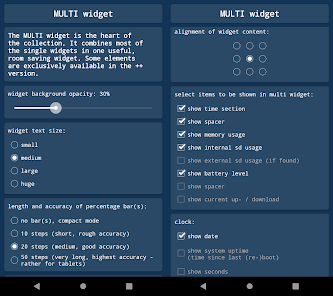
✨ Multi Widget – combine several of the above in one widget (configurable)
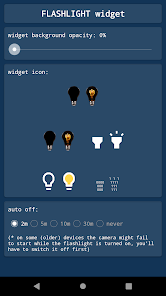
🔦 Flashlight Widget – auto-off after 2 minutes, with 4 icon sets to choose from
(Permission for camera & flashlight is required only to control the LED. The app cannot take pictures!)
Free Version Limitations (compared to "+" version):
• Multi Widget: some elements disabled
• No custom font & background colors
• Battery, SD and RAM update interval fixed at 60s
• Flashlight auto-off always after 2 minutes
How To (Setup & Troubleshooting):
1. Open the app and adjust widget settings to your needs
2. Add the desired widgets to your home screen
👉 If widgets don’t load right after installation: restart your device or re-install the app.
👉 If widgets show "null" or don’t update: open the app once to initialize and make sure the Keep-Alive Service is enabled in General Settings.
Tapping Actions:
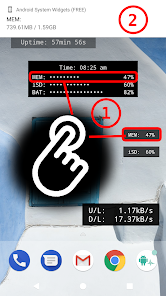
Tapping most widgets shows detailed info as a toast/notification.
Example:
Internal SD:
753.22MB / 7.89GB
Global Settings:
🎨 Widget Font Color – + Feature!
🖼️ Widget Background Color – + Feature!
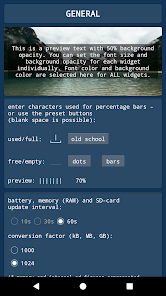
▓ Custom Characters – for percentage bar display
Widget Configuration Options:
- Background opacity
- Font size
- Percentage bar length & accuracy (or compact mode)
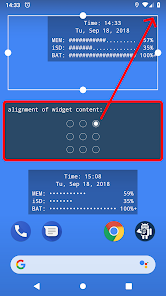
- Alignment of widget content (precise positioning on screen)
Why Choose System Widgets Free?
✔️ All-in-one widget collection (RAM, Storage, Battery, Network/Internet Speed, Clock, Flashlight)
✔️ Lightweight, fast & ad-free
✔️ Upgrade anytime to the full "+"-version for more customization
📲 Download System Widgets Free now – monitor your phone and customize your home screen!
All essential info right on your home screen: Clock, Date, Uptime, RAM, Storage, Battery, Net Speed & Flashlight.
Included Widgets:
🕒 Clock / Uptime
📈 Memory (RAM) Usage – monitor free & used RAM
💾 Storage / SD-Card Usage – available & used space
🔋 Battery – level + NEW: 🌡️ temperature (°C / °F)
🌐 Net Speed – current upload/download speed (NEW: switch Bytes/s ↔ Bits/s)
✨ Multi Widget – combine several of the above in one widget (configurable)
🔦 Flashlight Widget – auto-off after 2 minutes, with 4 icon sets to choose from
(Permission for camera & flashlight is required only to control the LED. The app cannot take pictures!)
Free Version Limitations (compared to "+" version):
• Multi Widget: some elements disabled
• No custom font & background colors
• Battery, SD and RAM update interval fixed at 60s
• Flashlight auto-off always after 2 minutes
How To (Setup & Troubleshooting):
1. Open the app and adjust widget settings to your needs
2. Add the desired widgets to your home screen
👉 If widgets don’t load right after installation: restart your device or re-install the app.
👉 If widgets show "null" or don’t update: open the app once to initialize and make sure the Keep-Alive Service is enabled in General Settings.
Tapping Actions:
Tapping most widgets shows detailed info as a toast/notification.
Example:
Internal SD:
753.22MB / 7.89GB
Global Settings:
🎨 Widget Font Color – + Feature!
🖼️ Widget Background Color – + Feature!
▓ Custom Characters – for percentage bar display
Widget Configuration Options:
- Background opacity
- Font size
- Percentage bar length & accuracy (or compact mode)
- Alignment of widget content (precise positioning on screen)
Why Choose System Widgets Free?
✔️ All-in-one widget collection (RAM, Storage, Battery, Network/Internet Speed, Clock, Flashlight)
✔️ Lightweight, fast & ad-free
✔️ Upgrade anytime to the full "+"-version for more customization
📲 Download System Widgets Free now – monitor your phone and customize your home screen!
Updated on
Safety starts with understanding how developers collect and share your data. Data privacy and security practices may vary based on your use, region, and age. The developer provided this information and may update it over time.

No data shared with third parties
Learn more about how developers declare sharing

No data collected
Learn more about how developers declare collection
Ratings and reviews
4.5
710 reviews

A Google user
- Flag inappropriate
- Show review history
November 13, 2025
Still has too much space around widget after adjusting, but I've upped my review because the developer got back to me to help. PREV: WEIRD SIZE ISSUE.. I like the app and I like the idea and everything looks great but as you can see when you select the mukti-widget size it has huge blank spacing around it for no reason and the widget itself is smaller so it doesn't fill the space so it's unusable I don't need all this blank space on my screen.
Benjamin Laws
November 13, 2025
It has 4 different text and 4 different percentage resolution sizes, if you make the widget even bigger than its maximum content, it will not get larger than the largest predefined size.
E.g. on a tablet you could theoretically make it use the whole screen width, but that's not intended. Instead you may select a gravity, e.g. top-left or center top

Huzaifa Nahiyan
- Flag inappropriate
October 22, 2022
Great App actually. Works exactly as advertised. All the widgets are functional. And not a single ad even in the free version. Applause to the dev of this app. Thanks! If I had money, I would buy the full version to support you but I don't. Thanks again for this little but great app.
27 people found this review helpful
Benjamin Laws
October 23, 2022
Thank you too!! I hate apps which contain ads myself... Just so annoying.. I hope I'll be able to keep my apps ad free forever :) Ben

Android Mobile
- Flag inappropriate
- Show review history
May 12, 2024
Really good app with a neat and tidy UX. Best of all it has no ads. Why only 4 stars then? The memory and SD card usage only shows you the percent utilised instead of the actual numbers such as "2.7 / 8GB". EDIT: Yes, I already tapped the widget but that shows a notification so you have to keep tapping it to see the actual numbers. Would be great if the widget could be set to show percentage or actual usage. Also, a data usage widget would be great.
6 people found this review helpful
Benjamin Laws
March 31, 2024
did you ever tap it? :)
What’s new
App support
About the developer
Benjamin Laws
support@android-co.de
Am Hüning 22
46414 Rhede
Germany


