
Clippit - Save Book Quotes
3.8star
156 reviews
10K+
Downloads

Everyone
info

About this app
100% FREE • NO ADS • NO SUBSCRIPTIONS • NO IN APP PURCHASES • NO LOGIN REQUIRED
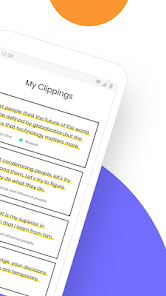
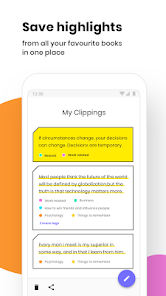
Read great books, save quotes you love, share clippings with your friends or revisit them whenever you need to. Clippit makes it easier to save and organize quotes in one convenient place!
Clippit offers 3 easy ways to save and organize quotes:
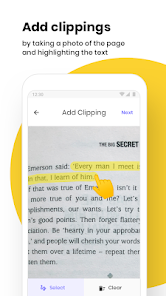
• Take a photo of the book you're reading, and use the highlighter tool to select text
• Select an image from your gallery that contains text you'd like to save
• Or use the 'Free Text' option to type and save whatever is on your mind!
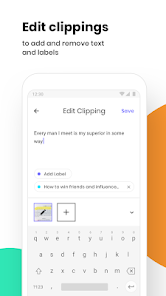
You can easily add tags to each quote, and use the filter button to find clippings when you need them.
Whether you’re looking for a place to save inspirational quotes for self improvement, or highlight important information to help you study better, Clippit will keep you organized and motivated.
Key features:
• Save quotes in 3 easy ways
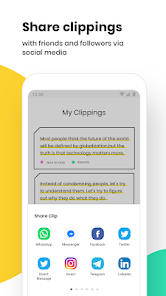
• Share them with your friends - through text or image
• Use tags in your clippings to keep everything organized
• Use the filter button to find clippings quickly, when you need them
• Use Clippit for leisure, work, school, and just about anything else
For anything you need, Clippit saves what’s important to you.
Read great books, save quotes you love, share clippings with your friends or revisit them whenever you need to. Clippit makes it easier to save and organize quotes in one convenient place!
Clippit offers 3 easy ways to save and organize quotes:
• Take a photo of the book you're reading, and use the highlighter tool to select text
• Select an image from your gallery that contains text you'd like to save
• Or use the 'Free Text' option to type and save whatever is on your mind!
You can easily add tags to each quote, and use the filter button to find clippings when you need them.
Whether you’re looking for a place to save inspirational quotes for self improvement, or highlight important information to help you study better, Clippit will keep you organized and motivated.
Key features:
• Save quotes in 3 easy ways
• Share them with your friends - through text or image
• Use tags in your clippings to keep everything organized
• Use the filter button to find clippings quickly, when you need them
• Use Clippit for leisure, work, school, and just about anything else
For anything you need, Clippit saves what’s important to you.
Updated on
Safety starts with understanding how developers collect and share your data. Data privacy and security practices may vary based on your use, region, and age. The developer provided this information and may update it over time.

No data shared with third parties
Learn more about how developers declare sharing

No data collected
Learn more about how developers declare collection
Ratings and reviews
3.8
149 reviews

Lauren Prichard
- Flag inappropriate
December 10, 2023
I really, really, REALLY wish this saved the actual highlighted photos. I don't always want to have to check that the quote is correct (especially an issue for poetry—the app doesn't like putting the line breaks in) while I'm reading as it's too disruptive. Would much rather go back and edit the quotes after I'm done. Unfortunately without the photo saved, that's not possible. This app is so close to being perfect otherwise!
1 person found this review helpful

Saadat
- Flag inappropriate
- Show review history
June 25, 2022
Everything is simple to use and brilliantly designed. I've had no problem at all in saving clips, in any of the three methods available. Though it'd be wonderful to have more options (like being able to add who said the quote for example since the source only indicates the title and author of a book and adding links as a source) so far, the app has served its purpose and I couldn't be more happier with it.
3 people found this review helpful
1GuyDev
June 26, 2022
Thank you so much for the review and kind words! We've already started work on such a feature. If you have any more feedback, feel free to reach out to us at 1guydev+feedback@gmail.com.

Daniel Ranger-holt
- Flag inappropriate
December 28, 2021
Exactly the type of app I was looking for. Easily scan pages of my physical books. Convert them to text, save and review as and when. Especially important as we forget most of what we read. Very basic design but it works. Specific categories wouks be nice for the type of book clipping you're saving. But otherwise, a great start! And no ridiculous monthly subscription charge like other apps of this type 😏
10 people found this review helpful
1GuyDev
January 3, 2022
We're so happy you like Clippit, Daniel! You can use tags to categorize and filter clippings by topic, and we plan on adding more categorization options in the future 🙌
What’s new
📚 Clip Editor – Rich Text Formatting Update
This update brings big improvements to the clip editor so you can better format your clips. Rich text functions like bold and italics were added to the clip editor screen. In addition, astrix characters at the beginning of a new line can be converted to bullet characters automatically.
Bug fixes:
• Fix crash when navigating to a screen after returning from background
• Fix transparent navigation bar
• Fix crash when sharing text with Clippit
This update brings big improvements to the clip editor so you can better format your clips. Rich text functions like bold and italics were added to the clip editor screen. In addition, astrix characters at the beginning of a new line can be converted to bullet characters automatically.
Bug fixes:
• Fix crash when navigating to a screen after returning from background
• Fix transparent navigation bar
• Fix crash when sharing text with Clippit
App support
About the developer
Guy Carmeli
1guydev@gmail.com
Israel
undefined


