
BNZ Mobile
4.0star
7.36K reviews
1M+
Downloads

Everyone
info


About this app
Manage your money on the go with the BNZ app. Check your account balances, transfer money, top up your prepay mobile, and more.
KNOW YOUR MONEY
• View account balances and transaction history
• Set goals and follow your progress
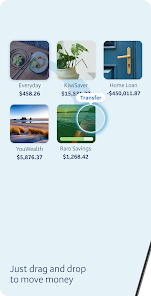
• Personalise your accounts with images
• Set up push notifications for money in and out, and account balance alerts
• Turn on instant balances to view account balances without logging in
• View your accounts in list or grid view
MANAGE YOUR MONEY
• Transfer money between your accounts
• Pay your bills, credit card, or IRD
• Make one-off payments
• Open and close accounts instantly with YouMoney
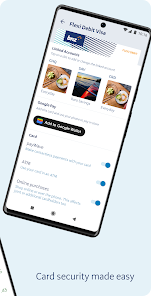
• Link accounts to your Eftpos, Flexi Debit Visa, or credit card
• Add or edit payees and view payment history
• Set up, edit, and delete automatic payments
EXTRA SERVICES
• Top up One NZ, Spark, Skinny, and 2degrees prepaid mobile
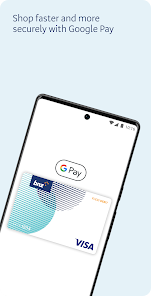
• Get Google Pay™ and pay with your phone
GET IN TOUCH
• Message our virtual assistant
• Find the nearest BNZ branches and ATMs
• View our contact phone numbers
• Request a call
APPLY ONLINE
• Apply for a Flexi Debit Visa or credit card
• Apply for loans or insurances
• Join the BNZ KiwiSaver Scheme
SECURE BANKING
• Set up a personal 5-digit PIN or
• Log in with your Internet Banking password
• Touch ID and Face ID login are available on supported devices
IMPORTANT INFORMATION
• Android 11.0 or above required to use this app
• Always remember to log out and update your device to the newest version of Android
• Never store your BNZ access number or password on your device
• Never allow other people to access your mobile device using Touch ID, Face ID, or device password
• Mobile data is required to access the BNZ app
• Use of the BNZ app is subject to the Internet Banking Terms and Conditions (https://www.bnz.co.nz/about-us/governance/terms-and-conditions/internet-banking)
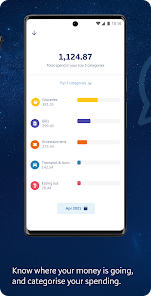
• Spend tracker is available with a personal BNZ credit card or transaction account, including joint transaction accounts.
• Non-personal accounts like family trust or business accounts won’t show in the spend tracker.
GET STARTED
• A BNZ Personal Internet Banking customer?
Install this app and get going. It’s easy.
• Not a BNZ Personal Internet Banking customer?
Install this app and register for Internet Banking on bnz.co.nz/registernow, call 0800 999 269 or +64 4 494 7153 from overseas (international toll charges apply).
KNOW YOUR MONEY
• View account balances and transaction history
• Set goals and follow your progress
• Personalise your accounts with images
• Set up push notifications for money in and out, and account balance alerts
• Turn on instant balances to view account balances without logging in
• View your accounts in list or grid view
MANAGE YOUR MONEY
• Transfer money between your accounts
• Pay your bills, credit card, or IRD
• Make one-off payments
• Open and close accounts instantly with YouMoney
• Link accounts to your Eftpos, Flexi Debit Visa, or credit card
• Add or edit payees and view payment history
• Set up, edit, and delete automatic payments
EXTRA SERVICES
• Top up One NZ, Spark, Skinny, and 2degrees prepaid mobile
• Get Google Pay™ and pay with your phone
GET IN TOUCH
• Message our virtual assistant
• Find the nearest BNZ branches and ATMs
• View our contact phone numbers
• Request a call
APPLY ONLINE
• Apply for a Flexi Debit Visa or credit card
• Apply for loans or insurances
• Join the BNZ KiwiSaver Scheme
SECURE BANKING
• Set up a personal 5-digit PIN or
• Log in with your Internet Banking password
• Touch ID and Face ID login are available on supported devices
IMPORTANT INFORMATION
• Android 11.0 or above required to use this app
• Always remember to log out and update your device to the newest version of Android
• Never store your BNZ access number or password on your device
• Never allow other people to access your mobile device using Touch ID, Face ID, or device password
• Mobile data is required to access the BNZ app
• Use of the BNZ app is subject to the Internet Banking Terms and Conditions (https://www.bnz.co.nz/about-us/governance/terms-and-conditions/internet-banking)
• Spend tracker is available with a personal BNZ credit card or transaction account, including joint transaction accounts.
• Non-personal accounts like family trust or business accounts won’t show in the spend tracker.
GET STARTED
• A BNZ Personal Internet Banking customer?
Install this app and get going. It’s easy.
• Not a BNZ Personal Internet Banking customer?
Install this app and register for Internet Banking on bnz.co.nz/registernow, call 0800 999 269 or +64 4 494 7153 from overseas (international toll charges apply).
Updated on
Safety starts with understanding how developers collect and share your data. Data privacy and security practices may vary based on your use, region, and age. The developer provided this information and may update it over time.


Ratings and reviews
4.0
7.11K reviews

Llewellyn Marriott
- Flag inappropriate
November 20, 2025
Feels like I am banking in 2005 again. Can't see reference when I view a payment I sent to someone. The notifications are not useful, they just say how much has gone out, why not include the name of the merchant? I don't need to be notified about each transaction twice (pending then cleared). It also wouldn't let me set up a scheduled payment because it was too late at night. are you guys using overnight scheduled tasks with CSV files in the backend?
1 person found this review helpful
Bank of New Zealand
November 24, 2025
Hi, sorry to hear you are having trouble with the app. Could you please contact us on 0800 735 901 (or +64 4 931 8209) so we can support you. ^MP

Laurraine Stewart
- Flag inappropriate
October 6, 2025
I've had problem free usage in the past, but I just had to set the app up again for some reason. It temporarily restricts certain features e.g. two factor authentication, on new setup but doesn't say long this is for. I'm sure I went through this a couple of months ago already.? BNZ, how long is this restriction for, please? I'd like to pay an account that I don't have saved as a payee.
12 people found this review helpful
Bank of New Zealand
October 14, 2025
Hi Laurraine, thank you for the feedback. The restriction is a temporary control when you download and setup the app to protect you from potential fraud. ^KM

Andy Drain
- Flag inappropriate
November 30, 2025
When the latest release weas opened for the first time it displayed several screens of text. As I was in a hurry I skipped assuming I could then read them later. Apparently I can't. I was then also asked to grant the app permission to make phone calls and to contact nearby devices. Naturally I refused but I have never had similar requests in the past. Simply why cannot I re-read what were clearly new release issues.
2 people found this review helpful
Bank of New Zealand
December 1, 2025
Hi Andy, Thank you for your feedback.
App permissions cannot be re-presented because this is controlled by the operating system for security and privacy. To change or review permissions, go to your device’s Settings > App Permissions. This ensures you stay in control without repeated prompts. ^RT
What’s new
We've added new security features to help prevent fraud and keep your money safer.
App support
About the developer
BANK OF NEW ZEALAND
mobilefeedback@bnz.co.nz
L 4, 80 Queen Street Auckland Central
Auckland 1010
New Zealand
+64 20 5911 0739


