Access Dots - iOS cam/mic/gps!
Contains adsIn-app purchases
3.9star
16.2K reviews
1M+
Downloads

Everyone
info


About this app
Did you know that once you grant access to your phone's camera/microphone/GPS location to any third-party App, they can use it silently in the background?
And do you feel envious about the new iOS 14's privacy feature - shows an indicator whenever camera or microphone is accessed? Or you can't wait for Android 12's implementation of the same feature?
Presenting Access Dots for Android, supporting all the way down to Android 8.0!
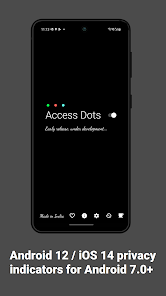
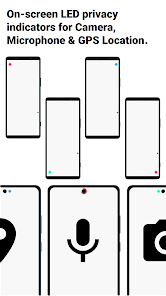
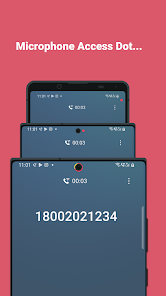
Access Dots, adds the same iOS 14 style indicators (few pixels light up as a dot) to the top right (default) corner of your screen whenever any third-party App uses your phone's camera/microphone/GPS location. Access Dots will be visible even on your lockscreen!
Configuring the App is as simple as enabling the Access Dots Accessibility Service (Toggle switch in the App > (More) Downloaded Services/Installed Services > Access Dots > Enable). By default the App is configured to show iOS 14 style colored access dots - green for camera access, orange for microphone access and blue for GPS location. The App itself does not request for camera or microphone access, however, to be able to monitor GPS access by any App, 'Access Dots' require GPS location permission.
Access Dots is in early BETA, under development, so far it has the following features:
● Display Access Dots whenever phone's camera/microphone/GPS location is engaged by a third-party App.
● Maintain an Access Log, which can be accessed from the App's main settings screen. The Access Log shows when the camera/microphone/GPS location was accessed, which App was in foreground at the time of access initiation and how long did the access last.
● Assign any color to either of the Access Dots.
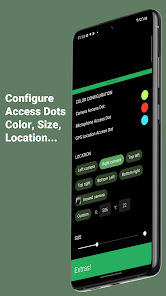
● On Android 10+, Access Dots by default sticks beside your camera cutout (if your device has.) You can configure the location of Access Dots to the point of specifying X/Y coordinates.
● If your device supports 'Energy Ring - Universal Edition!' App, then you can wrap Access Dots around the punch hole camera as well.
● The size of Access Dots can be adjusted.
While it's free to change the Access Dots' color to whatever you want, consider making a donation to support the development and have access to few extra configurations like changing the 'size' of the dot or its location on the screen. :)
Note: Please make sure the App is whitelisted under any kind of optimization setting your device has, if the App is killed from background by the System, you may have to restart phone to get the Access Dots active again.
Accessibility Service Requirement
Access Dots requires to run as an Accessibility Service to display the indicator/dot on any screen whenever a third-party App uses camera/microphone/GPS. The service does NOT gather any data whatsoever.
This Service/App itself does NOT have permission to use your device’s camera or microphone.
And do you feel envious about the new iOS 14's privacy feature - shows an indicator whenever camera or microphone is accessed? Or you can't wait for Android 12's implementation of the same feature?
Presenting Access Dots for Android, supporting all the way down to Android 8.0!
Access Dots, adds the same iOS 14 style indicators (few pixels light up as a dot) to the top right (default) corner of your screen whenever any third-party App uses your phone's camera/microphone/GPS location. Access Dots will be visible even on your lockscreen!
Configuring the App is as simple as enabling the Access Dots Accessibility Service (Toggle switch in the App > (More) Downloaded Services/Installed Services > Access Dots > Enable). By default the App is configured to show iOS 14 style colored access dots - green for camera access, orange for microphone access and blue for GPS location. The App itself does not request for camera or microphone access, however, to be able to monitor GPS access by any App, 'Access Dots' require GPS location permission.
Access Dots is in early BETA, under development, so far it has the following features:
● Display Access Dots whenever phone's camera/microphone/GPS location is engaged by a third-party App.
● Maintain an Access Log, which can be accessed from the App's main settings screen. The Access Log shows when the camera/microphone/GPS location was accessed, which App was in foreground at the time of access initiation and how long did the access last.
● Assign any color to either of the Access Dots.
● On Android 10+, Access Dots by default sticks beside your camera cutout (if your device has.) You can configure the location of Access Dots to the point of specifying X/Y coordinates.
● If your device supports 'Energy Ring - Universal Edition!' App, then you can wrap Access Dots around the punch hole camera as well.
● The size of Access Dots can be adjusted.
While it's free to change the Access Dots' color to whatever you want, consider making a donation to support the development and have access to few extra configurations like changing the 'size' of the dot or its location on the screen. :)
Note: Please make sure the App is whitelisted under any kind of optimization setting your device has, if the App is killed from background by the System, you may have to restart phone to get the Access Dots active again.
Accessibility Service Requirement
Access Dots requires to run as an Accessibility Service to display the indicator/dot on any screen whenever a third-party App uses camera/microphone/GPS. The service does NOT gather any data whatsoever.
This Service/App itself does NOT have permission to use your device’s camera or microphone.
Updated on
Safety starts with understanding how developers collect and share your data. Data privacy and security practices may vary based on your use, region, and age. The developer provided this information and may update it over time.

No data shared with third parties
Learn more about how developers declare sharing

This app may collect these data types
Location, Personal info and 3 others

Data isn’t encrypted
Data can’t be deleted
Ratings and reviews
3.9
16K reviews

Gabriel Gregg Schmidt
- Flag inappropriate
December 6, 2025
Baffled by an Android app called iOS, an app that has no contact info for the developer, whose description seems to be a few years old, and finally, seem superfluous, as this feature is built into Android. My dot is on much of the time, Android's is not, and there is no way to tell if the app is glitching or Android is failing to report an app using the camera. Also the logs aren't showing all times the dots are on, or maybe there is a horrible lag to update logs.

Caleb Faulkner
- Flag inappropriate
September 27, 2020
Very very good. A couple suggestions - One: the ability to change the dot animation. I don't love how it starts larger than decreases in size personally and how it fades out. I would prefer just on and off. (But it should be a setting so people can choose) Two: Maybe the option to make it so that a silent notification in the bar shows up so that you can drag the bar down and actively see what is using your mic/camera. LOVE it otherwise!
67 people found this review helpful

shane miles
- Flag inappropriate
December 22, 2020
I really really like this app. Haven't had any issues with it turning off or anything. I have a Pixel 5. One thing I've noticed lately though is the "microphone" light comes on whenever I'm playing audio in certain apps like Twitter. I'd rather only have it turned on when the microphone is listening. I don't know if those things can be separated but it's making me think Twitter is listening even though it's playing audio through my microphone. Otherwise, outstanding job!
119 people found this review helpful
What’s new
1,000,000+ downloads, thanks for the support, everyone!
* Added Android 16 support!
___________________________________________
* Brand new UI for the new year! *
* Better foreground App detection!
* Monitors switching between front/rear cameras
* Added Android 16 support!
___________________________________________
* Brand new UI for the new year! *
* Better foreground App detection!
* Monitors switching between front/rear cameras
App support
About the developer
I Jagatheesan Pillai
dev@ijp.app
E 609 TOWER 3 RADIANCE MANDARIN NO 1 200 FT PALLAVARAM RADIAL ROAD OGGIAM THORAIPAKKAM
CHENNAI, Tamil Nadu 600097
India


